Unreal Engine 4 vs 5: A Complete Comparison for Game Studios in 2026
What actually changes in rendering, hardware, tooling, and cost when you pick one version over the other, what a migration involves, and where Unreal Engine 6 now fits into the decision.
Most arguments about Unreal Engine 4 vs 5 trace back to one blog post from 2020. Epic published it next to Lumen in the Land of Nanite, a demo running live on a PlayStation 5 that promised a world without polygon budgets, baked normal maps, or waits on lightmap bakes. The part a producer should reread is further down the page. Start next-gen work in UE4 now, it said, and “move your projects to UE5 when ready.”
Six years later the technology promise has been kept, and a surprising number of studios still haven’t decided they’re ready. Square Enix is finishing its Final Fantasy VII remake trilogy on a heavily modified UE4. Sandfall started Clair Obscur: Expedition 33 on UE4, switched to UE5 partway through, and collected nearly every Game of the Year award going. Then, in June, Epic said 5.8 is the last planned UE5 release and put Unreal Engine 6 into early access at the end of 2027. That changes the math.
So the question isn’t really which engine looks better. UE5 does, and nobody serious argues otherwise. It’s which one fits the project you already have, the hardware your players own, and a schedule that now has a third engine version sitting on it. The sections below compare both engines system by system, then get practical about mobile and Switch 2, migration, UE6, the call itself, and what it all costs.
What’s the Real Difference Between Unreal Engine 4 and Unreal Engine 5?
UE5 replaces most of what UE4 precomputed with systems that work it out at runtime. Lighting that UE4 baked with Lightmass, Lumen calculates live, and the level-of-detail chains artists once built by hand for UE4 static meshes, Nanite now generates on the fly from film-resolution source geometry. World Composition gave way to World Partition, and PhysX to Chaos. Almost every headline difference between unreal engine 4 vs unreal engine 5 is a version of that one trade.
That trade moves cost rather than removing it. A UE4 project spends artist hours up front on LODs, lightmap UVs and bake cycles, then ships a lean runtime. A UE5 project spends fewer of those hours and pays the difference in GPU time, memory, and optimization work later on. Which bill is cheaper depends on your team, your content volume, and the weakest machine you have promised to run on. Usually it’s the last one.
The clearest proof that UE5 is first of all a new renderer came from Bethesda and Virtuos. Oblivion Remastered runs its 2006 gameplay on the original Gamebryo code and hands everything players see to UE5, and it reached 9 million players within three months. It also showed the bill: Digital Foundry called the PC version one of the worst-performing games it had ever tested.
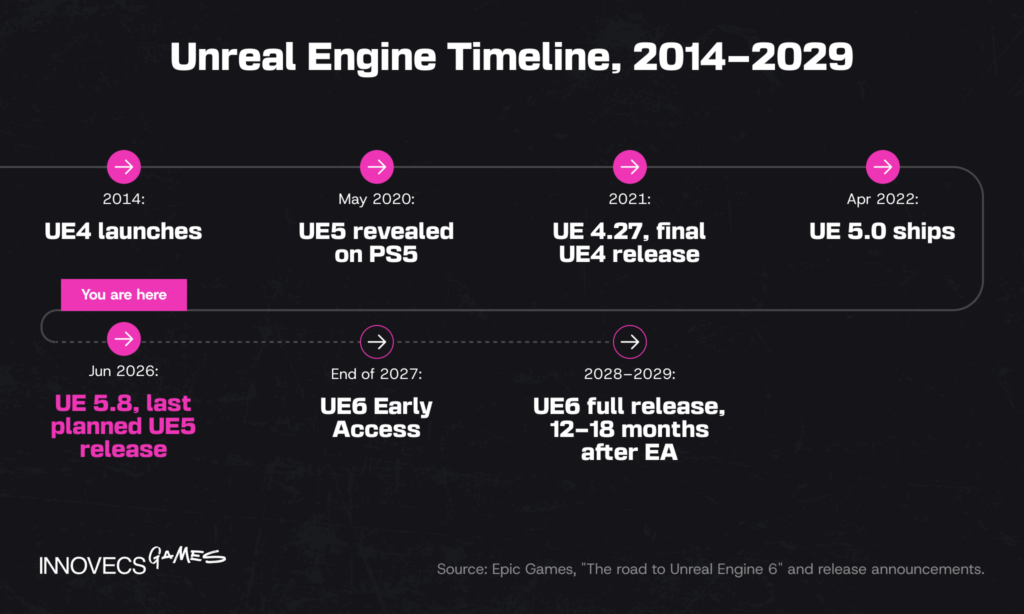
The versions also sit in very different places in Epic’s plans. UE4 stopped at 4.27, released in 2021, and every rendering, tooling and platform improvement since has landed in UE5. UE5 itself reached its final planned version with UE 5.8 in June 2026. For a studio lead, that makes the choice about three things at once: how long your project runs, how much you’re willing to spend on hardware and optimization, and how close to the current visual bar the game has to land. Those are also the three places where outside game engineering services tend to earn their fee, because each one runs into engine-level work most content teams don’t staff for.
Unreal Engine 4 vs 5 at a Glance
Versions and hardware figures are current as of September 2026, and licensing is the only row where the two engines match.
| Unreal Engine 4 | Unreal Engine 5 | |
|---|---|---|
| Final / current version | 4.27 (2021), no further feature releases | 5.8 (June 2026), last planned UE5 release |
| Global illumination | Baked (Lightmass), plus limited dynamic options | Lumen: real-time global illumination and reflections |
| Geometry | Static meshes with hand-built LODs and normal maps | Nanite virtualized geometry, film-quality source assets |
| Physics | PhysX | Chaos Physics |
| Large worlds | World Composition, Level Streaming | World Partition, One File Per Actor, production-ready PCG |
| Recommended dev RAM | 8 GB | 32 GB |
| GPU for full feature set | DirectX 11 or 12 card | DirectX 12, SM6, and at least RTX 2000 / RX 6000 / Arc A-series for Lumen |
| Scripting | C++ and Blueprint | C++ and Blueprint (Verse arrives with UE6) |
| Licensing | 5% royalty over $1M lifetime gross | Same terms |
| Upgrade path | UE4 to UE5 converter, one way | Epic promises a managed path to UE6 |
| Notable games | Final Fantasy VII Rebirth, Hogwarts Legacy, Star Wars Jedi: Survivor, Lies of P, Stellar Blade | Fortnite, Black Myth: Wukong, Clair Obscur: Expedition 33, S.T.A.L.K.E.R. 2, ARC Raiders |
| Best fit | Late-stage and live projects, heavily customized engines, low-end targets | New projects, open worlds, current-gen console and PC visuals |
Read the upgrade-path row next to the best-fit row. The engine you choose today also decides which migration you’ll be doing in 2028.
Graphics and Rendering: Nanite, Lumen, and the Visual Leap
Rendering is where the unreal engine 5 vs 4 gap is widest, and where most of UE5’s reputation, good and bad, comes from. The largest unreal engine 5 vs 4 improvements sit in two systems, Nanite for geometry and Lumen for light, plus the ray tracing work Epic has since folded into Lumen. Epic’s keynotes tend to present both as pure gain. They aren’t: each removes a production step and adds a runtime cost, and the subsections below take them in that order.
Nanite vs. Traditional Static Meshes
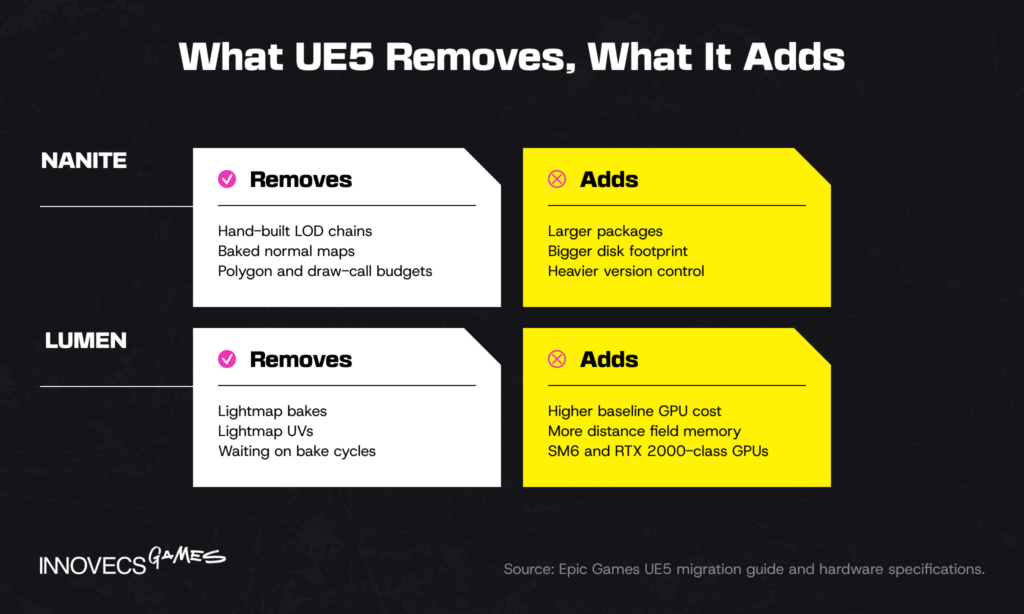
In UE4, every static mesh needs a polygon budget, a chain of LODs, and usually a normal map baked from a high-poly sculpt, and draw calls cap how much of it fits on screen. Nanite skips most of that: artists import the high-resolution asset, and the engine streams and scales its triangles at runtime, so a single ZBrush sculpt can sit in a scene without anyone building LOD2. GSC Game World told Epic that on S.T.A.L.K.E.R. 2 Nanite removed “a large chunk of work from our artists” on handcrafted LODs and memory footprints. Nanite shipped for static meshes only, and UE 5.7 added an experimental Nanite Foliage system aimed at dense forests. It isn’t free. Source-resolution assets are large, so package size, disk footprint, and the time it takes to move content through version control all grow, and those costs land on your build pipeline rather than on the artist. Your artists will love Nanite. Your build engineer will have opinions.
Lumen vs. Baked Lighting (Lightmass)
Lightmass bakes lighting into textures offline, and UE4’s deferred rendering pipeline reads it back cheaply at runtime. It looks excellent when nothing moves and makes every lighting change a wait. Anyone who has kicked off a full bake at six in the evening and come back to find one wrong lightmap UV knows exactly what that wait costs. Usually the whole evening. Lumen computes global illumination and reflections in real time, so a moved light or a blown-out wall updates immediately, in the editor and in the game. Epic’s own migration guide is candid that Lumen carries a higher baseline performance cost than the systems it replaced. UE 5.8 answered part of that with a lightweight Lumen mode that Epic says holds 60 fps on Nintendo Switch 2 and PCs, and Lightmass still exists in UE5 for projects that want baked light where it makes sense.
Real-World Impact on Visual Fidelity
The ceiling has moved. The showcases prove it. Senua’s Saga: Hellblade II is still the reference for UE5 character and environment detail. CD Projekt Red’s Witcher 4 tech demo ran on a base PS5 at 60 frames per second with Nanite Foliage and crowds of MetaHumans. At State of Unreal 2026, The Coalition showed Gears of War: E-Day scaling some environments from a handful of lights to hundreds or thousands, all casting dynamic shadows, at 60 fps on Xbox Series X. The floor is less dramatic than the forums suggest, though. Lies of P shipped on UE4 in 2023 and nobody called it ugly, because art direction and lighting craft still carry more of a game’s look than the engine version does. Our read: UE5 raises what a team of your size can reach, and it does very little for a team that hasn’t decided what it wants the game to look like. For context on where the engine sits in the wider hardware cycle, see our piece on Unreal Engine and next-gen tech.
Performance and Hardware Requirements Compared
All of that visual headroom gets paid for in hardware, first on your team’s desks and then on your players’. Epic publishes the machine it uses internally as a guideline for each engine, and the pair says more than any benchmark. The UE4 reference workstation had a six-core Xeon, 64 GB of RAM and a GeForce GTX 970. For UE5 the same page now describes a Threadripper PRO, 256 GB of RAM and an RTX 4080. Neither is a minimum. Together, though, the jump in hardware requirements between those two machines tells you more about what a comfortable day in the editor now costs than any spec sheet aimed at players ever will.
Runtime Performance and Optimization
UE5’s reputation on PC is shakier than its showcases. Shader compilation stutter, traversal hitches, uneven frame rate and heavy CPU load have followed a string of releases, and when Borderlands 4 launched in September 2025 it drew “Mixed” Steam reviews and a public spat between Gearbox’s CEO and his own players. Stutter isn’t a UE5 invention, though: Star Wars Jedi: Survivor shipped on UE4 in 2023 and needed years of PC patches before the hitching was mostly gone. Tim Sweeney’s explanation, reported by VGC, is that too many studios build for high-end hardware and leave low-spec testing to the final months. That’s convenient for Epic and also mostly right, in our experience. The engine is improving too: Epic reworked shader compilation and deduplication in 5.8, which cut Fortnite’s shader count by 68%, and PSO pre-caching now makes fallback rendering easier to tune. The practical rule is dull and it works: put a minimum-spec machine on the desk at the first milestone, set frame and memory budgets per feature, and profile with Unreal Insights every sprint instead of once before certification. Boring works.
System Requirements: UE4 vs UE5
Hardware has two sides here: the machines your team works on and the machines your players own. Epic’s current listing of unreal engine 5 system requirements covers the first; the second is set by which rendering features you turn on.
| Development machine (Windows) | UE 4.27 | UE 5.8 |
|---|---|---|
| Operating system | Windows 10 64-bit | Windows 11 recommended; Windows 10 22H2 minimum to run |
| Processor | Quad-core, 2.5 GHz or faster | Quad-core, 2.5 GHz or faster; 12 to 16 cores advised for local compiles |
| Memory | 8 GB RAM | 32 GB RAM |
| Graphics | DirectX 11 or 12 card | DirectX 12 card with 8 GB VRAM or more |
| Lumen and MegaLights | Not available | SM6, plus NVIDIA RTX 2000, AMD RX 6000, Intel Arc A-series or newer |
| Nanite | Not available | DirectX 12 with Shader Model 6.6 atomics, or Vulkan equivalent |
| IDE | Visual Studio 2017 or 2019 | Visual Studio 2026 (2022 for Nintendo work) |
Source: Epic Games hardware and software specifications for UE 4.27 and UE 5.8.
The row that surprises budget owners is memory, a fourfold jump before anyone opens a large World Partition map. On the player side, a GPU older than the RTX 2000 generation can still run a UE5 game, just without hardware Lumen. Plan a fallback lighting path early if your audience’s Steam hardware survey says they own one.
Mobile and Nintendo Switch 2
On a phone, UE5 looks a lot more like UE4 than the showcase reels suggest. Epic lists Nanite support for current consoles and DirectX 12 desktops, and its page on Lumen for mobile is blunt: experimental, high-end Android only, no iOS, and “we do not recommend shipping projects with it yet.” The showcase reels were never filmed on a mid-range Android, and it shows. A mobile UE5 project still leans on baked lighting, hand-built LODs and the mobile renderer, which is exactly the craft a UE4 team already has. What UE5 adds on mobile is everything around the renderer: World Partition, PCG, Chaos, the newer animation tools, and the same editor your PC team uses, which is why Riot could move Teamfight Tactics onto one UE5 codebase for PC and phones. The hard part on Android is the long tail of mid-range devices, where frame rate stability, texture compression and battery drain decide store reviews far more than lighting does. Budget a device lab from the first playable, not from soft launch.
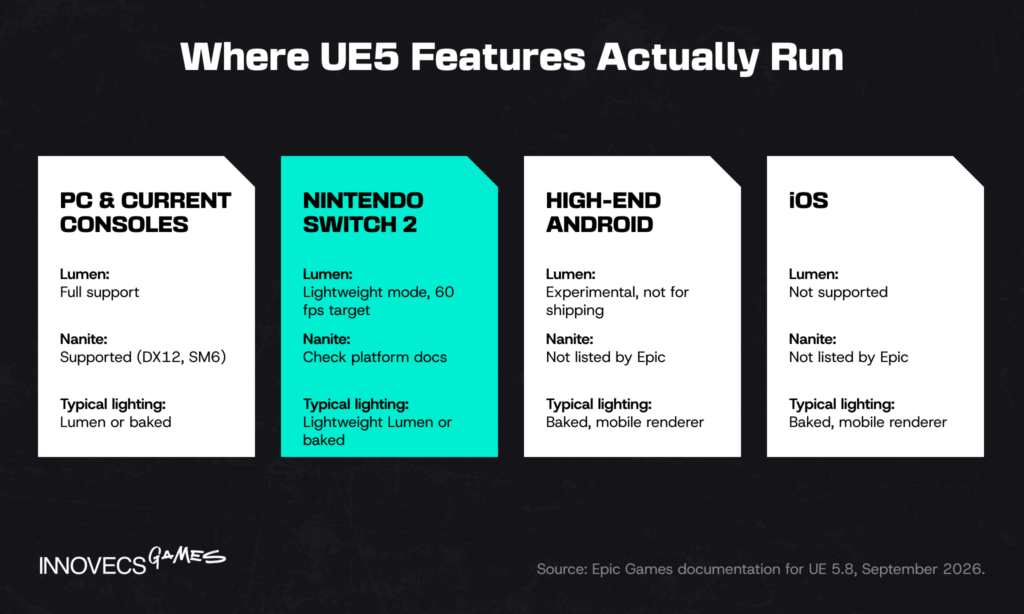
Switch 2 sits between the two worlds. The lightweight Lumen mode from the rendering section is aimed squarely at it, which puts dynamic lighting on a Nintendo handheld for the first time. UE4 games are getting there as well: Hogwarts Legacy was a Switch 2 launch title, and Stellar Blade is due on it in November, both still built on UE4. Porting in either engine needs a Nintendo devkit, platform certification, and a team that has taken a build through Lotcheck before, and that last part is the one most schedules underestimate.
Workflow, Editor, and Tooling Differences
Rendering gets the headlines, but the tooling changes are what your team feels on a Tuesday. Designers, animators and engineers each lose a different chore in UE5, and each picks up a new one.
World Partition and Level Design
UE4 handled big maps with World Composition and manual Level Streaming, which meant designers carving the world into sublevels and fighting over who had which one checked out. World Partition divides the map into a grid that streams automatically, and its One File Per Actor setup stores each actor separately, so two designers can edit the same region without a lock conflict. The same S.T.A.L.K.E.R. 2 team credits One File Per Actor with letting its level designers work on the same open-world locations at once, which on a map that size is the difference between a queue and a team. Epic has deprecated World Composition, and a conversion commandlet moves old maps across one at a time. The Procedural Content Generation framework went production-ready in UE 5.7, so scattering rocks and trees is now a rule set rather than an afternoon of placing them by hand. Nobody on any team we’ve worked with has missed that afternoon.
Editor UI and Usability
The UE5 editor is a reskin with real changes underneath: a content drawer instead of the permanent browser panel, more screen space for the viewport, and modeling and UV tools built into the editor. Someone fluent in UE4 needs about a week to stop hunting for buttons that moved. Not a course. The content drawer alone will fill your team chat with complaints for five days, and on the sixth nobody will remember the old layout. Blueprint visual scripting works the same way it did, and C++ teams get the optional TObjectPtr pointer system rather than a rewrite. The real learning curve isn’t the editor. It’s knowing which of the new systems to switch on and when, which is an engineering judgment rather than a UI one.
Animation, Chaos Physics, and MetaHuman
Animation authoring has moved into the engine. Control Rig, the IK Retargeter, and the refactored Animation Mode in 5.7 let animators rig, retarget and polish without round-tripping to a DCC tool for every fix. Chaos Physics replaced PhysX as the only physics engine you get out of the box, and it behaves differently enough that vehicles, ragdolls and destruction all need retuning after an upgrade. Vehicles usually show it first: a car that handled well under PhysX tends to arrive in Chaos with the suspension of a shopping trolley. MetaHuman went from a character creator to a pipeline: MetaHuman Animator for facial capture, and in 5.8 an experimental MetaHuman Collections feature that Epic says scales to hundreds of characters on mobile and thousands on high-end platforms. If your project needs believable crowds, that last one alone can justify the upgrade. The same Live Link and animation tools also run UE5’s virtual production stages, so a studio with a mocap setup gets game and cinematic capture from one toolset.
Migrating a Project from Unreal Engine 4 to 5
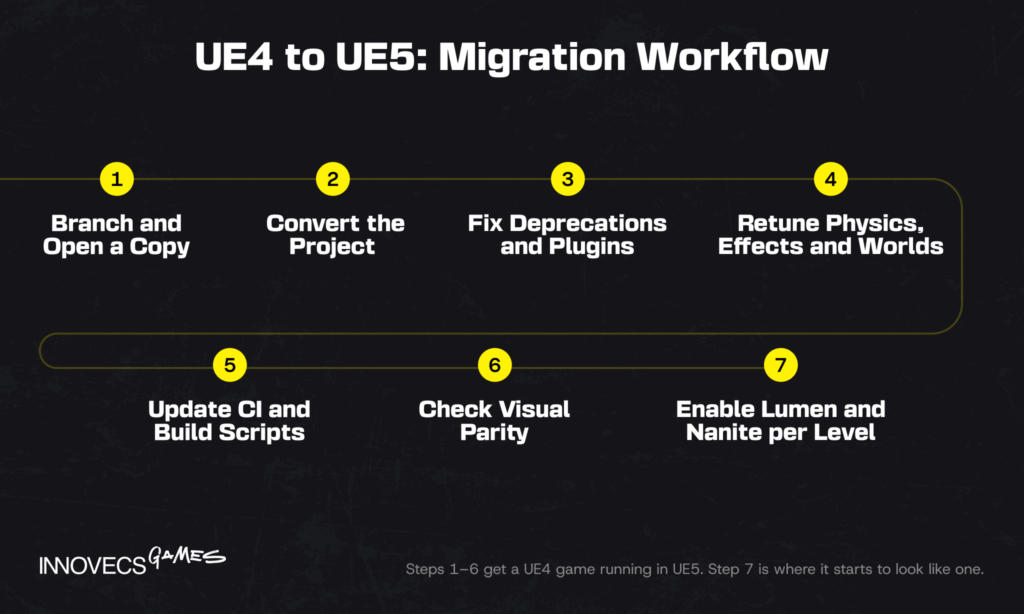
Everything above assumes a fresh UE5 project, and most studios reading this have a UE4 one instead. As with any game engine migration, the conversion itself is the easy half. Epic’s converter does most of the mechanical work, and Epic says most projects build and run after it without further action. That sentence is true and slightly misleading, because “runs” and “looks and plays the way it did” are two different milestones. The conversion is also one way: once a project opens in UE5 it won’t open in UE4 again. And in 2026 there’s a new wrinkle: a team starting a UE4 to UE5 migration today will face a second, smaller move once UE6 matures.
What Transfers Automatically
Projects saved in 4.27 load in UE 5.0 and later, and older 4.x projects load too, though Blueprints that call functions deprecated years ago will need their references fixed. Assets, levels, materials, Blueprints and most C++ code carry over. Raw pointers still compile, since TObjectPtr is optional and Epic ships a tool that converts header properties for you. Audio moves to the Unreal Audio Mixer without any action, and the Zen Loader replaces the old Event-Driven Loader behind the scenes. Lumen and Nanite don’t switch themselves on for a converted project. That’s a feature: the game should look like the UE4 build on day one, and you decide what to upgrade.
What Needs Rework
The mandatory list is short. The recommended list is where the schedule goes.
- Physics. PhysX is gone. Vehicles move to the Chaos Vehicles plugin, Apex destruction to Chaos Destruction, and physics-driven gameplay needs retesting because Chaos can tick on its own thread.
- Effects and cinematics. Cascade particles are deprecated in favor of Niagara, and Matinee sequences need rebuilding in Sequencer.
- Worlds. World Composition maps should be converted to World Partition, one map at a time.
- Rendering features. Hardware tessellation is removed, Light Propagation Volumes are replaced by Lumen, and UE4’s standalone ray tracing features are folded into Lumen’s hardware ray tracing path.
- Audio. Sound Cues are deprecated in favor of MetaSounds.
- Toolchain. Visual Studio 2017 isn’t supported, 32-bit targets are gone, and target platform names changed, which breaks build scripts that call them directly.
- Performance workarounds. Blueprint Nativization no longer exists, so projects that relied on it for speed need another optimization route.
- Third-party plugins. Every Marketplace or Fab plugin needs a UE5 build from its vendor, and some of them never got one.
Common Migration Pitfalls
The failures we see most often aren’t technical. They’re scheduling decisions made before anyone opened the project.
- Converting in place. Epic recommends the “Open a Copy” option and warns that in-place conversion can corrupt data. Branch first, and keep the UE4 build shippable until the UE5 one passes QA.
- Migrating mid-milestone. An engine upgrade eats the stability a milestone depends on. Schedule it straight after a delivery, never in the four weeks before one. We have yet to see an engine upgrade finish early, so the buffer isn’t optional.
- Switching everything on at once. Turning on Lumen, Nanite and Virtual Shadow Maps project-wide on day one is how a stable 60 fps build becomes a 38 fps one. Enable them per level, measure each one, and keep what earns its cost.
- Forgetting the build farm. CI scripts, device profiles, and packaging steps break on the renamed platforms and new toolchain long before the game does.
- Underestimating memory. Distance field voxel density doubled for Lumen’s software tracing, and memory use rose with it. Console targets feel that first.
How long all this takes depends far more on how much of the engine you’ve modified than on the size of the game.
| Project profile | Typical effort to a stable UE5 build | Where the time goes |
|---|---|---|
| Blueprint-heavy, stock engine, few plugins | 2 to 4 weeks, 1 to 2 engineers | Deprecated nodes, plugin updates, visual parity checks |
| Mixed C++ and Blueprint, moderate plugin use | 1 to 3 months, 2 to 4 engineers plus tech art | Physics retuning, Niagara conversion, build pipeline |
| Custom engine modifications, physics-driven gameplay | 3 to 6 months or more, dedicated team | Merging engine changes forward, Chaos behavior, re-profiling every platform |
Source: Innovecs Games delivery data, projects staffed 2023 to 2026. Estimates exclude adopting Lumen and Nanite across all content.
That third row is the one that keeps some studios on UE4 for good, and the decision section below has the best-known example.
Upgrading a Live Game
Those estimates assume the game can sit still while the team works. A live game can’t stop for an engine upgrade, and it doesn’t have to. Epic did it with the biggest live game it owns. Fortnite switched development to UE5 with Chapter 3 in December 2021, and what players mostly noticed was new log-cutting physics, not new graphics. Nanite, Lumen and Virtual Shadow Maps only arrived a year later with Chapter 4 on UE 5.1. That split is the pattern worth copying: move the engine first, change the look later.
In practice:
- Run the upgrade on a parallel branch while the live team keeps shipping content from UE4.
- Merge live content forward into the UE5 branch every sprint, so the gap never grows beyond a few weeks.
- Ship the first UE5 build as a like-for-like update with the same visuals and content, then watch crash rates and frame times by device for two or three weeks.
- Keep the UE4 client and its server version deployable until the UE5 build has held for a full content cycle.
- Turn on new rendering features per season or per map, each tied to a content drop players will actually see.
Rendering is rarely where a live upgrade breaks. Save data, backend contracts and store submissions are, so test last season’s save files against the new build before anything else.
Keeping the Art Style Intact
A converted project opens with its UE4 settings, so the first build should look the way it always did. The risk arrives later, when someone switches Lumen on and the game quietly changes character: indirect light shifts, interiors lose the falloff a lighting artist spent months tuning, and reflections show what the baked version politely hid. Licensors and long-time players notice that before any frame counter does.
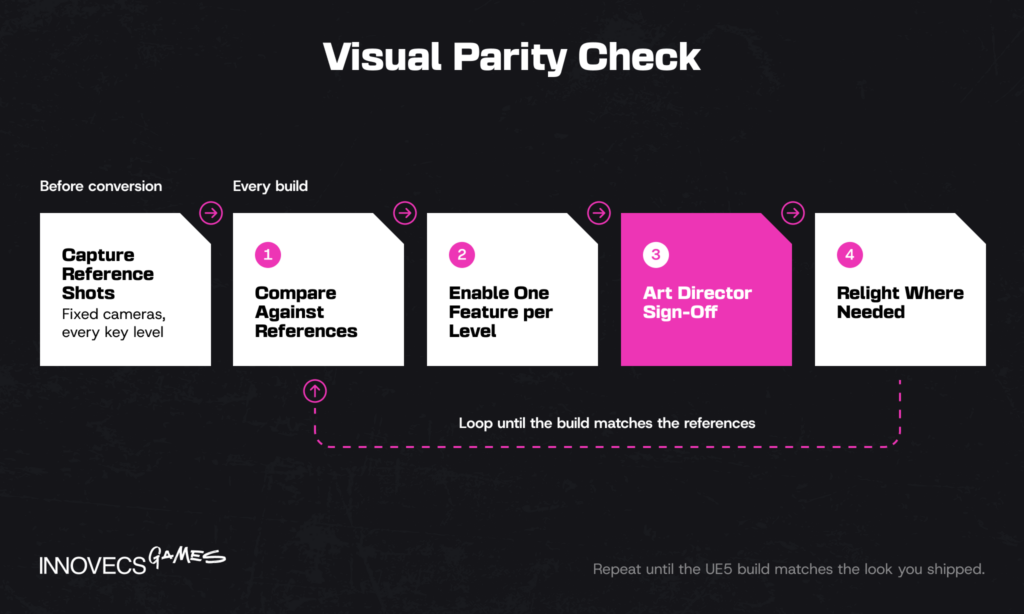
Protect the look the way you protect frame rate. Capture reference screenshots from fixed cameras in every key level before conversion, and compare each new build against them as part of QA. Give the art director sign-off on every rendering feature you enable, level by level. Plan for lighting artists to relight rather than simply re-bake, because Lumen responds to materials and emissive surfaces differently. And a strongly stylized game, cel-shaded or painterly, often keeps baked lighting on purpose, which is a legitimate UE5 choice rather than a failure to adopt it.
Running a Migration With an External Team
Most studios can’t pull senior engineers off the roadmap for three months, which makes engine upgrades one of the most common reasons to bring in an outside team. It works when the split is clean: your team keeps shipping, the external team owns the upgrade branch, and both sides agree in advance on what “done” means.
Put these in writing before work starts:
- Acceptance criteria. Frame time on the minimum-spec machine for each platform, memory ceilings, crash rate, and visual parity against the reference screenshots.
- Branch ownership. Who merges your content into the upgrade branch, how often, and who resolves conflicts in code both teams touch.
- Engine changes. Every custom engine modification gets an owner on your side, because only your team knows why it exists.
- Reporting. A weekly written status covering what converted, what broke and what’s next, on the same Jira board and build dashboards your team already uses.
- Handover. Documentation for every change, plus a pairing period so your engineers own the UE5 codebase when the external team rolls off.
Negotiate the last point hardest. An upgrade only your vendor understands is a new dependency, not a finished job. We sell this exact service, so weigh the advice accordingly, but we’d say the same to a studio hiring someone else.
Which Engine Should You Choose for Your Next Game?
Neither answer is a verdict on the engines. It’s a verdict on where your project sits, so find your project in the scenarios below before reading any benchmark.
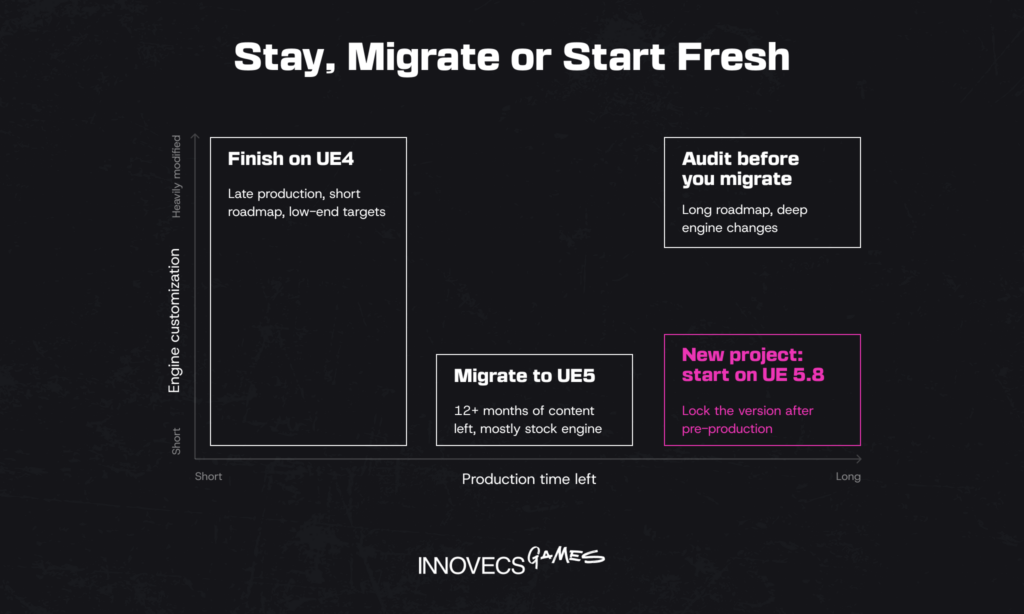
When Unreal Engine 4 Still Makes Sense
Stay on UE4 if you’re in late production, or running a live game whose remaining roadmap is too short to collect the benefits, and the upgrade would cost you a release window in exchange for features players won’t notice. Stay if you’ve spent years modifying the engine: Naoki Hamaguchi told GameSpot the team finds it more beneficial to have something we’re already familiar with, which is why the final Final Fantasy VII remake is being built on UE4. Stay if your targets are older or low-power hardware where Lumen and Nanite would sit switched off anyway; Shift Up shipped Stellar Blade’s PC version on UE 4.26 in 2025 and nobody asked for a refund over the engine. The honest cost is maintenance. Every fix, platform SDK update and security patch Epic ships now lands in UE5 and UE6, so each year on UE4 you carry a little more of the engine yourself. Stay long enough and you’re no longer using Unreal Engine 4 at all. You’re maintaining your own engine that happens to share its name.
When Unreal Engine 5 Is the Better Fit
For a new project starting in 2026, UE5 is the default, and we’d want to hear a specific reason before recommending anything else. Open worlds, dense environments, dynamic time of day, and next-gen consoles all play to what UE5 does well. It also suits small teams better than its reputation suggests. Sandfall built Clair Obscur with a core team of about 30 and four programmers, and told GDC that about 95% of it was built in Blueprint, according to Game Developer. A project that starts on 5.8 and ships in 2028 is on the supported road. One that starts on 4.27 is on a road Epic closed in 2021. Our view, for what it’s worth: a new game on UE4 in 2026 is like buying a phone the manufacturer stopped updating. It works fine, right up to the day it doesn’t.
What About Unreal Engine 6?
Every Unreal planning meeting now ends with this question, and for most teams the answer is not to wait. Waiting for the next engine is a tradition as old as engines, and it has shipped exactly no games. Epic’s UE6 roadmap targets early access at the end of 2027 and a full release 12 to 18 months after that, which puts a production-ready UE6 somewhere between late 2028 and mid-2029. The big changes are in how gameplay gets written. Verse becomes the programming model, a new framework called Scene Graph gradually takes over from Actors, and UE5 and the Fortnite editor merge into one product.
Three points matter for a decision made today. Actors and Blueprints will ship in early UE6 versions, and Epic promises conversion tools before it deprecates them, so a UE5 project isn’t heading for a dead end. UE4 projects get no such path; they go through UE5 first. And nobody should plan a commercial release on an early access engine, a view Epic shares, since it says its public UE6 branch “is not meant to be any kind of Alpha.”
For a project starting now, our advice is to build on UE 5.8, lock the version at the end of pre-production, and take only hotfixes after that. Epic isn’t planning another UE5 release but is holding a 5.9 in reserve, which makes 5.8 an unusually stable version to lock to. Before you lock, check that every plugin you depend on lists 5.8 support on Fab, which replaced the Unreal Engine Marketplace in October 2024. One plugin stuck on 5.6 will hold the whole project there with it.
Unreal Engine vs. Unity: A Quick Note
Some teams reading a UE4 and UE5 comparison are really choosing a game engine, not a version. The unreal engine 5 vs unity choice usually comes down to target platform, team skills, and how much rendering you need out of the box: Unreal for high-fidelity console and PC, Unity for mobile-first and lighter cross-platform development. We cover it properly in our Unity vs Unreal comparison.
Not Sure Which Engine Fits Your Project? Let’s Talk
Tell us what version you’re on, what you’re shipping to, and when. We’ll tell you whether an upgrade pays back before your next milestone, and we’ll say so plainly if staying put is the better call.
Cost and Licensing: Does UE5 Cost More Than UE4?
Not in licensing. Epic’s terms are identical across both versions: the engine is free to use, and games owe a 5% royalty on lifetime gross revenue above $1 million per product. Under Epic’s Launch Everywhere with Epic program, games that ship on the Epic Games Store before or alongside other stores pay 3.5% instead, across all platforms, and revenue from Epic Games Store sales is royalty-free either way. On a game that grosses $5 million, that’s $200,000 in royalties at the standard rate and $140,000 under the program. At hit scale the numbers change character. Clair Obscur passed 8 million copies in its first year; at an assumed $35 average per copy that is about $280 million gross and roughly $14 million owed at 5%, or $9.8 million at 3.5%. That’s an illustration, since Game Pass deals, Epic Games Store sales and each studio’s own terms move the real figure.
The real difference is everywhere else in the budget:
- Hardware. 32 GB workstations as the baseline, current-generation GPUs for anyone touching lighting, and more build-farm cores for shader compiles.
- Optimization time. UE5 moves effort from asset preparation to profiling, and that effort needs senior engineers rather than juniors.
- Migration. For an existing UE4 project, the table in the migration section above is the real upgrade price.
- Savings. Fewer LODs to author, fewer bake cycles, and faster lighting iteration give some of that back, mostly in the art team.
Whether UE5 comes out cheaper depends on which side of that list your team is heavier on.
When a Migration Pays for Itself
The migration line in that list is paid once, while the savings recur, so the real question is whether enough production is left to collect them. A rough model helps. Take a project in the middle row of the migration table: about three engineers for two months, or six engineer-months. Now suppose eight environment and lighting artists each lose around four hours a week to lightmap bakes, lightmap UV fixes and LOD authoring. If UE5 gives most of that back, the team recovers roughly one person-month every five weeks, and the migration pays back in seven to nine months once the extra workstation memory is counted. In our experience, teams tend to overestimate what the upgrade will cost and underestimate how long they’ll keep working in the engine afterwards. The second mistake is the expensive one.
| Where the project is | Does the upgrade usually pay back? | Why |
|---|---|---|
| 12+ months of content production left, dynamic lighting planned | Yes | Iteration savings compound across the rest of the schedule |
| 6 to 12 months left, mostly static lighting | Borderline | Savings arrive close to ship; decide on platforms and visual goals instead |
| Under 6 months to ship | Rarely | The cost lands now and the savings land after launch |
| Heavily modified engine | Only if the next title reuses the tech | Migration effort outweighs the savings on any single game |
Source: illustrative model based on Innovecs Games delivery data, projects staffed 2023 to 2026. The four-hours-a-week figure is an assumption to replace with your own team’s numbers. Not a quote.
A live game with years of seasons ahead is the exception to the third row, because its production never really ends. Fortnite is the extreme case.
How AI Tools Are Changing Unreal Engine Development
Part of that cost equation is about to move, because Epic is building AI into the engine rather than bolting it on. UE 5.7 added an AI Assistant for guidance inside the editor, and UE 5.8 went a step further with an experimental Model Context Protocol plugin that lets models such as Claude or Gemini work inside a project with real context, rather than on snippets someone pasted into a chat window. For UE6, Epic plans to expose a broad set of engine capabilities through MCP, and separately says diffusion-based tools for image and video work will arrive in early 2027.
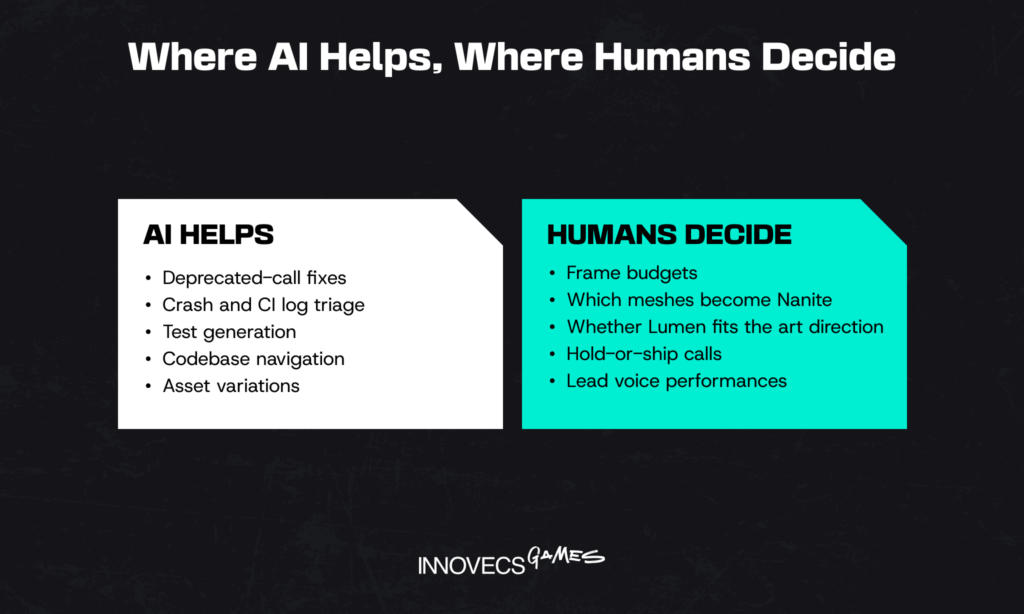
The more useful signal is how Epic’s own engineers use it. Its UE6 roadmap lists the jobs that paid off internally: fast code indexing so language models can navigate a codebase the size of Unreal, automated root cause analysis for crashes and failed CI jobs, and automated test generation. Very little of it writes shipping engine code. Most of it takes the tedium out of the work around the code.
That maps well onto Unreal projects in general:
- Asset work. AI speeds up concept iterations, texture variations and placeholder content. The Procedural Content Generation framework, which is rule-based rather than AI, already handles world dressing at scale.
- Code and migration grunt work. Deprecated calls, pointer conversions, renamed console variables and build script changes are pattern work a model handles well, with an engineer reviewing every diff.
- Debugging. Crash dumps, shader compile logs and Unreal Insights traces are long, repetitive and well suited to a first pass by a model.
ARC Raiders is the most public test of where AI help ends and player patience begins. Embark built the game on UE5, used machine learning to help animate its robot enemies, and generated some voice lines with text-to-speech trained on contracted actors. The game became a hit anyway, and the voices still drew enough criticism that CEO Patrick Söderlund said in March 2026 the studio had re-recorded many of them with real actors, conceding that “a real professional actor is better than AI.” The robots kept their machine-learned animation. Nobody complained about that part.
Where humans still decide is the part that ships. A model can list which meshes could become Nanite; it can’t tell you which ones should, given your memory budget on a base console. It can suggest Lumen settings but not whether a scene reads the way the art director intended. Frame budgets, art direction, and the call to hold or ship a build stay with people who will answer for them.
How Innovecs Games Helps You Build with Unreal Engine 4 or 5
Engine decisions go wrong in the gap between rendering engineering and content, and that gap is where we work. Innovecs Games has delivered 300+ games over more than a decade, with 200+ developers and artists across the US, UK, EU, Israel, Australia, and Ukraine, and our focus is AAA and AA production for console and PC. Engineers and technical artists sit on the same bench, so the person profiling a Lumen scene and the person rebuilding the assets inside it are on one team with one lead.
For Unreal projects that usually takes one of three shapes. A migration audit, where a small team branches your project, converts it, and reports what breaks, what it costs, and whether it’s worth doing before you commit. A co-development slice, where our engineers own a defined workstream such as Chaos retuning, World Partition conversion, or a performance pass against a minimum-spec target, embedded in your pipeline and your sprint cadence, so your in-house team keeps shipping while ours carries the upgrade branch. Or a dedicated team for longer programs, part of our wider AAA game development services.
The same engineers handle mobile and Switch 2 performance work, where the frame budget is tighter than on any current console. Studios that want to scale without adding permanent headcount use the same bench through game development outsourcing or staff augmentation. The honest part: we’ll sometimes recommend you stay on UE4 and spend the migration budget on content, and we’ve lost engagements by saying it. Our portfolio shows the range of what we’ve shipped.
FAQ
What is the main difference between Unreal Engine 4 and Unreal Engine 5?
UE4 prepares a lot of work in advance, baking lighting and building LOD chains by hand, while UE5 calculates much of it at runtime through Lumen and Nanite. The result is faster iteration and a higher visual ceiling in exchange for heavier hardware demands. UE5 also swapped PhysX for Chaos and World Composition for World Partition. And it’s the only one of the two Epic still develops.
Should I still use Unreal Engine 4 in 2026?
Only if you already have a project on it. Live games, late-stage productions, and heavily customized engines can reasonably finish on UE4, the way Shift Up kept Stellar Blade on it for the PC and Switch 2 versions. Starting a new game on UE4 in 2026 means building on a branch that stopped at 4.27 in 2021 and faces a two-step upgrade later.
Is Unreal Engine 5 harder to learn than Unreal Engine 4?
The editor, no. An experienced UE4 developer adjusts to the new layout in days, and Blueprint and C++ work the way they did. What takes longer is learning to budget Lumen, Nanite and Virtual Shadow Maps against a frame target, which is closer to tech art and rendering engineering than to learning an interface. Newcomers learn UE5 directly, since current courses and documentation target it.
Can I convert an existing Unreal Engine 4 project to Unreal Engine 5?
Yes, through Epic’s built-in converter, which handles most of the work and supports 4.27 projects directly. Always use “Open a Copy”, because the upgrade is one way and in-place conversion risks data loss. Expect manual work on physics, particles, cinematics and third-party plugins. Budget for re-profiling every target platform afterwards, not just for getting the build to compile.
Does Unreal Engine 5 require a more powerful PC than Unreal Engine 4?
Yes, noticeably. Epic’s recommended development RAM went from 8 GB to 32 GB, and Lumen and MegaLights need at least an RTX 2000, RX 6000 or Intel Arc card with Shader Model 6 enabled. Epic’s own reference workstation went from a GTX 970 to an RTX 4080. For players, UE5 games can scale down, but only if the team builds lower settings deliberately.
What are Nanite and Lumen, and why do they matter?
Nanite is UE5’s virtualized geometry system: it streams very high-detail meshes and adjusts their detail automatically, so artists skip most LOD and normal-map work. Lumen is real-time global illumination and reflections, which replaces most lightmap baking. Together they are why UE5 scenes can look film-quality and why lighting changes show up instantly. They’re also the two systems most responsible for UE5’s higher hardware cost.
Is Unreal Engine 5 free to use, like Unreal Engine 4?
On the same terms, yes. Both are free to download and develop with, and games pay a 5% royalty only on lifetime gross revenue above $1 million per product. Titles in Epic’s Launch Everywhere program pay 3.5%, and Epic Games Store revenue is royalty-free. Non-game commercial users above $1 million in annual revenue buy seat licenses instead.
Which games are built on Unreal Engine 5?
Fortnite has run on UE5 since late 2021 and serves as Epic’s test bed. Shipped titles include Senua’s Saga: Hellblade II, Black Myth: Wukong, Clair Obscur: Expedition 33, Silent Hill 2, and Borderlands 4, with Gears of War: E-Day and The Witcher 4 in development. Riot also moved Teamfight Tactics from internal tech to UE5 across PC and mobile.
🤖 How is AI changing Unreal Engine development workflows?
Mostly around the edges of the code rather than inside it. UE 5.7 added an in-editor AI Assistant, UE 5.8 an experimental MCP plugin that connects models to a live project, and Epic plans deeper model integration for UE6. The gains so far are in crash triage, test generation, code navigation and asset variation. Decisions about frame budgets and art direction still sit with the team.
🤖 Can AI tools help migrate a project from UE4 to UE5?
For the repetitive half, yes. Models are good at finding deprecated calls, converting pointer declarations, updating renamed console variables and summarizing thousands of lines of build errors. They’re poor at judging why Chaos physics now feels different or whether a converted level still matches the art direction. Treat AI as a fast junior on the migration branch, with every change reviewed before it merges.
Ready to Build Your Next Game on the Right Unreal Engine Version?
You know your target platforms and your release date; we know where Unreal Engine 4 vs 5 decisions tend to break on the way there. Send us the project profile, and we’ll come back with a recommendation and a scoped team within a week.