Unity vs Unreal: How to Choose the Best Game Engine

Choosing between Unity and Unreal is one of the most common challenges in modern game development. Both engines power thousands of games across mobile, PC, console, and emerging platforms, yet they cater to very different needs, skill levels, and project scopes. For many game developers, selecting the wrong game engine can result in performance issues, higher costs, or a steeper learning curve than expected.

The debate around Unity and Unreal often centers on graphics quality, ease of use, pricing models, and long-term scalability. Indie developers may prioritize flexibility and fast iteration, while AAA studios often demand top-notch graphics and advanced features capable of delivering cinematic experiences. Understanding how these engines differ is critical before committing time and resources.

In this guide, we compare Unity and Unreal Engine across technical capabilities, pricing, learning curve, platform support, and real-world use cases to help you identify the right engine for your next project.

Explore Game Development With Modern Game Engines

Modern engines act as the foundation of today’s gaming industry, allowing teams to create games without building every system from scratch. A powerful game engine handles rendering, physics, animation tools, scripting, audio, and deployment, enabling developers to focus on gameplay and creativity rather than low-level infrastructure.

Unity and Unreal stand out as the most widely adopted engines. They are used not only for games but also for simulations, virtual production, architectural visualization, and web applications. Their versatility has made them industry standards across multiple sectors.

Most modern engines provide an integrated editor, real-time visual feedback, and extensive tooling designed to speed up development cycles. This combination of accessibility and power is why engines like Unity and Unreal dominate professional and independent workflows alike.

Key responsibilities of a modern engine include:

  • Real-time rendering and lighting
  • Physics simulation and collision detection
  • Animation systems and visual effects
  • Scripting and programming language support
  • Deployment to multiple platforms

What Is a Game Engine and Why Does It Matter

A game engine is a software framework that simplifies development by providing reusable systems and tools. Instead of writing everything from the ground up, game devs rely on engines to manage complex technical tasks while maintaining performance and scalability.

The engine you choose directly affects graphics quality, performance, development speed, and even team structure. Some engines emphasize beginner-friendly workflows and rapid prototyping, while others focus on high-end graphics and advanced optimization for large-scale projects.

Core components commonly found in game engines include:

  1. Rendering pipelines for 2D and 3D graphics
  2. Physics and collision systems
  3. Animation tools and visual effects
  4. Scripting systems and code integration
  5. Build tools for multiple platforms

Because of these components, the right engine can significantly reduce production costs, shorten development timelines, and improve the final player experience.

Unity Engine Overview

Unity Engine is one of the most widely used game engines in the world, known for its flexibility across platforms and beginner-friendly workflows. It supports more than 25 platforms, allowing game developers to create games for mobile, desktop, consoles, virtual reality, and more – all from a single project. This versatility makes Unity ideal for a wide range of projects, from small indie games to sophisticated 3D and 2D titles.

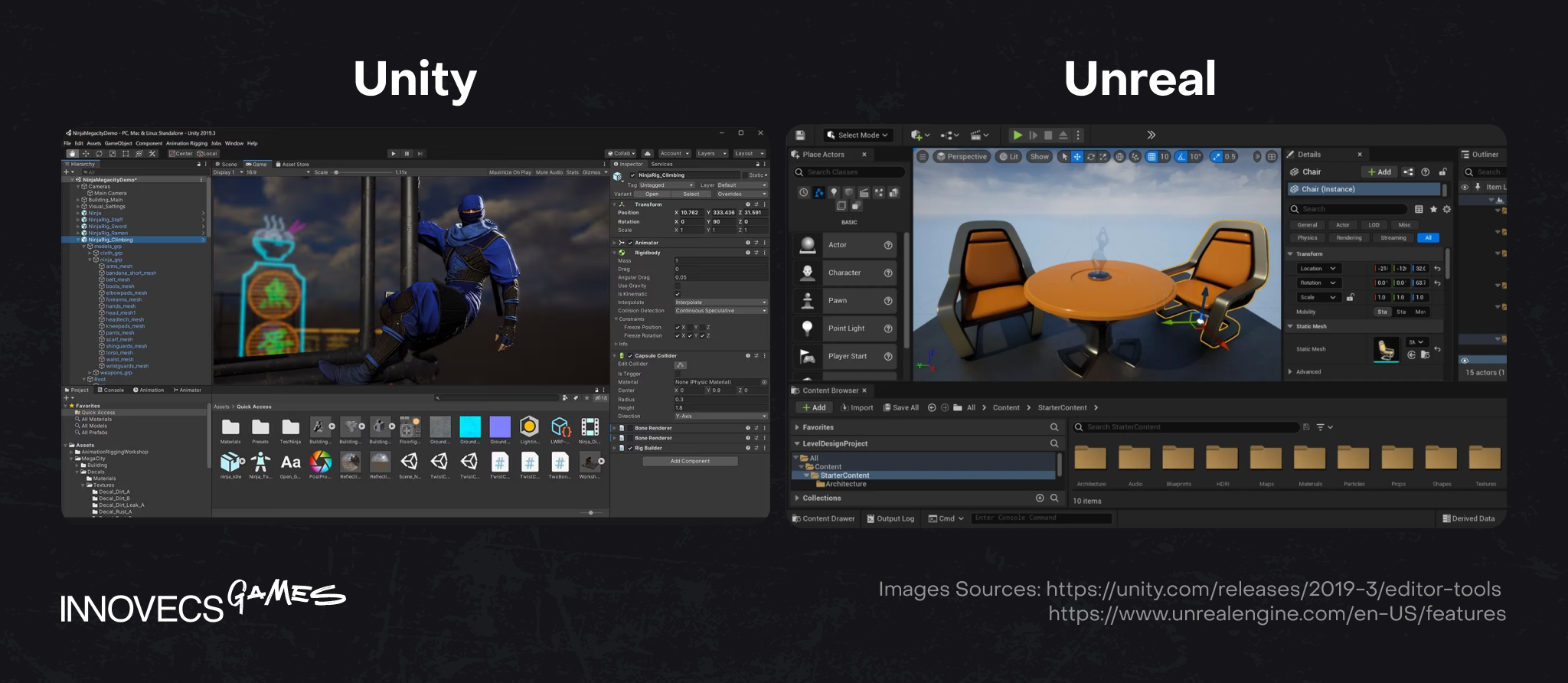
Unity’s editor offers a clean, intuitive user interface that helps new developers get started quickly, while still providing advanced functionality for experienced teams. The engine’s strong support for C# scripting, extensive documentation, and large asset store also contribute to Unity’s popularity among game devs.

In the broader game engine landscape, Unity continues to lead in sheer volume of game usage. According to Video Game Insights’ analysis of Steam releases in 2024, 51% of all games released on Steam were built with Unity, significantly outpacing other engines. Unreal Engine was second with 28% of new Steam releases.

Unity is a strong choice for developers looking to create games that run smoothly on lower-end devices, mobile platforms, and browser-based applications. Its combination of ease of use, multiple platform support, and expansive tooling ecosystem makes it a go-to engine for many in the indie and small team space.

Unity Game Engine Use Cases

The Unity game engine excels in projects that require flexibility, performance on lower-end devices, and fast development cycles. It supports both 2D and 3D development and can be used to create games for over 25 platforms, including mobile, desktop, consoles, and web applications.

Unity is especially popular among indie developers and small teams who need to ship games quickly without sacrificing stability. Its lightweight builds and optimization options help games run smoothly across a wide range of hardware.

Common Unity use cases include:

  • Mobile games for iOS and Android
  • 2D platformers and casual games
  • Lightweight 3D experiences
  • Web applications and browser-based games
  • Prototypes and early-stage projects

Unreal Engine Overview

Unreal Engine is known for its superior graphics and powerful visual tools, making it the go-to choice for developers aiming to create photorealistic games and cinematic experiences. The Unreal Engine is frequently associated with AAA games and high-budget productions that demand high-end graphics and advanced rendering capabilities.

Unlike Unity’s minimal approach, Unreal Engine offers a feature-rich editor packed with advanced systems out of the box. While this can feel overwhelming for beginners, it provides professional teams with more features and deeper control over complex projects. Unreal Engine 5.4 and later versions lead the industry with technologies like Nanite and Lumen, enabling near-cinematic realism without heavy manual optimization.

Unreal Engine is free to use for products that generate less than $1 million in gross revenue. After that threshold, Epic Games charges a 5% royalty. For organizations not using the runtime code, Unreal Engine also offers a seat-based pricing model starting at $1,850 annually per seat.

Unreal Game Engine Use Cases

Unreal Engine shines in projects where visual fidelity and performance are critical. It is often preferred by AAA studios and large teams working on expansive 3D worlds, virtual reality, and augmented reality experiences.

The engine’s advanced graphics pipeline and optimization tools allow developers to push hardware limits while maintaining stability. This makes Unreal ideal for projects where realism, lighting, and visual effects play a central role.

Common Unreal Engine use cases include:

  • AAA games with high-end visuals
  • Photorealistic games and simulations
  • VR and AR experiences
  • Large-scale 3D environments
  • Cinematic storytelling projects

Market Share and Industry Adoption

When evaluating Unity vs Unreal Engine adoption, raw usage numbers only tell part of the story. Unity and Unreal are adopted in fundamentally different ways across the gaming industry, depending on project scope, target platforms, and production scale.

Unity dominates in terms of volume of shipped projects, especially across mobile, indie, and mid-sized productions. Industry analyses of Steam releases consistently show that Unity is used in a significantly higher percentage of newly released games. This reflects Unity’s accessibility, lower barrier to entry, and ability to scale across many project types rather than a focus on a single market segment.

Unreal Engine, by contrast, represents a smaller share of total releases but has an outsized presence in high-budget and high-visibility productions. It is frequently selected by AAA studios and teams working on photorealistic games, cinematic experiences, and technically demanding 3D projects. As a result, Unreal’s influence in the gaming industry is often measured by impact and visual benchmarks, rather than by the number of titles shipped.

Developer sentiment also highlights this distinction. While Unity remains widely used, recent developer surveys show growing interest in Unreal Engine, particularly among developers aiming to work on advanced graphics, large-scale worlds, or AAA-style production pipelines. This trend suggests that adoption is shifting not away from Unity, but toward specialization, with each engine reinforcing its strengths.

In practical terms, Unity is often the industry standard for mobile games, 2D projects, and high-volume releases, while Unreal Engine is viewed as the standard for AAA development and high-fidelity 3D experiences. Understanding this split is more valuable than comparing headline market share numbers alone, as it directly reflects how each engine is used in real-world production.

engine capabilities

Unity vs Unreal Pricing and Licensing Models

The pricing difference is one of the most practical factors when comparing Unity vs Unreal for real-world projects. Both engines offer free access, but their monetization models diverge significantly as revenue and team size grow.

Unity offers a free Personal plan for individuals and small teams, which includes core access to the Unity Engine. For professional development, Unity Pro starts at $2,200 per year and allows developers to publish games on consoles. Larger studios can opt for Unity Enterprise, which uses customized pricing based on company needs and scale.

Unreal Engine is free to use until a project reaches $1 million in gross revenue. After that threshold, Epic Games applies a 5% royalty on revenue exceeding $1 million. For organizations not distributing runtime products, Unreal Engine also offers a seat-based pricing model starting at $1,850 per seat annually.

Pricing comparison at a glance:

AspectUnityUnreal Engine
Free accessYes (Personal plan)Yes (under $1M revenue)
Paid entry$2,200/year (Unity Pro)5% royalty after $1M
Enterprise pricingCustom$1,850 per seat (non-runtime)
Console publishingUnity Pro requiredIncluded

This difference makes Unity more predictable for budgeting, while Unreal can be more cost-effective for high-revenue projects with strong visual ambitions.

Unity vs Unreal Learning Curve

The learning curve is a decisive factor for many game devs choosing the right engine. Unity is widely considered more beginner-friendly, while Unreal Engine is known for a steeper learning curve, especially for developers new to programming.

Unity’s clean editor, simpler workflows, and extensive tutorials make it easier for beginners to start creating games quickly. Unreal Engine offers more features out of the box, but its complexity can slow early progress for smaller teams or solo developers.

In short, Unity prioritizes approachability, while Unreal prioritizes depth and control.

Unity Scripting and Programming Language

Unity uses C# as its main language, which is often considered easier to learn and more forgiving than lower-level alternatives. This makes Unity scripting accessible for beginners while remaining powerful enough for complex projects.

Key reasons C# works well in Unity:

  • Clear syntax and strong documentation
  • Faster onboarding for new developers
  • Large ecosystem of learning resources
  • Strong integration with the Unity editor

This balance helps Unity support both rapid prototyping and long-term development.

source code


Unreal Engine Programming and Blueprint Visual Scripting System

Unreal Engine relies primarily on C++, a powerful but more demanding programming language with a steeper learning curve. To offset this complexity, Unreal includes a Blueprint Visual Scripting System, allowing developers to create game logic without writing code.

Blueprints are especially useful for:

  1. Rapid prototyping
  2. Visualizing gameplay logic
  3. Avoiding coding during early development
  4. Collaboration between technical and non-technical team members

This hybrid approach makes Unreal flexible, but mastering both Blueprint and C++ takes time, particularly for beginners.

Graphics Quality: Unity vs Unreal

Graphics quality is one of the clearest differences between Unity and Unreal. Unreal Engine is known for its superior graphics and ability to deliver photorealistic graphics with minimal setup, making it a strong choice for visually demanding projects.

Unity focuses on flexibility and performance rather than raw realism. While Unity can achieve impressive results, especially in stylized visuals, Unreal consistently delivers better visuals for high-end graphics and cinematic experiences.

Visual Effects and Post-Processing Capabilities

Unreal Engine leads in visual effects and post-processing thanks to built-in technologies like Nanite and Lumen. These tools enable advanced lighting, reflections, and detailed geometry out of the box.

Unity supports post-processing through configurable pipelines and add-ons, offering more customization but requiring additional setup. This makes Unreal more efficient for projects targeting top-notch graphics, while Unity remains better optimized for varied hardware.

Related reading: Maya vs Blender: Choosing the Right 3D Software for Your Projects

Unity vs Unreal Performance and Optimization

Unity is generally less resource-intensive, making it well-suited for games that need to run smoothly on mobile and lower-end devices. Its lightweight builds support a wide range of platforms.

Unreal Engine prioritizes visual fidelity and complex scenes, which can increase hardware demands. Unity’s DOTS further improves performance for large-scale simulations across diverse devices.

Unity vs Unreal for Indie Developers and AAA Studios

AspectUnityUnreal Engine
Indie developers and small teamsBeginner-friendly editor, predictable pricing, and a large asset store make Unity a practical choice for indie developers and small teams.Can be used by small teams, but a steeper learning curve and higher system requirements increase complexity.
Learning curveEasier to learn, especially for developers new to game development.More complex, especially when working with C++ and advanced systems.
Project scaleWell-suited for small to mid-sized projects and rapid iteration.Designed for large-scale, technically complex projects.
AAA games and large studiosCapable at scale, but less commonly chosen for visually intensive AAA production.Widely regarded as the AAA game engine, favored for high-end graphics and cinematic experiences.
Graphics and visual effectsFlexible graphics pipeline suitable for many styles.Advanced graphics capabilities, advanced visual effects, and production-ready tools.
Industry perceptionPopular among indie developers and mobile-focused teams.Industry standard for AAA studios and high-fidelity 3D games.

Cross-Platform and Multiple Platforms Support

Both Unity and Unreal Engine are built for cross-platform game development, allowing developers to create games for mobile, desktop, and consoles from a single codebase. This capability is essential in today’s gaming industry, where reaching multiple platforms is often a core business requirement.

Unity supports development across more than 25 platforms, including iOS, Android, Windows, macOS, consoles, VR, AR, and web applications. Its lightweight builds and strong mobile optimization make Unity particularly effective for projects targeting lower-end devices and broad hardware compatibility.

Unreal Engine also supports multiple platforms, including mobile, PC, and consoles, but it is more commonly used for high-performance environments. While Unreal can target mobile, its advanced graphics pipeline is better suited to high-end hardware, which can make optimization more challenging on constrained devices.

Both engines offer robust deployment tools, but Unity is generally preferred for projects requiring maximum platform reach and consistent performance across varied hardware.

Asset Stores, Add-ons, and Ecosystem

A strong ecosystem can significantly accelerate game development, and this is an area where Unity has a clear advantage. Unity has a large asset store where developers can buy, sell, and share 2D and 3D assets, scripts, animation tools, shaders, and complete project templates.

This ecosystem is especially valuable for indie developers and small teams, as it reduces development time and allows teams to focus on gameplay rather than rebuilding common systems. Many Unity add-ons integrate directly into the Unity editor, streamlining workflows.

Unreal Engine also offers a marketplace with high-quality assets, but its ecosystem is smaller and more curated. Unreal’s strength lies less in volume and more in deeply integrated, production-ready tools included directly in the engine.

As a result, Unity offers a wider range of third-party resources, while Unreal emphasizes built-in advanced features.

Community, Online Support, and Documentation

Both Unity and Unreal Engine benefit from large, active communities and extensive online support, which is critical for long-term project success. Documentation, tutorials, forums, and community-driven examples help developers solve problems faster and learn new workflows.

Unity has one of the largest communities in game development, supported by years of widespread adoption across mobile, indie, and educational projects. This results in abundant tutorials, troubleshooting guides, and community-created tools that are easy to find and apply.

Unreal Engine also provides strong documentation and official learning resources, particularly for advanced graphics, visual effects, and AAA workflows. However, due to its complexity, Unreal’s resources often assume a higher baseline level of technical knowledge.

Both engines offer access to extensive learning materials, but Unity’s community-driven support is often easier for beginners to navigate, while Unreal’s resources cater more to experienced developers and professional teams.

huge community

Unity vs Unreal Engine: Which One Should You Choose

Choosing between Unity vs Unreal Engine depends largely on your experience level, project scope, and target platforms. Unity is widely recognized for its ease of use, flexible workflows, and strong mobile support, making it a common choice for beginners, indie developers, and teams working on 2D or lightweight 3D games.

Unity uses C# as its main programming language, which is generally considered easier to learn than Unreal’s C++. This makes Unity more accessible for developers new to game development or those who want to avoid complex low-level code. Unity is also the industry standard for mobile games, offering smaller build sizes, better ad support, and smoother performance on lower-end devices.

Unreal Engine is often the right engine for developers targeting high-quality graphics and complex projects. It uses C++, which provides deep control but comes with a more difficult learning. Unreal’s Blueprint visual scripting system helps offset this by allowing developers to create game logic without writing code, making it easier to prototype and iterate.

Developer sentiment reflects this divide. In the 2024 Stack Overflow Developer Survey, 5.9% of respondents reported using Unity in the past year, compared to 3% reporting use of Unreal Engine, reflecting relative usage among software developers.

Final Verdict: Choose Unity or Choose Unreal

There is no universal winner in Unity vs Unreal – each engine excels in different areas of game development. Unity stands out for its user-friendliness, flexibility across platforms, and suitability for mobile, indie, and small-team projects. Its free version, large community, and extensive asset store make it easy to start and scale.

Unreal Engine is the go-to choice for AAA studios, high-end graphics, and visually ambitious games. Its advanced features, powerful visual effects, and industry-leading rendering technologies make it ideal for teams aiming to create photorealistic experiences.

Both engines support multiple platforms, provide strong online support, and offer free access models. The right engine ultimately depends on whether your priority is accessibility and versatility, or top-notch graphics and technical depth.

READY TO START YOUR PROJECT?
If you need assistance in building a product from scratch or supporting the existing one, drop us a line to discuss details, and we will reply within 24 hours.