Level Design Document Explained, From Core Sections to a Ready Template
A plain definition, the eight sections every LDD needs, a six-step writing process, a one-page outline to copy, and a worked example to measure your own levels against.
Thirty minutes into a 2007 playtest of Halo 3, the map on the researchers’ screen looked as if somebody had spilled confetti on it. Each colored dot marked where a tester had stood a few seconds earlier, and across the Jungle level the dots were everywhere except on the route Bungie had built.
Nobody on that team had made a bad level. They’d made one that only its designers could read.
That picture from above, drawn early, is the heart of a level design document (LDD): the space, the route the designers intend, and later a record of where players really go. Bungie reworked the terrain until the dots moved together. Most studios would rather catch that problem on paper, when moving a path costs an afternoon, than after the rooms along it have been lit, dressed and optimized.
What goes into one, who reads it, how to write it step by step and how to keep it alive past the first playtest is all below, along with a template and one level written out in full.
What Is an LDD, and Why Do Studios Still Write One?
In plain terms, an LDD is the shared plan for one level or area of a game: what the player does there, in what order, in what space, and what each discipline has to build to make that happen. It’s the step between the design idea and the engine. A good one fits on a few pages, carries more maps and charts than paragraphs, and changes whenever a playtest proves it wrong.
Most of its readers aren’t designers. The designer responsible for the space writes it and owns it. Environment artists read the layout and mood notes, technical artists and programmers read the triggers, scripted events and budgets, QA reads the intended route so they know what “working as intended” means, and the producer reads the shopping list to see how many weeks the level will eat. In video game level design that list of readers keeps growing as teams split across studios and time zones.
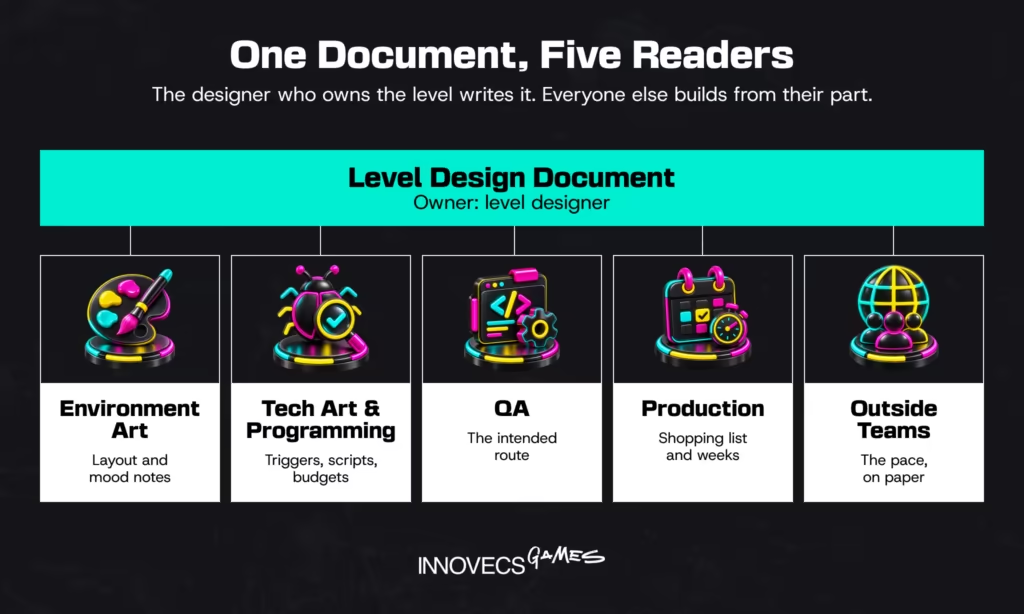
Why bother, when a designer can just build the thing? Because the build shows what the level is, and only the doc says what it was meant to be. QA can’t file a bug against intent nobody wrote down. A producer can’t schedule a shopping list that lives in one person’s head, and an outside team can’t match a pace it has never seen on paper.
LDD vs. GDD: Where One Ends and the Other Begins
The two documents describe the same game at different zoom levels. A game design document covers the whole thing: concept, core loop, systems, progression, art direction, platforms. An LDD zooms in on one level or area and answers questions the GDD can’t, such as where the third enemy wave spawns and why the player turns left at the crane.
| Game design document (GDD) | Level design document (LDD) | |
|---|---|---|
| Scope | The whole game | One level, mission, map or area |
| Owner | Lead game designer or creative director | The designer who owns that level |
| Level of detail | Systems and rules, rarely specific places | Exact layout, encounters, triggers and timings |
| Main audience | Whole team, publisher, partners | Level, art, tech art, scripting, QA, production |
| When it’s written | Pre-production, maintained through launch | Once the systems it uses are stable enough to build with |
| How often it changes | Milestone to milestone | After nearly every playtest of that level |
The last row explains most arguments between these two documents. A GDD that tries to hold forty levels in detail turns into a phone book nobody updates, and an LDD that starts redefining how the grappling hook works has wandered into somebody else’s job. When a level needs a system that doesn’t exist yet, the LDD links to a GDD page or a ticket. It doesn’t invent the system in a margin note.
8 Core Sections Every Level Doc Needs
A competent LDD for a single linear level runs 6 to 12 pages in our projects, most of it maps and charts (first-party estimate, see the template section for the breakdown). The eight sections below are what we’d expect to find in it, whatever the genre. Their weight shifts: a stealth sandbox spends pages on routes and AI patrols, while a mobile puzzle level might cover all eight in a single table row.
Level Overview and Goals
This is the page everyone reads, so it carries the essentials in a few lines: the level’s name and slot in the game, target playtime, the mechanic it introduces or tests, and what the player can do by the end.
Hazelight’s It Takes Two shows why that mechanic line matters. Josef Fares said the game never repeats a major mechanic from one level to the next, so each overview there is effectively a brief for a small new game. Close the section with a definition of done: the playtime, the performance target and the playtest result that make this level finished. Producers and new team members rely on this page more than any other.
Narrative Context and Player Objectives
Here the doc states where the level sits in the story and what the player is trying to do, in their words, not the writer’s. Primary objectives, optional ones and fail conditions belong together, because a level that doesn’t explain them will be explained by QA in a bug report.
IO Interactive’s Hitman (2016) is a useful model for open spaces: its “opportunities” system points newer players toward routes to their targets without walking them through the final steps.
Environmental storytelling lives here too. Mark the points of interest that carry plot without dialogue (a barricaded door, a camp abandoned mid-meal) on the map, so the environment artist knows which props are set dressing and which are story.
Two Bethesda designers on how level and quest teams split one space between objectives and layout, from Skyrim to Starfield.
Top-Down Map and Layout Sketches
Put the map straight after the overview. Draw the critical path, optional routes, landmarks and sightlines, then number the key spaces so the rest of the doc can point at them. Name the layout type as well. A linear level, a hub with spokes and an open sandbox need different maps: the first is mostly a path with pinch points, the second a set of loops that return to the center, and the third a field of landmarks the player navigates by sight.
Add the player metrics the space is built around: jump distance, cover height, corridor width, how far the camera sees. A map without scale can’t be built from.
It’s also the oldest part of the job. In 1985 Shigeru Miyamoto and Takashi Tezuka drew Super Mario Bros. courses on huge sheets of graph paper that programmers then typed in, and a moved pipe didn’t show up in the game until the following day. The tools got faster; drawing first still pays, and this is the page environment artists, scripters and QA open every day.
Arkane veteran Steve Lee walks through eight layout problems that a top-down map catches before anyone builds them.
Gameplay Beats and Pacing
A beat chart lists the moments of a level in order, with the intensity of each, so the team can see the rhythm before building it: arrival, a lesson, a test, a twist, a peak, a release. Valve went as far as to automate this. Left 4 Dead’s AI Director was built partly to generate dramatic game pacing, cycling through build-up, sustained peak and relax states so no two runs played out alike. Most studios don’t need a director system. They do need a pacing chart somebody can argue with in a review.
Enemies, Encounters, and Puzzles
Each encounter gets its own entry: the space it happens in, enemy types and counts, spawn triggers, what the encounter is testing, and how it changes if the player arrives from a different direction. id Software’s Hugo Martin describes Doom Eternal’s demon roster in exactly these terms. “We use our chess pieces,” he told Fandom, “to move the player around and get them off those ledges.” That’s an encounter written for a space, and that’s the whole point.
Puzzles follow the same logic. Write down the solution steps and the dependencies between them, so QA can test each order a player might try. Gameplay programmers, AI designers and QA live in this section.
Items, Rewards, and Checkpoints
List what the player finds, where, and why it’s there: health and ammo for the next fight, keys that open the next space, optional rewards that pay for exploring off the main path. A reward can also be pure invitation, as Celeste shows. Its first chapter alone hides 20 optional strawberries, many far from the main route, and they work because reaching each one is a small level of its own.
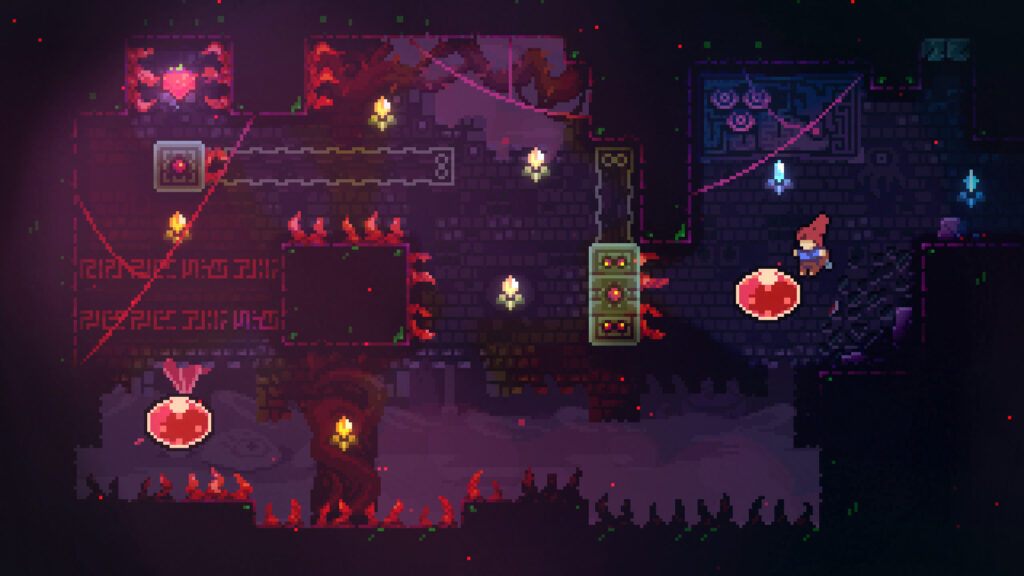
Checkpoint placement goes here too, with the reason for each one and the longest replay a failure can cost.
Art, Audio, and Mood References
This section shows what the level should feel like: reference images, palette, lighting and time of day, signature props, the music state and the ambient sound bed. The richer the references, the fewer rounds of art review. Creative Assembly had an unusually rich set for Alien: Isolation, where Fox supplied three terabytes of original production material, including detailed blueprints of the Nostromo that shaped the game’s spaces. Most teams get a mood board and a Spotify playlist instead, and that’s fine as long as it’s in the doc and not in someone’s DMs.
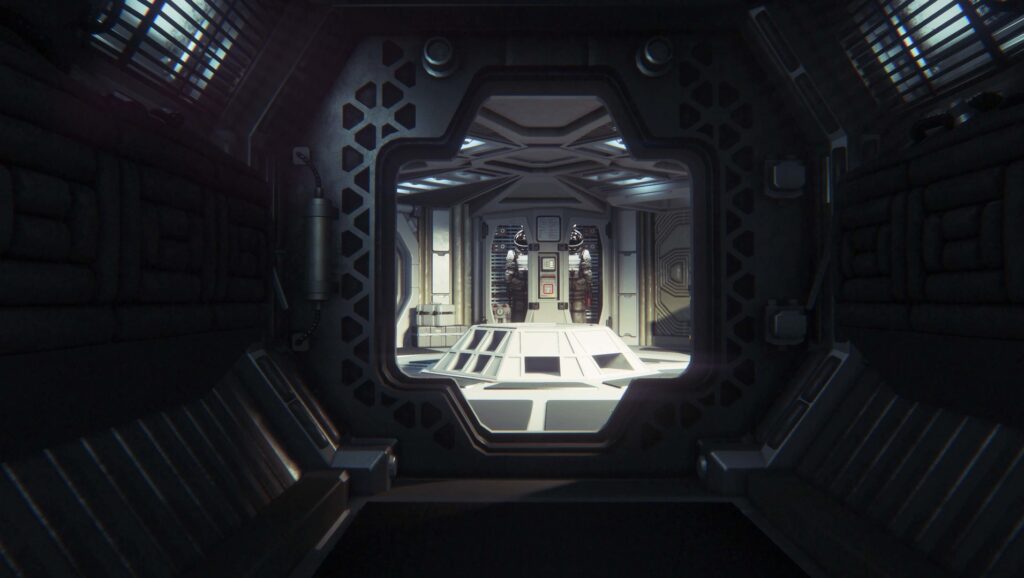
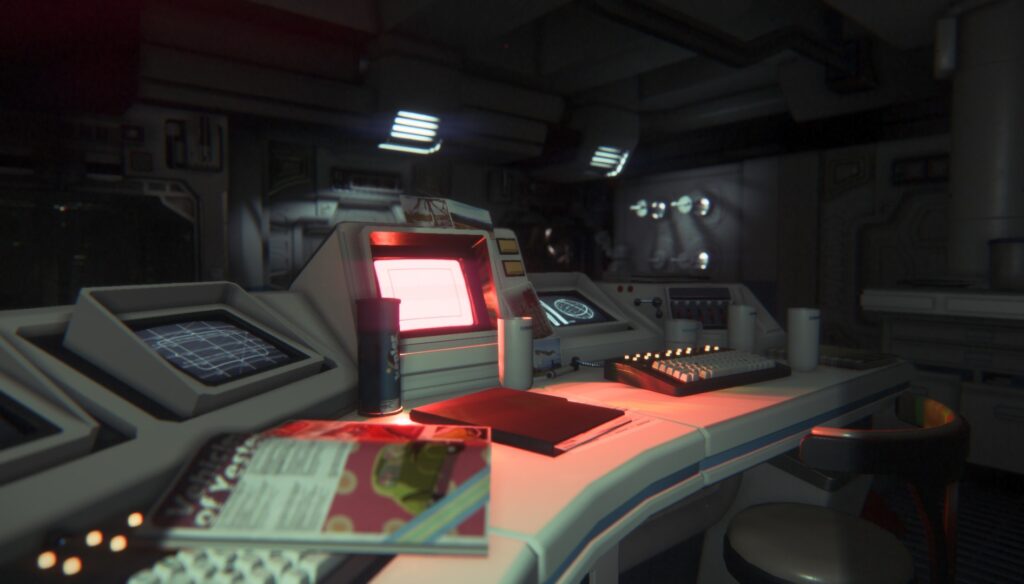
Readability belongs on this page as well. Note how the level signals the route without relying on color alone, how large the key landmarks read on a handheld screen, and which subtitle and contrast options the space has to work with. Accessibility planned on the mood board costs a fraction of accessibility retrofitted after art lock.
Technical Notes and Performance Budgets
Write down the limits the level must live within: memory and streaming budget, draw call or frame-time ceiling, maximum active AI, physics objects, and where the engine needs time to load the next area. Sometimes the fix becomes part of the design. BioWare built Mass Effect’s long elevator rides so the team didn’t have to show loading screens. Players still joke about those elevators nearly two decades later. Few loading screens have been that famous.
Technical artists, engine programmers and the performance owner read this section. They’d rather read it in pre-production than in a profiler capture two weeks before certification.
How to Write a Level Design Document Step by Step
The sections above tell you what goes in. The order you fill them in matters as much, because each step should make the next one cheaper to change. In our projects the steps below take roughly a week for a linear level of 15 to 25 minutes, spread across two or three weeks so playtests can happen in between (first-party estimate).
| Step | What you produce | Ready to move on when |
|---|---|---|
| 1. Purpose and core mechanic | One-paragraph overview, target playtime, the mechanic it teaches or tests | The lead can say in one sentence why the level exists |
| 2. Player flow | Bubble diagram or flowchart of spaces, locks and keys | Every route and dead end is on paper, with no geometry yet |
| 3. Pacing beats | Beat chart with intensity per beat | The chart has rises and rests, and nobody wants to cut a peak |
| 4. Greybox and playtest | Playable blockout, first playtest notes | Fresh testers finish it without being told where to go |
| 5. Annotations | Map callouts for art, scripting, audio, QA | Each discipline can start without a meeting |
| 6. Upkeep | Change log, owner, review rhythm | The doc matches the latest build |
The steps overlap in practice, and that’s fine. What shouldn’t happen is step five starting before step four has survived a playtest.
Step 1: Define the Level’s Purpose and Core Mechanic
Start with one sentence: this level exists to teach, test or twist a specific mechanic, and the player leaves it able to do something new. Our article on core game mechanics covers how those mechanics are built; the LDD decides where each one gets its moment.
Titanfall 2’s “Effect and Cause” is the textbook case. Respawn’s Jake Keating had wanted to build its time-shifting mechanic since before the series existed, and the finished level took longer than anything else in the game. A purpose that clear justified the schedule. A vague purpose (“a fun industrial area”) can’t justify anything, so it tends to lose its schedule to the level that can.
Step 2: Sketch the Player Flow Before the Map
Draw the level as boxes and arrows before it has any shape: which spaces connect, which ones are locked, where the key for each lock sits, and where a player can get stuck. Mark Brown’s Boss Keys series made this format famous by reducing Zelda dungeons to diagrams of keys, locks and the routes between them. A flow diagram exposes the problems a pretty map hides, such as a key the player can only reach by backtracking through three rooms they’ve already cleared. Fix those on paper.
Our verdict, from watching teams skip this step: a flowchart that takes an afternoon saves at least one rebuilt greybox.
Step 3: Plot the Pacing Beats
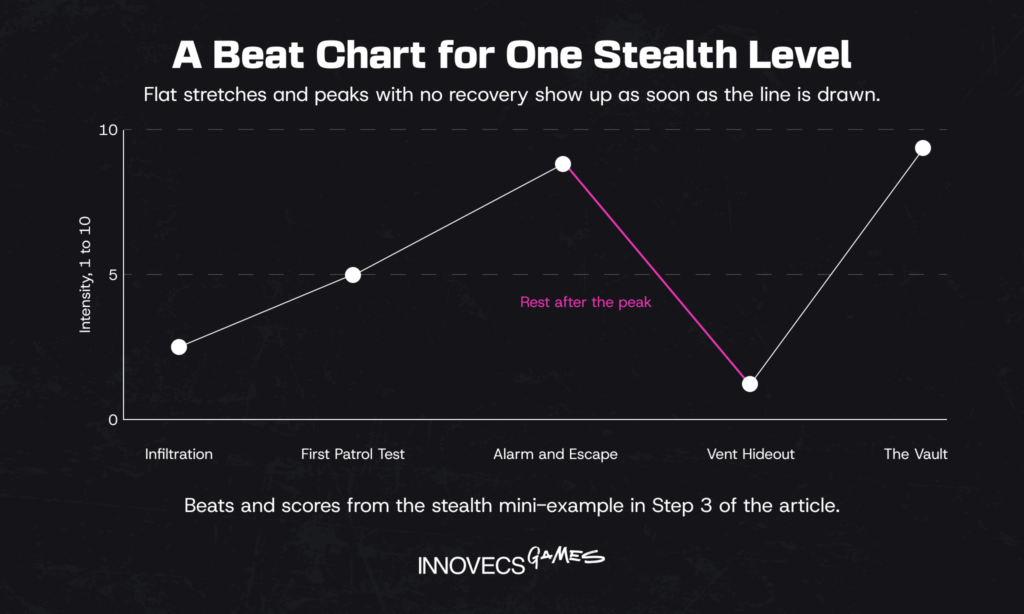
Now lay the beats along the flow: where the player learns, where they’re tested, where something changes, where they rest. Give each beat an intensity score from 1 to 10 and draw the line. Long flat stretches show up immediately, and so do peaks with no recovery behind them.
When the level’s job is teaching a mechanic, the beats can borrow a structure Nintendo has used for years. Koichi Hayashida, director of Super Mario 3D Land, described levels built in four movements: the player learns a mechanic, uses it in a harder spot, gets surprised into using it an unexpected way, then shows mastery. He likened it to the structure of four-panel comics.
Respawn’s campaign team came at pacing from the other end. It built over 100 small “action blocks” as quick experiments, then strung the best ones together into missions.
A mini-example from a stealth level: infiltration (3), first patrol test (5), alarm and escape (8), hiding in a vent with the guards’ radio chatter (2), the vault (9).
Step 4: Greybox and Playtest Early
Greyboxing turns the flow and the beats into untextured geometry the team can actually play. Scale, sightlines, jump distances and cover all get tested here, before an artist spends a day on any of it. If a new mechanic needs proving first, a short build from outside game prototyping services can save the core team from stopping production to do it. The honest caveat: blockouts don’t work equally well for every game. Campo Santo’s Jane Ng said greyboxing “didn’t work” for Firewatch, whose appeal depended on its art, so the team built a full vertical slice of the first day instead, and that took 15 months.
If your level’s whole point is atmosphere, budget for a dressed slice. For everything else, playtest the grey version with people who’ve never seen it, and write down where they hesitate.
Step 5: Annotate the Layout for Every Discipline
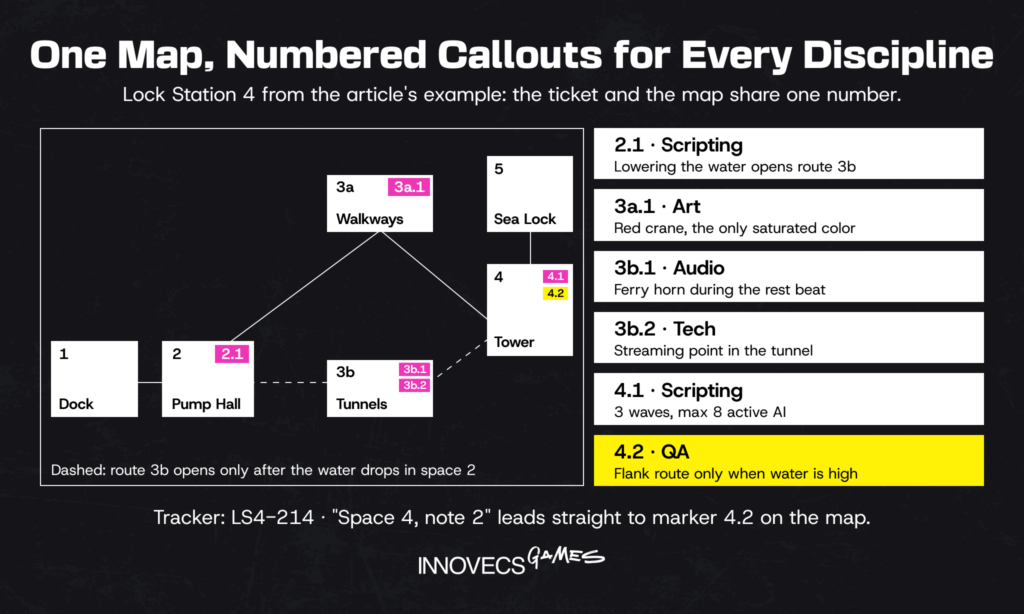
Once a blockout has survived a playtest, the map gets its callouts: trigger volumes and script events for programmers, prop and lighting notes for artists, sound emitters and music cues for audio, the intended route and known exploits for QA. Annotations save meetings, and on big spaces they save months. Ubisoft’s Caroline Miousse spent more than two years recreating Notre-Dame for Assassin’s Creed Unity; at that scale, an artist working from an unclear layout note is an expensive misunderstanding.
A practical tip: number the callouts on the map and use the same number in the tracker, so a ticket like “Space 7, note 3” leads straight to the right spot.
Step 6: Keep the Doc Current Through Iteration
A playtest always changes something, so each one should leave a dated line in the change log, with what moved and why. Name one owner who updates the doc (the designer who owns the level, not the producer), and review it at each milestone against the build.
Valve treated even a 16-year-old map this way. When it rebuilt Counter-Strike’s Dust II in 2017, it refined the existing layout for readability, movement and cover and kept the map players knew. If Valve can keep a map that old current, a six-week-old level can manage a change log, can’t it?
Tools Teams Use to Plan and Share Level Layouts
No tool writes a good LDD for you, but the wrong setup makes a good one hard to keep alive. Most studios use four kinds of tool, and the useful question is which job each one does:
| Job | Common tools | What lives there |
|---|---|---|
| Writing and wikis | Google Docs, Confluence, Notion | Overview, objectives, encounter tables, change log |
| Boards and flowcharts | Miro, Milanote, draw.io | Flow diagrams, beat charts, mood boards |
| In-engine blockout | Unity ProBuilder, Unreal Engine modeling tools | Greybox geometry, annotation volumes, test routes |
| Version control | Git, Perforce, Unity Version Control | The level files, plus the doc’s own history if it’s kept as text |
Keep the doc where the team’s already working every day, and link to boards and engine files rather than pasting screenshots of them. Screenshots go stale silently. A beat chart that lives only as a photo of a whiteboard in someone’s camera roll isn’t under version control, however good the lighting was.
Level Design Document Template and Example
A template is only useful if it’s short enough to fill in. The one below fits on a single page for most levels and grows into linked pages only when a level needs them, and the worked example after it shows what “filled in” looks like.
A One-Page Template Outline You Can Adapt
Copy this level design document template into your wiki and delete any row your level doesn’t need. An empty row tells readers the decision hasn’t been made yet; a missing row tells them it’s out of scope.
Download the free LDD template: Word (.docx) · Markdown for Notion or Confluence
Twelve sections with guidance in grey, fill-in fields and empty tables for metrics, beats, encounters, budgets and the change log, plus a review checklist and a brief for an external level team.
| Section | What to write | Keep it to |
|---|---|---|
| Level name and slot | Working title, position in the game, the levels before and after it | 1 line |
| Purpose | The mechanic this level teaches, tests or twists, in one sentence | 1 to 2 lines |
| Target playtime | First-time playtime and an expert run | 1 line |
| Narrative context | Why the player is here, what changed since the last level | 2 to 3 lines |
| Player objectives | Primary, optional, fail conditions | Bullet list |
| Flow diagram | Spaces, locks, keys, one-way paths | 1 diagram |
| Top-down map | Critical path, numbered spaces, landmarks, sightlines; layout type | 1 annotated map |
| Player metrics | Jump distance, cover height, corridor width, camera range | 1 short table |
| Beat chart | Beats in order with intensity 1 to 10 | 1 chart |
| Encounters and puzzles | Per space: enemies, triggers, solution steps | 1 table |
| Rewards and checkpoints | What, where, and why each one is there | 1 table |
| Art and audio references | Mood board link, palette, music and ambience states | Links plus 3 lines |
| Accessibility | Route cues beyond color, landmark readability, subtitle and contrast needs | 3 to 5 lines |
| Technical budget | Memory, frame time, max active AI, streaming points | 1 table |
| Shopping list | New assets, scripts, VO lines, VFX the level needs | 1 list |
| Definition of done | Playtime, performance target, playtest result that close the level | 2 to 3 lines |
| Open questions and change log | Undecided items with owners; dated changes | Living list |
How much of this a level actually needs depends on the project. Here’s what we see across the work we staff:
| Project type | Typical LDD size | First version takes | How often it changes |
|---|---|---|---|
| Mobile casual or puzzle level | One row in a level spec sheet, plus a board screenshot | 30 to 60 minutes per level | After each tuning pass on live data |
| Linear AA action or adventure level | 6 to 12 pages, mostly maps and charts | 3 to 5 working days | After every playtest until art lock |
| Open-world region or hub | One overview plus linked pages per point of interest | 2 to 4 weeks | Weekly through production |
| Multiplayer map | 4 to 8 pages, with a callout map | 2 to 3 days | After every playtest round, and after launch |
The bottom row surprises people. A multiplayer map often has the shortest LDD and the longest life, because players find the strongest angle on day one and the map has to answer.
Genre moves the outline too. These are the adjustments we make most often:
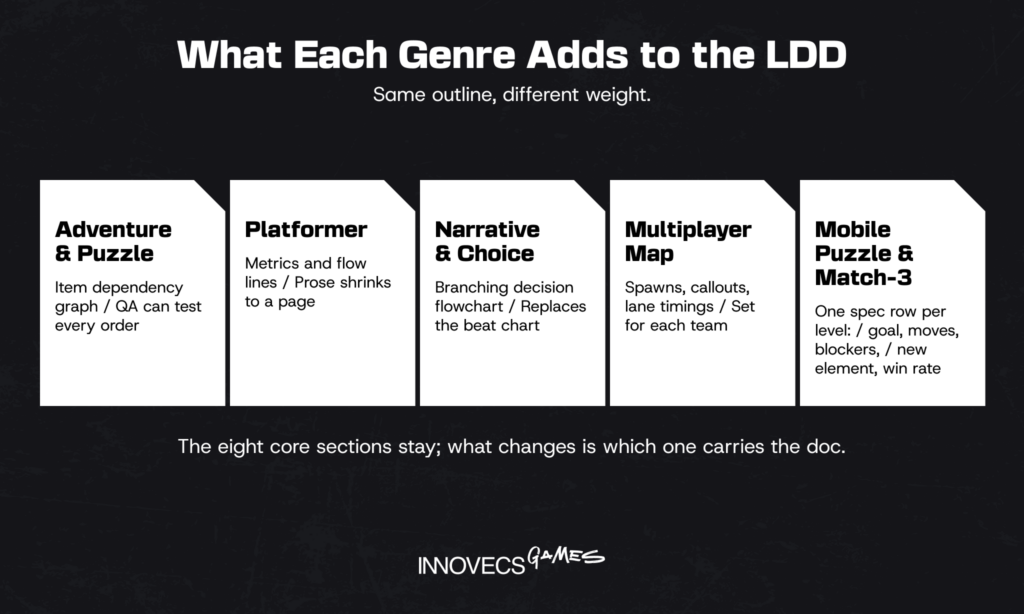
Two of these, filled in for invented levels, show how small the doc can get. First, five rows from a match-3 level spec:
| Level | Goal | Moves | Blockers | New element | Target first-try win rate |
|---|---|---|---|---|---|
| 101 | Collect 30 shells | 25 | 12 ice tiles | None, practice level | 55 to 60% |
| 102 | Clear 18 ice tiles | 22 | Ice, 6 crates | Crates | 45 to 50% |
| 103 | Collect 20 shells and free 2 crabs | 24 | 10 crates | Crab cages | Around 50% |
| 104 | Clear 24 jelly tiles | 20 | Jelly, crates | None, marked hard | 25 to 30% |
| 105 | Collect 25 shells | 28 | 8 ice tiles | None, breather | Around 70% |
Illustrative values for a fictional game, not benchmarks.
Look at rows 104 and 105. A hard level followed by a breather is a beat chart squeezed into two lines, and it’s the pair a producer should check first when a soft-launch funnel shows a quit spike.
Second, the lane sheet that sits next to the callout map of a three-lane multiplayer map:
| Lane | Route | Time to first contact | Sightline | Note |
|---|---|---|---|---|
| Middle | Market square | 12 seconds for both teams | Long, about 40 m | One smoke-able choke at the fountain |
| Left | Canal walk | 16 seconds | Short | Close-range lane; flank door closes after 60 seconds |
| Right | Rooftops | 14 seconds | Medium | Vertical; jump pads mirrored for both teams |
The column that matters most is the third. When one team reaches a lane noticeably sooner, that lane starts deciding rounds on its own, and players notice long before the telemetry dashboard does.
What a Strong Example Looks Like in Practice
Here’s a level design document example for an original level, so you can see the sections working together. The game is a fictional third-person adventure codenamed Project Brine. The level is “Lock Station 4,” the fourth of twelve.
| Section | What the example says |
|---|---|
| Purpose | Teaches water-level control: the player raises and lowers flood gates to change routes. First level where water is a tool and not a hazard. |
| Target playtime | 18 to 22 minutes first time; 9 minutes for an expert run |
| Narrative context | The ferry that carried the player out of Level 3 is stuck behind the sea lock. The lockkeeper is missing. |
| Objectives | Primary: open the sea lock. Optional: find the lockkeeper’s logbook (3 pages). Fail: drowning in a flooded chamber resets to the last checkpoint. |
| Flow | Dock (1) → pump hall (2) → two routes to the control tower (3a high walkways, 3b flooded tunnels) → control tower (4) → sea lock (5). Route 3b opens only once the player lowers the water in space 2. |
| Beats | Arrival and vista of the red crane, intensity 2 · first gate puzzle, 4 · patrol on walkways, 6 · power cut, manual crank under fire, 8 · rest in the dark tunnel with the ferry’s horn in the distance, 3 · control tower siege, 9 · ferry leaves, 1 |
| Encounters | Space 3a: 5 enemies, 2 snipers on the crane. Space 4: 3 waves, 8 enemies maximum at once, flanking from the flooded side only if water is high. |
| Rewards and checkpoints | Ammo cache before the siege. Logbook pages off route 3b. Checkpoints after the gate puzzle, before the crank and between siege waves 2 and 3, so a failed crank sequence never costs more than 3 minutes. |
| Art and audio | Mid-century industrial, rust and sodium lights, the red crane as the only saturated color. Pump rhythm in the ambience speeds up as water rises. |
| Technical budget | Water simulation limited to spaces 2 and 4. Streaming point in the tunnel rest beat. Max 8 active AI. |
What makes it strong isn’t length. Each line answers a question someone on the team will ask, the beats name their intensity so pacing can be argued about with numbers, and the rest beat in the tunnel doubles as the streaming point, so a technical constraint and a design need are solved by the same choice. Notice what it leaves out, too: no backstory for the lockkeeper beyond what the level uses, and no prose description of rust.
Before a lead signs off a doc like this, five questions do most of the review:
- Could someone outside the team say why this level exists after reading only the overview?
- Does every beat carry an intensity, with a rest after each peak?
- Is there a scale on the map and a metrics table behind it?
- Does each encounter say what it’s testing?
- Has the person who owns performance agreed to the technical budget?
A single “no” means the level isn’t ready for greybox validation, whoever wrote it. The same five questions work for docs written by an outside team, which is where they save the most time.
Download the full example and the checklist: Lock Station 4, a five-page LDD with map, flow diagram and beat chart (.docx) · One-page review checklist (PDF)
Common Mistakes That Turn the Doc Into Shelfware
None of these mistakes are about missing sections. They’re about a doc that stopped being useful, so the team stopped opening it and nobody noticed:
- Writing a novel. id’s Doom Eternal mission documents never spelled out every step a player would take, and Martin left his designers room to work inside them. Write what people need to build, and don’t go further.
- Locking it before the first playtest. A doc frozen at greybox stage describes a level nobody has played yet.
- Skipping the pacing chart. Without it, intensity gets decided by whoever builds the encounters, one room at a time.
- No clear owner. If three people can edit it and nobody has to, the doc and the build will disagree within a month.
- No version history. “Who moved the checkpoint?” should take ten seconds to answer, not a meeting.
- Text-only pages. A level is a space; a page with no map makes every reader draw their own.
- Ignoring technical budgets. Performance limits discovered in the last month get solved by cutting content, and it’s often the content players would have liked most.
The fix for most of these is boring: one owner, one change log, a map on page one.
When to Bring In an External Level Design Team
Everything up to here assumes your team has the people to write, build and maintain these docs. Many don’t, at least not for the whole project. Level designers are among the harder roles to hire in both casual and AA studios, and game level design work tends to arrive in waves. Yes, we sell this kind of help. The signs below hold whether or not you ever call us, and they’re cheaper to spot early.
Signs Your Team Is Short on Design Capacity
The pattern usually shows up in the schedule before anyone says it out loud. A premium game can need a lot of levels: Team Asobi’s Astro Bot shipped with over 80 levels across six galaxies, and a live mobile puzzle game needs fresh ones with each update. These signs are the ones we hear most:
- Greyboxes wait in a queue for weeks before anyone playtests them.
- Your lead level designer is still building levels and has stopped reviewing anyone else’s.
- Juniors are building spaces from verbal briefs because nobody had time to write the LDD.
- Art is blocked, waiting on layouts that keep changing.
- A milestone needs four new levels and the team has capacity for two.
- Live updates ship with recycled layouts because new ones didn’t make the cut-off.
Any one of these can be a bad month. Three at once tends to mean the team is a designer or two short of its plan, and the leads are paying for it in evenings.
What a Good Partner Delivers Beyond the Doc
A partner worth hiring writes the level design document in your format and builds greyboxes in your engine, then goes further. Expect them to playtest their own levels before you see them, log changes in your tracker, and hand art a layout that’s already survived a playtest. Through game co-development, their designers work inside your pipeline and your review rhythm, with their own lead and producer on the hook for quality.
Outside level work isn’t new at the top of the industry. Halo has relied on outside studios for multiplayer maps for years; one of them built seven co-op and PvP maps for Halo: Combat Evolved Anniversary in 2011 and several more for Halo 4.
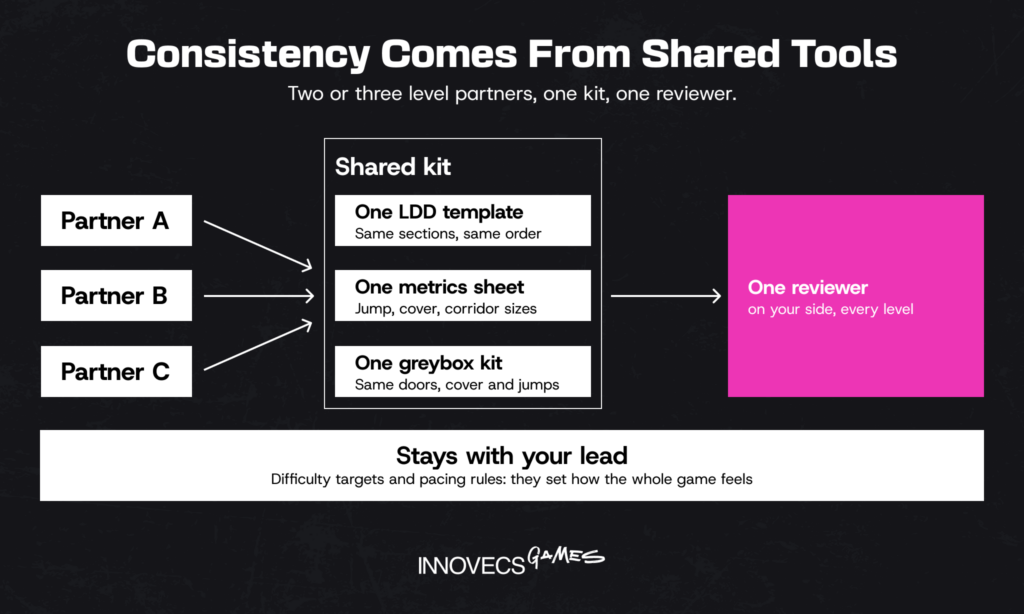
When two or three partners build levels for the same game, consistency comes from shared tools, not from goodwill. Give everyone one LDD template, one metrics sheet and one greybox kit with the same door, cover and jump sizes, and route every level through the same reviewer on your side. If a past vendor let you down, look at the brief first. When the plan for a level lived in someone’s head, no contract could have saved it, and a written LDD fixes that before anyone signs.
One honest limit, and a verdict. A partner who builds your levels shouldn’t also set your difficulty targets or pacing rules; keep those with your lead, because they define how the whole game feels. Layout production during a peak, playtests and art handoff notes can all sit with an outside team without the game losing its voice. Before you hand over volume, pay for one level built to your template and judge it on your own build.
Need Help Designing and Playtesting Your Levels? Let’s Talk
Is your level backlog growing faster than your designers can greybox it? A half-hour call with one of our senior designers is often enough to see whether outside help fits, and which level it should start with.
How AI Is Changing Level Planning
AI now shows up at most stages of level planning, though not with the same usefulness at each one. Four uses matter today, and our wider piece on AI in game development covers the rest of the pipeline:
- Drafting and summarizing doc text. Language models turn playtest notes into change-log entries, summarize a 40-page region doc for a publisher, and flag contradictions, such as a checkpoint listed in two different places. It’s the least glamorous use and the most reliable one.
- Procedural layout and blockout. Epic made Unreal Engine’s Procedural Content Generation framework production-ready in version 5.7 in November 2025. It scatters terrain, foliage and props by rules, so a designer can block out a forest or a city district in an afternoon. It won’t decide where the fight should happen.
- Playtest analytics. Models can cluster thousands of player paths and death points on a map in minutes, the same idea Bungie applied by hand on Halo 3, now at a scale no researcher could plot alone. Microsoft’s Muse research model, trained on Ninja Theory’s Bleeding Edge, goes further and generates plausible gameplay sequences for ideation, though it remains research, not a tool you can plug into your build.
- References and mood boards. Google’s Project Genie, launched in January 2026 for AI Ultra subscribers in the US, turns a prompt into a short explorable world, and DeepMind announced its successor model Genie 4 on October 27, 2026. Explorations last about a minute, and the model struggles to add objectives or remember what goes where. That’s a lively mood board and a poor substitute for a designer.
Where does judgment still decide the outcome? Pacing, readability and fun. A generator can produce a layout that’s technically traversable and still confusing. It can’t tell whether the player will notice the red crane, whether the rest beat comes too late, or whether the siege is exciting or just loud. Where we’ve landed: AI saves real hours on the doc and on set dressing, and none on the decisions the doc exists to record.
How Innovecs Games Helps Studios Build Better Levels
Most studios come to us with a level gap that has a date on it: a milestone with more levels than designers, a live game that needs a steady flow of new layouts, or a prototype that has to prove a mechanic before the core team commits. In 11+ years and across 300+ game projects, our game level design services have covered the whole path from LDD and greybox to a production-ready level, with prototyping and co-development teams alongside when the work needs them.
We plug into the client studio’s existing pipeline: your engine, your LDD template, your tracker and your review rhythm. You can bring us in as two or three designers for a content peak, as a full level pod with its own lead, or as a prototyping team proving one mechanic while your core team stays on the main game. The range of shipped work behind this is in our portfolio.
FAQ
Do small indie teams really need an LDD?
Usually a lighter one. When the person designing the level is also the person building it, a one-page sketch and a beat list can be enough, and John Romero’s first Doom level shipped as his first draft with a single change. The moment a second person touches the level, write it down.
How is a short level brief different from a full LDD?
A brief states intent: purpose, playtime, mechanic, mood. A full LDD adds what it takes to build it, meaning the map, encounters, triggers, budgets and change log. Many teams write the brief first and grow it into the LDD after the first greybox survives a playtest.
Who usually writes and maintains level documentation?
The level designer who owns that space writes it and keeps it current. Leads review it, and artists, programmers and QA comment on their parts. Producers shouldn’t own it, though they should check at every milestone that someone does.
How long should a level design doc be?
Short enough that the people building the level read all of it. In our projects a linear level runs 6 to 12 pages, mostly maps and charts. A mobile puzzle level fits in one row of a spec sheet. And if a page has no map, chart or table on it, ask whether anyone needs it.
When should a team start documenting a level?
Once the mechanics the level uses are stable enough to design around, usually late in pre-production. Start with purpose, flow and beats on paper, before any greybox. Starting earlier risks documenting mechanics that change; starting later means art arrives before the layout is settled.
Is there a standard template, or should every studio build its own?
No industry standard exists, so start from a common skeleton, such as the free template in this article (Word or Markdown), and trim it within a few levels. What matters is that section names stay the same from level to level, because that’s how people find things fast.
Can a single document cover several levels or an open world?
Yes, as long as it’s organized as a hub: a short overview with the region’s purpose, map and pacing, plus a linked page for each point of interest or mission. Mobile games with hundreds of levels swap pages for a spreadsheet with one row per level.
Can a studio outsource game level design work?
Plenty of studios do. Blockouts, layout production during peaks, playtests and art handoff notes are the usual pieces. It works best when the partner uses your LDD template and your engine, and your lead keeps pacing and difficulty decisions.
🤖 Which parts of level design can AI speed up today?
Doc drafting and summaries, procedural set dressing, and analysis of playtest paths and death points. Unreal Engine 5.7’s PCG framework, for instance, can scatter terrain and props by rules in minutes. Pacing, readability and whether a level is fun still need designers and real playtests.
🤖 Can AI generate a usable level layout from a written brief?
Not yet, in our experience. Tools like Project Genie produce a short explorable scene from a prompt, but they can’t hold a layout together for long or add objectives reliably. Treat the output as a reference for mood, and build the actual layout in your engine.
Ready to Turn Your Level Ideas Into Playable Spaces?
The first step is small: one level, written up as a level design document and greyboxed in your engine. If it doesn’t play better than what you’d have built without it, you’ve lost a couple of weeks and kept the doc.