How to Make a Multiplayer Game: A Step-by-Step Guide for 2026
Client-server or peer-to-peer, which engine, what the backend costs, and how to keep the netcode honest when 300,000 people show up on day one.
Bulkhead put Wardogs on Steam in early access on September 10, 2026. It went straight to number one on the best-seller chart at $40 and peaked near 300,000 concurrent players. A good share of them got a queue position north of 300,000 instead of a match. The studio’s explanation was capacity, not code. Wardogs wasn’t getting the rate-limit headroom AAA titles get, and the team spent launch night working with Valve to widen it.
Learning how to make a multiplayer game is mostly learning where that queue comes from. It isn’t one bug. It’s a chain of decisions made months earlier: who owns the authoritative game state, how many players share one simulation, whether the servers are yours or rented. Multiplayer game development is that chain, and a queue is where it becomes visible to people who paid $40. Arrowhead lived the same chain in public with Helldivers 2. It capped concurrent players at roughly 450,000 for stability, then raised the ceiling to 700,000, and later to 800,000 as the infrastructure caught up.
The ground also moved under everyone this year. Unity deprecated Multiplay Game Server Hosting on April 1, 2026 and handed the software to a licensee. A chunk of the industry’s default hosting answer changed mid-project, for studios that had already shipped on it. Prices, providers, and free tiers are not stable inputs anymore.
This guide walks the full path. Architecture first, then engines and netcode, server and backend setup with real 2026 prices, state synchronization, lag reduction, and testing. It ends on what a multiplayer build costs against an equivalent single-player one.
What Is a Multiplayer Game and Why the Architecture Decision Comes First
A multiplayer game is any game where two or more players affect the same simulation, and each one has to see a consistent version of it. That’s the whole definition. The second half is the expensive part. Two players in the same Mario Kart split screen share one machine and one truth. Two players in Rocket League sit 3,000 miles apart, each running a slightly different guess about where the ball is, and something has to decide which of those guesses becomes the one that counts.
That deciding mechanism is your architecture, and it’s the one choice on this list that resists being changed later. Netcode is not a system you bolt onto a finished game. It decides where player input is validated, which objects exist on which machine, how movement code is written, and, once the game is live, what arrives on your infrastructure invoice every month. Teams who postpone it end up rewriting movement, combat, and inventory, because all three assumed a single source of truth that doesn’t exist over a network.
The practical marker: if your combat code calls ApplyDamage locally and trusts the result, you have a single-player codebase with players in it. Retrofitting that into an authoritative model is a rebuild of the gameplay layer, not a refactor. It’s the most common reason a multiplayer schedule doubles. Our game engineering services exist mostly because studios call after that discovery rather than before it.
Choosing Your Multiplayer Game Architecture: Client-Server vs Peer-to-Peer
The first real decision in how to make a multiplayer game is which of four models you’re building. Two questions settle it: how much does cheating cost you, and how many players share one simulation at the same moment. Competitive shooters answer the first expensively and land on authoritative servers. Four-player co-op games answer it cheaply and land on a host. Multiplayer game development gets easier the earlier you say which one you are.
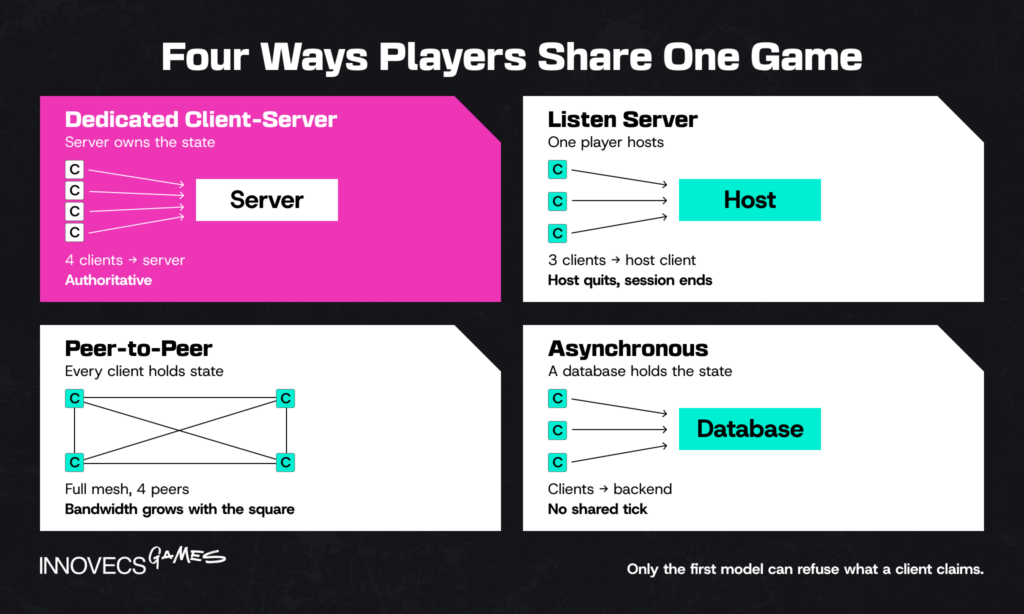
Client-Server (Authoritative Server)
Every client sends input to a server, the server runs the simulation, and clients render what the server tells them. Nothing a player’s machine claims is true until the server agrees. Valorant is the reference implementation of the expensive end. Riot runs 128-tick servers and built its own network backbone, Riot Direct, to put 70% of players inside a 35ms round trip. That combination is not a luxury. It’s the only way to make a game where a 40ms discrepancy decides a duel.
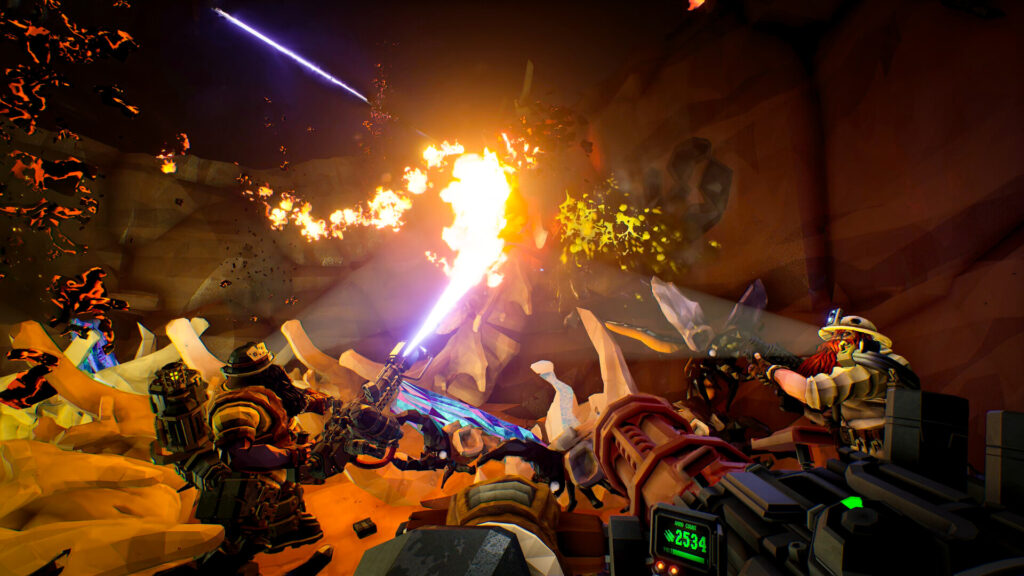
The model splits into two shapes with very different bills. A dedicated server is a process you run in a data center, with no player on the machine. A listen server runs inside one player’s client. That costs nothing, and hands that player a small latency advantage plus the power to end the session by quitting. Among Us, Deep Rock Galactic, and most co-op games use the second and are right to. Anything with a ranked ladder uses the first.
Counter-Strike 2, Overwatch 2, and Rocket League all run this same shape at different tick rates, and the reason a Rocket League match costs less per hour to host than a Valorant one has little to do with player count and a lot to do with how often the server is required to tell the truth. The honest downside: authoritative servers mean you pay for every hour of play, in every region, forever.
Peer-to-Peer
Clients talk directly to each other, with no server in the middle. Latency can be excellent, since packets take the short path, and infrastructure cost is close to zero. Valheim and many fighting games run this way, the latter often with rollback netcode that predicts opponent input and re-simulates when the real input arrives.
Fighting games are the case where the model genuinely shines, because the constraints are tight enough to suit it: two players, a small state vector, and a rollback implementation that resimulates the last few frames faster than a human notices. That is a completely different problem from keeping sixty players honest in an open world.
The trade-offs are real and mostly not about performance. Every client holds the game state, so every client can be modified, which makes anti-cheat structurally hard. NAT traversal fails often enough that you’ll need relay servers anyway, at which point the cost saving shrinks. So much for free. And bandwidth scales with the square of player count, because each peer talks to every other peer. Eight players is the practical ceiling before that math stops working.
Hybrid Models
Most shipped games are hybrids, and nobody puts that on the store page. The usual shape: an authoritative server for gameplay, peer-to-peer or relayed voice, and a cloud backend for accounts, matchmaking, and progression. Fortnite runs authoritative match servers with Epic Online Services handling identity, parties, and anti-cheat around them.
A second common hybrid is distributed authority, where ownership of individual objects moves between clients while a lightweight service keeps the session honest. Unity shipped this as a topology option in Netcode for GameObjects 2.x. It is aimed at social and creative games, where no single machine needs to own everything and cost per player has to stay near zero.
The reason to care about which hybrid you picked is contractual as much as technical, because a hybrid means two vendors, two bills, and two support paths, and the first time something breaks at 2am you will want to have decided in advance which of them owns the session.
Asynchronous and Pseudo-Multiplayer
The fourth model is the one most teams skip past, and for casual titles it is usually the right answer. Not every multiplayer game needs two people online in the same second. Words With Friends takes your turn, stores it, and tells the other player about it four hours later. Monopoly Go puts thousands of players into the same leaderboard event without any two of them sharing a simulation. Team tournaments in Royal Match work the same way.
Architecturally this is a web backend with a game attached: a real-time API or plain REST, a database, push notifications, and a scheduler. No tick rate. No prediction, no lag compensation, no dedicated servers, no netcode engineer. A managed backend carries it for tens of dollars a month at a scale where a real-time build would be spending thousands.
Pseudo-multiplayer sits next to it and is worth more than its reputation. A leaderboard race against a recorded run, a ghost opponent replayed from stored input, an asynchronous raid where the “defender” is a snapshot of someone’s base. Players read all of it as competition, and none of it requires the two of them to be awake at once.
The honest limit is absolute. Async cannot carry a game whose fun depends on reacting to another human inside the same second, and no amount of clever design changes that. What it can do is carry match-3, merge, idle, puzzle, word and most social casino loops, which is a large share of the mobile market. Our read, having watched both paths: teams talk themselves out of async because real-time sounds more ambitious in a pitch, then spend a year and a netcode budget proving that their players wanted a leaderboard.
| Model | Who owns game state | Cheat resistance | Infrastructure cost | Practical player count | Fits |
|---|---|---|---|---|---|
| Dedicated client-server | Your server process | High | Highest, per hour per region | 8 to 100+ | Competitive PvP, ranked, live service |
| Listen server (player host) | One player’s client | Low to medium | Near zero, plus relay | 2 to 16 | Co-op, PvE, session-based |
| Peer-to-peer | Every client | Low | Near zero, plus relay and NAT | 2 to 8 | Fighting games, LAN-style co-op, survival |
| Hybrid / distributed authority | Split by object or system | Medium | Low to moderate | 2 to 64 | Social, creative, UGC, party games |
| Asynchronous / pseudo-multiplayer | A backend database | High, nothing to desync | Lowest, managed backend | Unlimited, nobody shares a tick | Match-3, merge, idle, puzzle, word, social casino |
Two of those rows look similar on paper and behave nothing alike in a support queue. A listen server fails when one person quits. Peer-to-peer fails when one person’s router refuses to cooperate. Pick based on which ticket you’d rather answer ten thousand times.
Best Game Engines and Netcode Frameworks for Multiplayer Games
Neither engine rescues a team that hasn’t decided who owns the game state, which is why the architecture section came first. Engine share sets the hiring market before it sets anything technical. GDC’s 2026 State of the Game Industry survey put the question to more than 2,300 professionals: 42% named Unreal Engine as their primary engine, 30% Unity, 11% Godot. Networking maturity roughly tracks that order. So does the candidate pool when you need a netcode engineer in six weeks rather than six months. If you’re still weighing the broader trade-off, we’ve written it up separately in Unity vs Unreal.
Unity and Netcode for GameObjects
Netcode for GameObjects is Unity’s first-party networking package, now at 2.x. It’s the default answer for how to make a multiplayer game in unity without writing a transport layer yourself. Two components carry the model, and NetworkObject is the first: it marks a GameObject as something the network knows about and gives it an identity that holds across machines. NetworkBehaviour is where replicated variables and remote procedure calls live. State travels through NetworkVariable fields that sync automatically when the owner changes them, and anything one-directional goes through an RPC attributed as server- or client-bound.
Version 2.x added distributed authority as a selectable topology alongside client-server, the more interesting change for social and creative titles. The catch: it needs the Multiplayer Services SDK and a session created through Unity’s services rather than a raw IP connect. NGO handles scene synchronization, ownership transfer, and a network animator out of the box, which covers a surprising amount of a co-op game. Where it runs out of room is high-frequency competitive simulation at 32 players and up, and teams there move to Netcode for Entities or a third-party stack like Photon Fusion. Most tutorials on how to make a multiplayer game in unity stop at the connection screen, which is roughly where the work starts. The practical route for how to make a game multiplayer in Unity: start with NGO on a listen server, prove the gameplay loop, then move the same code to dedicated servers.
C# keeps the netcode readable to every gameplay programmer on the team, and NGO’s cross-platform development story covers mobile, PC, and console from the same codebase. Both matter more than they sound when a replication bug surfaces eleven days before milestone three.
Unreal Engine
Unreal’s networking is not a package you install. Actor replication is part of the engine, it has been battle-tested by Fortnite at scale, and the client-server model is assumed throughout the codebase. You mark a property Replicated, override GetLifetimeReplicatedProps, and the engine handles delivery; RPCs are function specifiers, Server, Client, or NetMulticast, with Reliable or Unreliable attached. Movement gets client-side prediction for free through CharacterMovementComponent. That’s a large head start, and also the thing people fight with for a week when they add a custom movement mode.
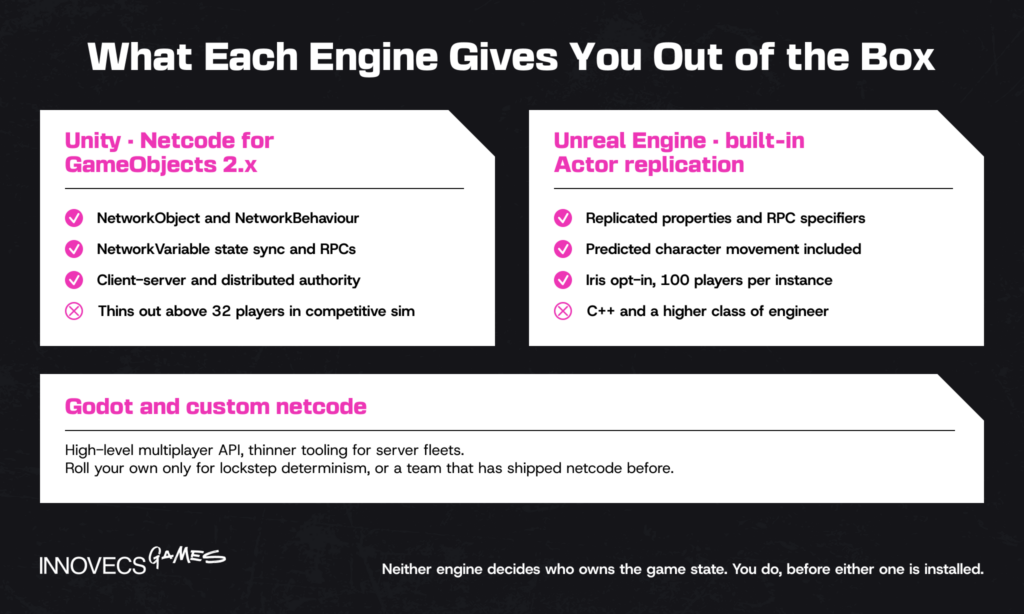
The 2026 story here is Iris, Epic’s opt-in replacement replication system built out of Fortnite Battle Royale experience. Epic’s documentation describes it as removing the antipatterns that constrained the legacy system, separating replication from game-thread data to allow concurrency, and sharing workloads across objects and connections, with 100 players per server instance as the reference point. It is still marked experimental, so treat it as a decision for a project starting now rather than one shipping in four months. In 2026, knowing how to make a multiplayer game in unreal engine 5 mostly means knowing whether to opt into Iris or stay on the legacy path. That answer depends on player count and world size more than on genre.
C++ is the tax. The engine gives you more networking out of the box than anything else on the market, and asks for a higher class of engineer to use it.
Godot and Custom Netcode
Godot ships a high-level multiplayer API: MultiplayerSpawner, MultiplayerSynchronizer, and RPC annotations. It is pleasant to work in and enough for small authoritative or host-based games. The gap is operational rather than conceptual: fewer shipped large-scale references, thinner tooling for dedicated server fleets, and a smaller pool of engineers who have debugged a replication problem in it under deadline.
Custom netcode over raw UDP, ENet, or a library like LiteNetLib is right in two situations only: a genre with hard determinism requirements such as an RTS running lockstep, or a team that has shipped netcode before and knows exactly what the frameworks cost them. Otherwise it is six months spent rebuilding what NGO and Unreal have already tested against millions of sessions.
Multiplayer Game Server Setup: Hosting, Backend, and Costs
The multiplayer game backend is where the recurring bill lives, and most budgets underestimate it. Build cost is visible in a spreadsheet. Run cost arrives after launch, monthly, forever. Four components make up almost every stack: game servers, backend services, relay, and voice. Each one is a cloud infrastructure decision with a scalability ceiling attached. Most of how to make an online multiplayer game, once the netcode holds, is deciding which of those four you rent and which you build. Prices below are September 2026 list rates, worth re-checking before you commit, since one of the largest providers left this market six months ago.
Dedicated Game Servers
A dedicated game server is a headless build of your game running in a data center, one process per match or per world. You need them in every region you sell in, which is the multiplier nobody plans for, because the same game hosted in Sydney or São Paulo costs measurably more per core-hour than the same fleet running in Iowa.
Unity’s published Multiplay price list is still the clearest public breakdown of how this gets metered, deprecation and all. Core time runs roughly $0.0316 per hour in us-central and $0.0502 in São Paulo. On top of that: RAM per GiB-hour, $0.13 to $0.17 per GiB of network egress, and $0.046 an hour for a Windows license where Linux is free. That last line is why almost every shipped game server is Linux. Amazon GameLift Servers bills per instance-second with a one-minute minimum. It also includes bandwidth at no charge on generation 6 and later instances, which changes the math for bandwidth-heavy genres.
One warning worth taking from Unity’s own docs: minimum fleet sizes cost money whether anyone is playing or not. An idle fleet held warm in eight regions is the most common surprise on a first post-launch invoice. Set the minimum to zero until you have data.
Backend Services (Matchmaking, Accounts, Leaderboards)
This layer is what makes an online multiplayer game a product rather than a demo. Identity and accounts, friends and parties, matchmaking, progression and inventory, leaderboards, telemetry, remote config. Most of it runs over a real-time API on WebSocket rather than the game’s UDP channel, since none of it is latency-critical and all of it needs a database behind it. You can buy it or build it, and for anything below a few hundred thousand players the buy case is overwhelming. It isn’t close.
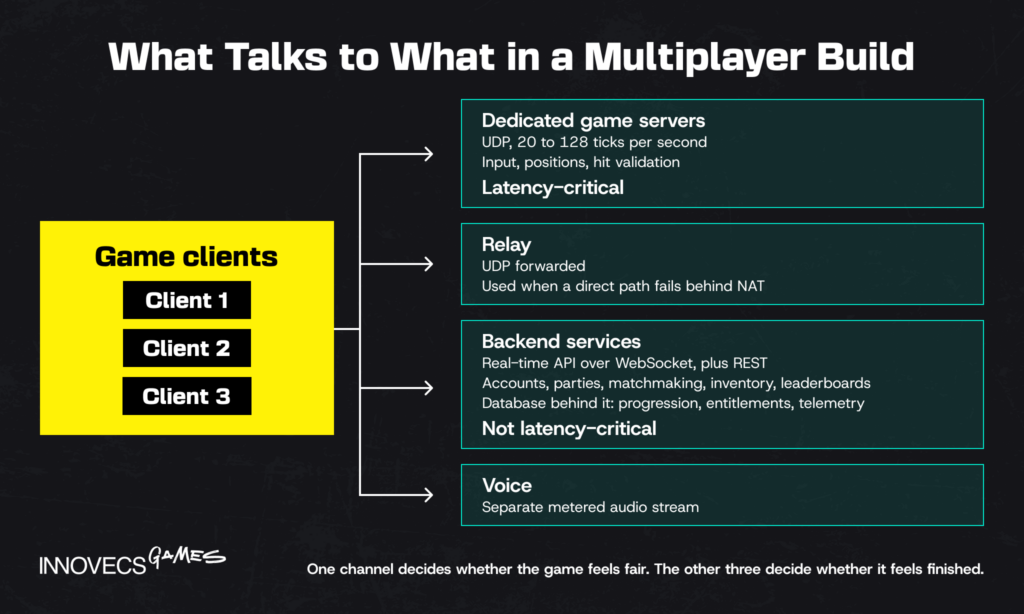
Epic Online Services is the aggressive option, since Epic made identity, lobbies, matchmaking, voice, and Easy Anti-Cheat available at no cost and engine-agnostic. Photon publishes per-CCU pricing, which makes forecasting easy: 100 CCU free for launch, then $250 a month at 1,000 CCU with 3TB of traffic. The premium tier runs $0.50 per CCU above a $1,000 monthly minimum. PlayFab, AccelByte, and Nakama occupy the middle, where you want your own economy rules and your own database.
Build a multiplayer game backend yourself in three cases: your game economy is the product, data-residency rules force it, or you intend to operate the title for a decade. Otherwise you’re staffing a services team to reimplement leaderboards. The buy-versus-build line has moved twice in five years, first when Epic made its stack free and then when Unity retired hosting it had spent years telling studios to standardize on, which is a reasonable argument for picking the provider whose incentives survive a strategy change.
Relay and Voice
Relay servers forward traffic between players who can’t connect directly, which is most players behind carrier-grade NAT. They are cheap, they are mandatory for any peer-to-peer or listen-server design, and they add one hop of latency. Unity Relay, Photon’s cloud, and Steam’s Datagram Relay all do this; Steam’s version also hides player IP addresses, which quietly removes a whole category of harassment.
Voice is metered separately and priced per minute. Agora lists $0.99 per 1,000 audio minutes with 10,000 free monthly minutes for new accounts, and Epic bundles voice into EOS at no cost. Run the arithmetic before you assume voice is a rounding error. A party of four talking for an hour burns 240 billed minutes, not 60, because every participant is metered.
| Component | Typical provider | September 2026 list price | What drives your number up |
|---|---|---|---|
| Dedicated game servers | Multiplay by Rocket Science, Amazon GameLift Servers, Edgegap | ~$0.032 to $0.050 per core-hour, plus RAM and egress | Region count, idle fleet minimums, session length |
| Backend services | Epic Online Services, Photon, PlayFab, AccelByte | Free to $250/month at 1,000 CCU; $0.50 per CCU at scale | Peak concurrency, custom economy logic, data residency |
| Relay | Unity Relay, Steam Datagram Relay, Photon | Metered per GiB of forwarded traffic | Share of players behind strict NAT, tick rate |
| Voice | Epic Online Services, Agora, Vivox | Free, or ~$0.99 per 1,000 minutes | Party size, session length, whether voice defaults on |
| Anti-cheat | Easy Anti-Cheat, BattlEye, server-side behavioral | Free with EOS, or licensed per title | Competitive stakes, platform requirements |
Sources: vendor list prices as published September 2026. Verify before contracting, since two of the five rows changed provider or price inside the last twelve months.
The row that breaks budgets isn’t the expensive one. It is egress, which scales with tick rate and player count at the same time, and nobody models it until the first invoice.
Live Ops and Version Compatibility
Hosting is a launch problem. Operating is the five years after it, and the thing that makes multiplayer live ops different from single-player patching is that every change is a compatibility question. A client on 1.4 talking to a server on 1.5 either negotiates or refuses, and both engines check a network version and disconnect on mismatch. That is correct behavior and a miserable player experience if you ship a forced update at 7pm on a Friday.
Three habits separate studios that operate a live multiplayer title calmly from studios that do it with heroics:
- Server-side config. Balance values, event dates, matchmaking weights and feature flags live on the server, so changing them costs an API call rather than a client build. On mobile this is the difference between a fix today and a fix after store review.
- A declared deprecation window. Support the current client and one version back for a stated period, write it into the release plan, and tell players before the cutoff rather than at it.
- Draining deploys. A server leaves the fleet when its current match ends, not when the deploy script reaches it. Ending live matches to ship a build is the fastest way to teach players that update day means stay away.
Seasonal content is the other half of the job. Casual and mid-core titles run events weekly, and each event touches the economy, the matchmaker and the leaderboard service at the same time, which makes every one of them an opportunity to break a running build. An event pipeline and a staging fleet with synthetic load are what make that routine. The app-store review queue, meanwhile, is the one dependency in this article you cannot autoscale.
Worth saying plainly, since it cuts against our own interest: live ops is the hardest thing to hand to an external team, because the judgment calls depend on telemetry and player history that live inside your studio. The work that does transfer cleanly is the infrastructure underneath it, the event tooling, the load testing, and the monitoring that decides who gets woken up.
Contracts, SLAs, and Exit Plans
The Multiplay deprecation at the top of this guide is the reason this subsection exists. Studios that had migration terms written down moved in weeks. Studios that had a relationship and a slide deck spent a quarter on it instead of on their game. Four clauses are worth the argument before you sign anything:
- Uptime, and the remedy. An availability target with service credits attached is standard, and service credits are not revenue. Know which one you are actually buying.
- Data export on demand. Accounts, progression, inventory and telemetry, in a documented format, retrievable without a support ticket. This clause is the whole difference between a migration and a rebuild.
- Who owns the cloud account. A fleet running inside your own cloud tenancy behaves very differently in a migration than one running inside the vendor’s. Decide it deliberately rather than by default.
- Notice period. For deprecation, for price changes, and for a change of ownership. Twelve months of notice on a hosting provider is worth more than a modest discount.
One engineering habit belongs in the same place: write latency targets down as acceptance criteria, per region, as a p95 round trip rather than an average. “It feels fine in the office” has never survived a launch. On the contract wording itself, we can tell you what to ask for and why it matters technically; the drafting is your legal team’s job.
How Game State Synchronization and Lag Reduction Work
Contracts cannot buy you physics. Every technique below exists to solve one problem: light is too slow. A packet from Frankfurt to Los Angeles needs about 75ms each way on a good day, which means the player is always acting on a version of the world that stopped existing before the input left the keyboard. Three techniques hide that gap. They stack.
State Synchronization Basics
The server runs the simulation on a fixed tick, 20 to 128 times a second depending on genre. Each client gets a snapshot of what it needs to know. Sending everything to everyone does not scale. Real systems send deltas instead of full state, and filter by relevance so a client only hears about objects near it. Unreal’s Iris exists largely to do that filtering at a scale the legacy path struggled with.
Genre sets the floor and the wallet sets the ceiling: a turn-based strategy game ships happily at 10 ticks a second, a co-op shooter wants 30 to 60, and anything with hitscan weapons and a ranked ladder ends up arguing for 128 in a meeting where somebody from finance is sitting in. Tick rate is a direct cost decision, not a quality dial. Doubling from 64 to 128 doubles CPU and roughly doubles egress. That’s why Counter-Strike ran 64-tick official servers for years while Valorant treated 128 as a competitive requirement and paid for it.
Client-Side Prediction and Interpolation
Prediction handles your own character. Press forward and the client moves you immediately, simulating the result locally, then reconciling when the server’s version arrives. If they match, nothing happens. If they don’t, the client snaps or smoothly corrects, which is the rubber-banding players complain about. Unreal’s character movement gives you this by default; in Unity you write it or adopt a framework that has.
Interpolation handles everybody else. Remote players are rendered slightly in the past, between two received snapshots, which is why other players look smooth while your own movement occasionally corrects. Riot’s netcode team quantified the buffering behind this precisely: one buffered frame on the client, half a frame on average server-side. That is the entire trick: a couple of milliseconds of deliberate delay, traded for visual stability.
Lag Compensation
When you fire, the server rewinds the world to the moment your client saw it, checks the shot there, and applies the result now. Without it, high-ping players would have to lead their targets by a body width. With it, you get the phenomenon every competitive player has an opinion about. You die behind a wall, because on the shooter’s screen you were still visible.
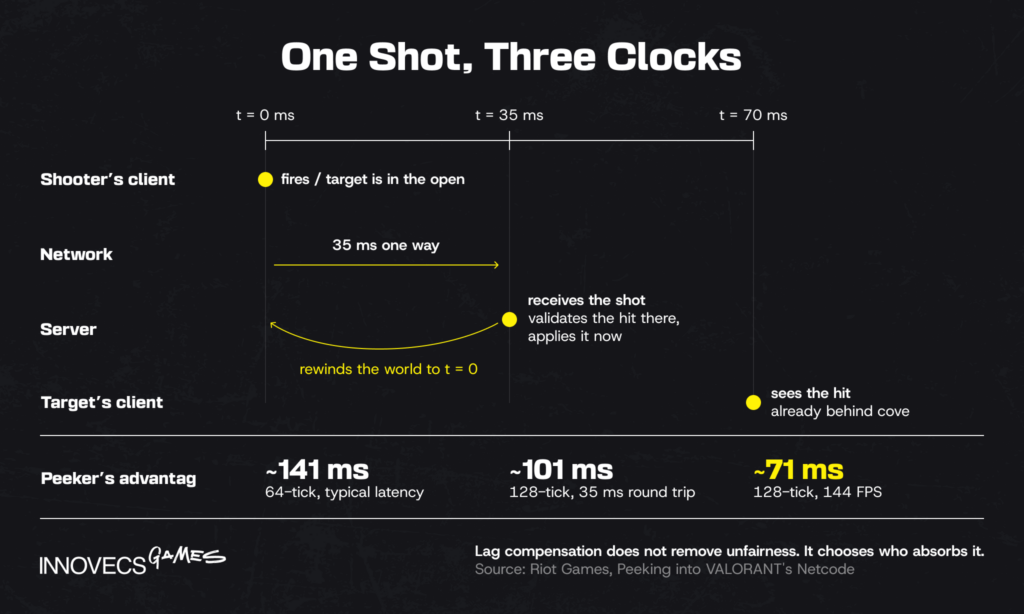
Riot published the math on that trade-off, which is the most useful public accounting of it. At 64-tick with typical latency, peeker’s advantage runs around 141ms. At 128-tick with a 35ms round trip it drops to roughly 101ms, and at 144 FPS to about 71ms. The number never reaches zero. Lag compensation does not eliminate unfairness, it chooses who absorbs it, and every competitive game makes that choice whether the team discusses it or not.
Mobile Networks, Backgrounding, and Battery
Everything above assumes a stable connection and a CPU with headroom to spare. Mobile gives you neither, which is why a netcode design that works on a LAN falls over on a commuter train. Three constraints do most of the damage, and none of them appear on a developer’s desk.
Network handoff comes first. A player walking out of wifi range onto cellular changes IP address mid-match, and a socket bound to the old path dies without an error either side would call a failure. Reconnect into an existing session has to be a normal, tested state, not an error path someone writes in the last sprint.
Then the operating system. Apple’s own documentation is blunt about it: “Typically, an app is in a suspended state when it’s in the background,” and the list of background execution modes has no entry for holding a game socket open. A player who takes a phone call is gone. Clash Royale, Brawl Stars and PUBG Mobile all answer this the same way: short match lengths, a fast rejoin, and a server that keeps the match running without the missing player rather than pausing for them.
Battery and heat are the constraint teams discover last. Prediction and reconciliation cost CPU on every frame, and on a mid-range Android device the combination of sustained networking and rendering reaches thermal throttling inside fifteen minutes. The frame rate drops, the client simulates fewer frames, prediction error grows, and corrections get more visible exactly as the session gets long enough to matter. That loop is invisible on a flagship handset. Every mobile netcode bug we have chased ended on a device nobody on the team owned, which is the argument for lower tick rates, smaller quantized payloads, and a test rack built from whatever your analytics say people actually hold.
How to Test a Multiplayer Game Before Launch
Multiplayer bugs do not reproduce on a developer’s machine, because that machine has a 2ms connection to localhost, no packet loss, and none of the conditions the bug needs. Testing here means manufacturing the conditions that break things and doing it before 300,000 people manufacture them for you.
Simulating Bad Networks and Disconnects
Both major engines ship network simulation tooling. Unity’s Network Simulator and Unreal’s Net PktLag and Net PktLoss console variables inject latency, jitter, and loss without leaving the editor. Clumsy on Windows and tc netem on Linux give the same control at the OS level, which is where the ugly cases live.
The profiles worth keeping as fixtures:
- 150ms latency with 40ms jitter, the honest mobile-on-wifi case
- 2% packet loss, which exposes every place you assumed reliable delivery
- A hard client disconnect mid-match, then a reconnect into the same session
- Host migration, if you’re on a listen server, tested at the worst possible moment such as mid-scoring
- Asymmetric conditions, where one player has 20ms and another has 250ms in the same match
The cheapest test in this entire article costs nothing: two people in different countries on a video call, each describing out loud what they see, because desync is hard to spot in telemetry and instantly obvious the moment one person says the door is open and the other says it isn’t.
Disconnects deserve their own pass. The question isn’t whether a player drops, it’s whether the session survives it, whether their progress survives it, and whether they can return. Write acceptance criteria for reconnect behavior per milestone, because “it mostly works” is not a testable state.
Load Testing and Playtesting Across Regions
Load testing means headless clients, thousands of them, driving real traffic against a real fleet until something bends. What you’re looking for is not the crash point but the knee: the concurrency where tick time starts drifting and latency climbs before anything fails. Wardogs and Helldivers 2 both found their knee in public, with an audience watching. We wrote a longer piece on how to scale your game servers for exactly this problem, including autoscaling and warm-pool strategy.
Regional playtesting is the other half, and it is the half that gets skipped. A session where all players sit in one country tells you nothing about matchmaking across a 200ms spread. That spread is the normal condition for any game with a global player base. Run at least one playtest per launch region, on consumer connections, on the hardware your analytics say people actually own.
The thing to keep watching after launch is server tick time under load, not player-reported ping. Ping is a symptom; tick time drift is the cause, and it shows up in your telemetry hours before it shows up in reviews.
Platform Certification and Cross-Play
On console there is one more gate after your own QA signs off, and multiplayer is where submissions fail. Sony, Microsoft and Nintendo each maintain their own online requirements, they sit behind developer NDAs on gated portals such as Nintendo’s Developer Portal, and the items that catch teams out are the system-facing ones rather than the gameplay: joining a session from the platform’s own invite UI, party and voice handling, privacy and blocklist behavior, error and disconnect messaging in every supported language, and the parental-control rules that govern communication features.
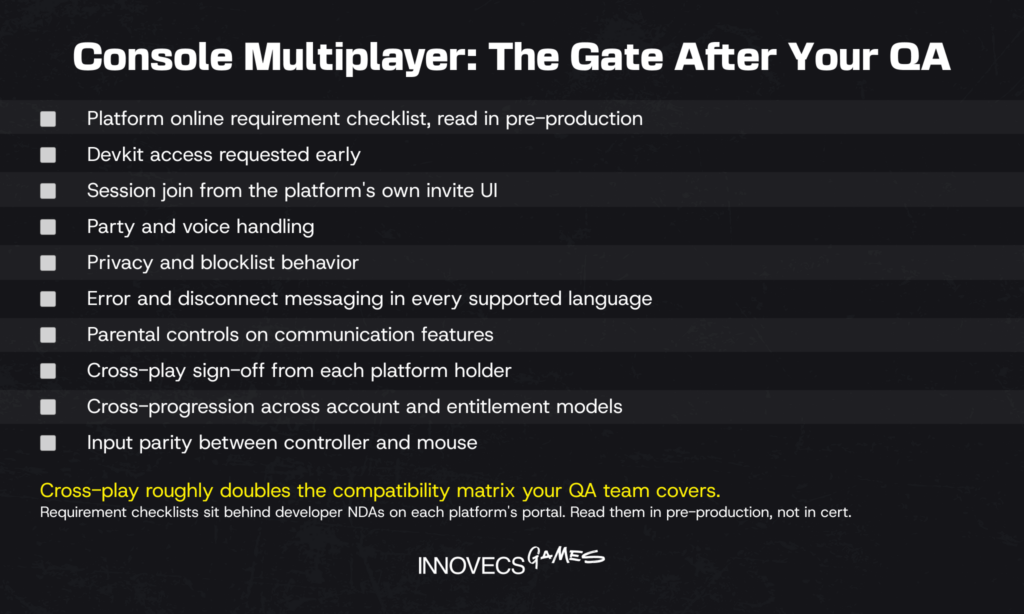
The practical sequence is unglamorous. Register early, read the online requirement checklist in pre-production, and build against it from the first networked prototype. Devkits take time to arrive and certification QA is a scheduled event with a queue behind it. Every item on those checklists is cheap to satisfy while the session layer is being written and expensive to retrofit around a shipped architecture.
Cross-play adds a second layer on top: one identity that works across stores, sign-off from each platform holder involved, and a cross-progression decision that reaches into your account model and your entitlement handling. Then there is the design question nobody settles in a meeting, which is input parity between a controller and a mouse.
The honest cost: cross-play roughly doubles the compatibility matrix your QA team has to cover, and in our experience it is the most common single reason a console multiplayer date moves. It is usually still worth it, because matchmaking quality improves with a larger pool and a fragmented player base is its own slow failure. Decide it in pre-production, not after the PC build is fun.
How Much Does It Cost to Make a Multiplayer Game?
Multiplayer adds cost in three places at once. Engineering with no single-player equivalent, infrastructure that bills monthly forever, and a live-ops function that exists from day one. How to make a multiplayer game is a budget question as much as an engineering one, and this is the shape of it. From our own staffing data, the same project scope with real-time multiplayer runs 25% to 60% above its single-player equivalent. The gap widens with player count and competitive stakes.
| Project scale | Example shape | Team for the multiplayer slice | Timeline | Multiplayer build cost | Monthly run cost at launch |
|---|---|---|---|---|---|
| Small | 2 to 8 player co-op, listen server plus relay | 4 to 7 people | 4 to 8 months | $80,000 to $200,000 | $300 to $2,000 |
| Mid | 16 to 32 player session PvP, dedicated servers, matchmaking, anti-cheat | 8 to 15 people | 9 to 16 months | $350,000 to $900,000 | $4,000 to $25,000 |
| Large | 60+ players or persistent world, custom netcode, regional fleets, live ops | 25 to 60 people | 18 to 30 months | $1.5M to $6M+ | $40,000 to $250,000+ |
Source: Innovecs Games delivery data, projects staffed 2023 to 2026. Run costs assume the vendor list prices in the backend table above.
Those run-cost columns are worth assembling once from the article’s own units, because the arithmetic is where the surprises live. Take a session-based mobile PvP title at 50,000 DAU. Peak concurrency on the titles we have staffed lands between 6% and 12% of DAU, so call it 4,000 players at peak. Four-player matches put 1,000 match instances live at once, and at four matches per two-core instance that is 250 instances, or 500 cores at peak. Peak is not all day: a normal daily curve averages around 40% of it, so you are paying for roughly 200 cores around the clock.
Run it through the us-central prices above. Compute is 200 cores at $0.0316 an hour over 720 hours, about $4,550. RAM at 2 GiB per core adds roughly $1,220. Egress at 3 KB/s per player across 1,600 average concurrent players works out near 12,400 GiB, another $1,740 at $0.14. Total: about $7,500 a month before backend services, voice, anti-cheat, or a second region. That lands in the Mid row, from a game a publisher would describe as modest.
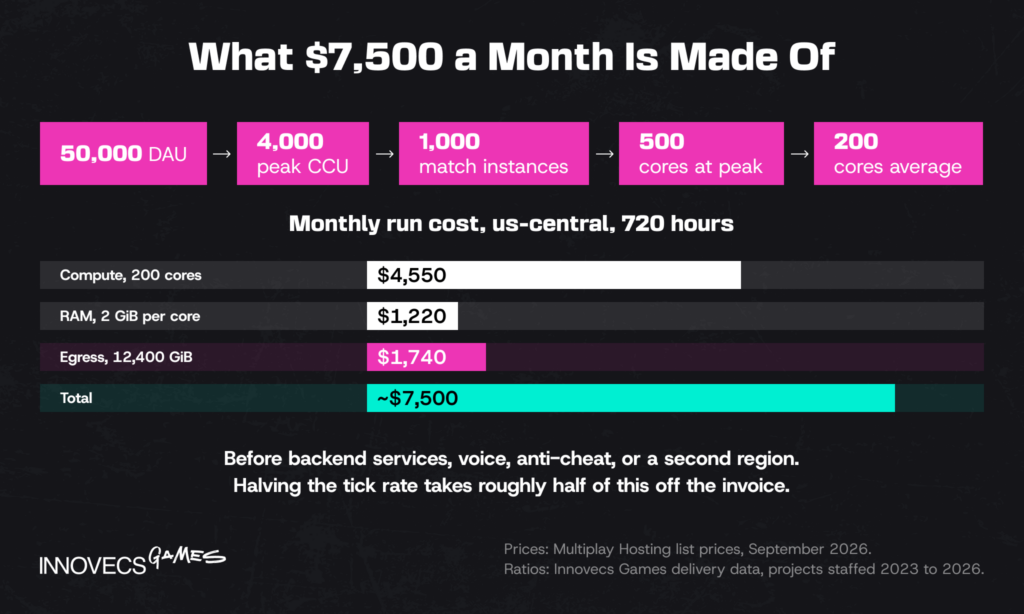
Two things fall out of that. Cores and egress are both driven by tick rate, so dropping from 30 ticks to 15 takes roughly half of it off the invoice, and for a lot of genres nobody can tell. And a second region does not double the number, it splits the same peak while adding the idle floor twice, which is why region count hurts small games more than large ones.
One figure decides viability more than anything in that table, and it isn’t in it: your retention curve. A game holding 2,000 concurrent players in month six costs a fraction of what the same game cost in month one, and most budgets are written as though launch month is the steady state.
Four things drive the premium, in descending order of how often they’re underestimated:
- Netcode engineering. Senior network engineers are the scarcest role on this list, the hardest to substitute with two mid-level hires, and the reason the hiring cost line on a multiplayer project looks nothing like a single-player one. Prediction, reconciliation, and relevance filtering are specialist work. Budget for seniority.
- Server hosting. Recurring, region-multiplied, and impossible to forecast precisely before you know your session length and retention curve.
- Live operations. Someone has to watch the fleet at 3am in your biggest region, and that’s a rota, not a person.
- Anti-cheat and trust. Cheap to bolt on, expensive to do well, and the cost is proportional to what winning is worth in your game.
Sequencing matters more here than on a single-player build: a small senior core settles the architecture, then volume gets added once the model holds. If you’re building that team from scratch, our guide to hire a game development team covers the composition question in more depth.
Not Sure Which Architecture Fits Your Game?
Most architecture mistakes are made in week three and discovered in month nine. Send us the genre, target player count, and launch regions. We’ll come back with the model that fits and what it costs to run, before anyone writes a NetworkBehaviour.
How AI Is Changing Multiplayer Game Development
AI has landed unevenly across multiplayer game development, and the split is clean. It is useful where the work is high-volume pattern matching, and close to useless where the work is deciding what should be true. Four areas are worth attention in 2026.
Netcode debugging is the pleasant surprise. Replication bugs generate enormous logs, packet captures, and desync traces, and models are good at finding the anomalous frame in 40,000 of them. What they don’t do is tell you where authority should live. A model will happily explain why your client and server disagree about a door and never mention that the door shouldn’t have been client-owned.
Automated QA testing and load testing is where the measurable savings sit. Scripted bot fleets have driven load tests for a decade. Reinforcement-learning agents that explore unscripted state add coverage a script can’t: the sequence where a player disconnects during host migration while holding a quest item, for instance. Both still need a human to decide what counts as broken.
Matchmaking has quietly become a machine-learning problem. Modern matchmakers weigh skill, latency, party size, queue time, and predicted match quality against each other, and models do that better than hand-tuned thresholds. They also encode whatever the training data rewarded. That’s how a matchmaker optimized for engagement ends up producing lopsided matches that keep people playing and make them miserable.
Anti-cheat is moving from signature detection toward server-side behavioral models. That’s the right direction: a model watching aim trajectories and reaction distributions sees things a driver-level scanner can’t. It also generates false positives with real consequences. Wardogs shipped with incorrect bans at launch, and that’s a trust problem no accuracy percentage fixes after the fact.
The pattern across all four is the same, and it’s worth saying plainly: these tools are strongest where there’s a large volume of data and an agreed definition of correct, and weakest where somebody has to decide what correct means for this game, in this genre, for these players.
What to expect from 2026 hires: fluency with assistants for scaffolding, tests, and log analysis, and the judgment to know where the tool stops. The useful interview question isn’t whether a candidate uses AI. It’s asking them to describe a replication bug their assistant got confidently wrong, and what the real cause turned out to be. Architecture decisions still come down to a person who has watched a fleet fall over and remembers why.
How Innovecs Games Helps You Build Multiplayer Games
Innovecs Games has delivered 300+ titles over more than a decade, with 200+ developers and artists across the US, UK, EU, Israel, and Ukraine. Clients include Zynga and JamCity, both operators of live titles rather than one-off commissioners. The studio sits on IAOP’s Global Outsourcing 100 and reports 92% NPS. For multiplayer work, the useful part of that record is the engineering side: backend development, dedicated server fleets, netcode, and the live-ops function any game studio needs running the week it launches.
We come in as an embedded team rather than a hand-off, whether that is co-development, staff augmentation on a named workstream, or a full build. Time-to-market is usually the reason clients pick one of the first two. In practice it means a senior network engineer and a backend architect in your sprints from week one. They decide authority boundaries with your leads instead of receiving them as a spec, and the slice scales once the model holds. Our game co-development services page covers how the model is structured contractually, including who owns what at milestone boundaries.
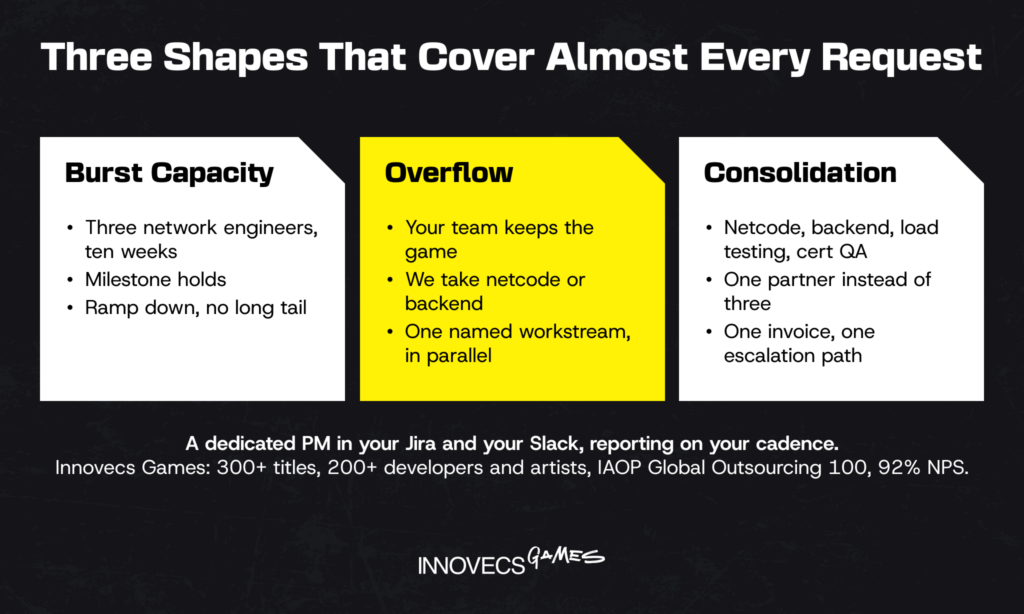
Three shapes cover almost every request we get on multiplayer work. Burst capacity, where three network engineers join for ten weeks so a milestone holds and then step back down. Overflow alongside an in-house team, where your engineers keep the game and we take the netcode or the backend as a named workstream running in parallel. And consolidation, where one partner holds netcode, backend, load testing and certification QA instead of three vendors, three invoices and three people to chase when a fleet misbehaves. In all three you get a dedicated PM working in your Jira and your Slack, reporting on your cadence rather than ours.
The honest limitation: this model costs more per month than contracting individual freelancers, and it is the wrong shape for a two-week prototype. It earns its price on projects where the architecture decision has a monthly invoice attached to it for the next five years.
FAQ
How do I make a multiplayer game?
Start with the architecture, not the engine. Decide whether the game needs an authoritative server or can run on a player host, because that answer dictates how every line of gameplay code gets written. Then build the smallest playable thing that has two clients in it, on the framework your engine ships with, and only add matchmaking, accounts, and dedicated servers once that loop survives 150ms. One sequencing rule saves more schedule than any tool choice: network the prototype, not the finished game.
Is it hard to make a multiplayer game?
Harder than most estimates assume, and the difficulty is distributed unevenly. Getting two clients to see each other is a weekend with a modern framework. Making it fair at 200ms, cheat-resistant, and stable at 10,000 concurrent players takes months of specialist engineering. The jump isn’t gradual either. It lands the moment competitive stakes or player counts rise, because both force authoritative servers, prediction, and lag compensation on you at once. The way out, for a lot of casual games, is to check whether the design actually needs real time at all: asynchronous and leaderboard-based multiplayer reads as competition to players and costs a fraction of it.
What is the difference between client-server and peer-to-peer multiplayer?
In client-server, one authoritative process owns the game state and clients render what it tells them. In peer-to-peer, every client holds state and they agree among themselves. Client-server resists cheating and scales to high player counts, but you pay per hour of play in every region. Peer-to-peer costs almost nothing and can have lower latency, at the price of weak cheat protection, NAT problems, and a practical ceiling around eight players.
Which game engine is best for making a multiplayer game, Unity or Unreal?
Neither wins outright. They fail differently. Unreal ships replication, RPCs, and predicted character movement inside the engine, proven at Fortnite scale, and charges for it in C++ complexity. Unity’s Netcode for GameObjects is faster to get moving in, readable to any C# gameplay programmer, and thins out above roughly 32 players in competitive simulation. Genre is the tiebreaker. High-fidelity console and PC shooters lean Unreal; mobile and mid-scale co-op lean Unity.
How much does it cost to develop a multiplayer game?
Budget the multiplayer slice separately from the game, in two halves. The build half runs from roughly $80,000 for co-op on a player host to several million for a persistent world, and the cost table earlier in this guide breaks that down by scale. The half people forget is everything after ship: hosting in every launch region, an anti-cheat integration, a live-ops rota that covers your biggest region overnight, and the engineer who stays on to tune the netcode for two years. Projects die on the second half far more often than on the first.
How long does it take to build a multiplayer game?
Four to eight months for a small co-op game where multiplayer is a layer on an existing loop. Nine to sixteen months for session-based PvP with dedicated servers and matchmaking. Eighteen months and up for persistent worlds or anything with custom netcode. Add a month for every launch region you haven’t load-tested, because regional fleet setup and latency tuning never go as fast as the plan says.
What backend do I need for an online multiplayer game?
Anyone working out how to make an online multiplayer game needs four things at minimum: identity and accounts, session or lobby management, matchmaking, and persistence for progression. Most games add friends and parties, leaderboards, telemetry, remote config, and an anti-cheat integration. Buy this rather than build it, unless your economy is the product or data-residency rules force your hand. Epic Online Services is free, Photon prices per concurrent user, and PlayFab or Nakama fit teams that need their own database and rules.
How do I reduce lag in a multiplayer game?
You cannot reduce latency, only hide it, and the netcode techniques for that are covered in the synchronization section above. The unglamorous wins sit outside netcode. Put regional servers in the markets your players live in, since nothing in software beats 40ms of removed distance. Send state over UDP with your own reliability layer instead of TCP, whose retransmission behavior is the wrong trade for position updates. Then cut packet size: quantize floats, drop fields nobody renders, and keep the per-tick payload small enough that a mobile connection is not the bottleneck.
How is AI changing multiplayer game development?
The gains are concentrated in the repetitive layers. Models comb replication logs and packet captures for the anomalous frame, drive load tests through unscripted state, and weight the many variables inside a matchmaker. They are unreliable at deciding where authority belongs, what fairness means in your genre, or which of two acceptable trade-offs your players will tolerate. Expect AI literacy from 2026 candidates, and expect the architecture calls to stay with people who have operated a live fleet.
Can AI help with netcode, matchmaking, or anti-cheat systems?
Yes, in all three, with different confidence levels. Netcode: useful as a debugging assistant on logs and captures, not as an architect. Matchmaking: genuinely better than hand-tuned rules at balancing skill, latency, and queue time, provided you audit what it optimizes for. Anti-cheat: server-side behavioral models catch patterns signature scanning misses. They also produce false bans, which is why a human appeals process is part of the system and not a nice-to-have.
Ready to Build Your Multiplayer Game? Let’s Talk
You now know how to make a multiplayer game on paper, which is the easy half. Tell us your genre, target concurrency, and launch regions, and we’ll come back with an architecture recommendation, a staffing shape, and a monthly run-cost estimate. No deck, just the numbers and the trade-offs.