How a Lighting Problem Turned into a Project-Wide Performance Toolkit

Tooling can look deceptively simple from the outside. A production problem appears, someone writes a script, builds an extension, or adds a small utility, and the immediate issue is solved. Under time pressure, that is often exactly how tools are created: quickly, for a specific need, and usually with functionality taking priority over usability. 

After more than twenty years across game development, technical art, R&D, different engines, and different stages of production, I have learned to be cautious about treating those problems in isolation. The immediate issue is often only the part that happens to be visible first. 

That is why I tend to think about tooling in terms of the wider production environment. A useful tool should solve the problem in front of you, but it should also fit naturally into the way people already work, expose enough information for them to understand what is happening, and remain useful as the project around it changes. 

It Started with Lighting

The first version of the tool came out of a straightforward request: the project had lighting problems, and I was brought in to help sort them out. Production was already well underway, so rebuilding everything around an ideal setup was never realistic. Whatever I made had to work with the game as it existed. 

The tool scanned the project for lighting conditions worth investigating, including unnecessary ray-traced shadows, assets affecting distance fields, and lights with heavily overlapping attenuation. It then took the user directly to the relevant content, where an artist could see what was expensive, adjust the setup, and immediately judge the effect on both performance and the scene itself. 

This was the starting point: a focused lighting tool built to surface those conditions and make them easier to investigate in the scene. 

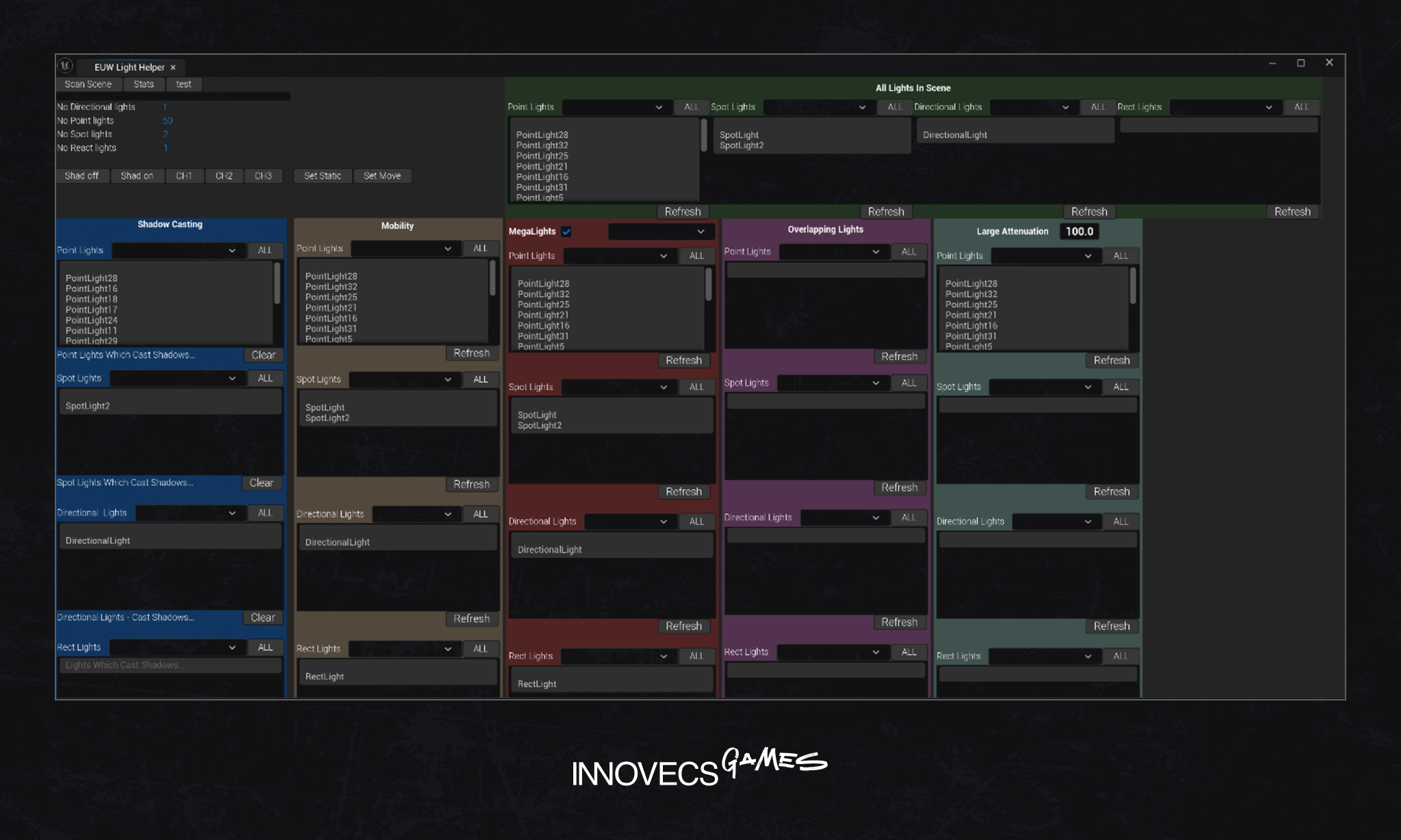
innovecs technical art tool
The initial interface grouped scene checks, feedback, and lighting controls in one place.

I did not want the tool deciding that something was “wrong” and fixing it automatically. An expensive setup can still be doing something visually important. The useful part was showing where the cost came from, giving the artist sensible options, and letting them decide what to change. 

As those scans started pointing back to the same scenes, though, it became clear that some of the performance issues were coming from much earlier decisions in the way the content had been built. 

That was the point where a lighting tool stopped being enough. 

The Problem Was Moving Upstream

Looking more closely at those scenes shifted the investigation away from lighting and into asset composition and scene construction. Some of the cost had been introduced much earlier in production, while the content itself was being built. 

When Fast Content Creation Gets Expensive

The team relied heavily on kitbashing to build environments quickly and get large areas playable. That approach was useful for production speed, but the accumulated structure of the scenes had become expensive. Assets were stacked, intersected, and layered, while nested content and incorrect settings added further cost across the level. 

The effect became more visible once Nanite, Lumen, and the target hardware entered the equation. Trees, foliage, and other layered geometry could look perfectly reasonable as individual pieces, yet repeated at scale they created overdraw and a much heavier rendering load than the art team could easily see while building the scene. 

Following the Cost Through the Pipeline

Lighting changes alone were never going to recover enough performance. We started looking at where geometry could be merged, where unnecessary geometry could be removed, and how the assets themselves were structured. 

Asset analysis therefore became part of the optimization workflow rather than a separate task. Following those costs through the scene also exposed another problem: collision had been authored with far more complexity than the game needed. 

Collision Changed the Scale

There had been no consistent standard for constructing collision meshes on the project, and by this stage of production a manual rebuild was not realistic. The issue was also difficult to judge from individual assets because the cost only became obvious once those assets were repeated across a level. 

One wooden walkway made the problem very clear. It had been assembled from individual planks, each sculpted with the crevices, dents, and surface detail you would expect from final visual geometry. In some cases, a single plank could be around 100,000 polygons, and essentially the same level of detail had been carried into its collision. Across an environment containing many of those pieces, the engine was processing collision complexity that added almost nothing to player interaction. 

The scene assessment tool was therefore extended to look at collision from several angles. It tracked: 

  • entity counts across static and kinematic objects; 
  • collision counts per object; 
  • overall collision density; 
  • outliers that needed direct artist review. 

That data gave us a much better basis for targeted optimization. 

The tool could algorithmically generate new, simplified collision meshes across the project while still flagging unusual cases rather than forcing the same correction onto everything. 

Reducing collision complexity exposed another part of the problem. The project also contained very large numbers of separate static objects, which affected how content was partitioned and loaded. We had to look at entity counts, where geometry genuinely needed to remain separate, and how much data the relevant buffers were being asked to handle as sections of the world streamed in and out. 

By then I was working with the engine team as well as the artists. The final step was to rebalance asset partitioning and loading across those buffers to remove the bottlenecks we had uncovered. 

What had started as a lighting investigation was now reaching into collision authoring, asset structure, streaming, and the engine underneath them. 
One Tool Was Becoming a System

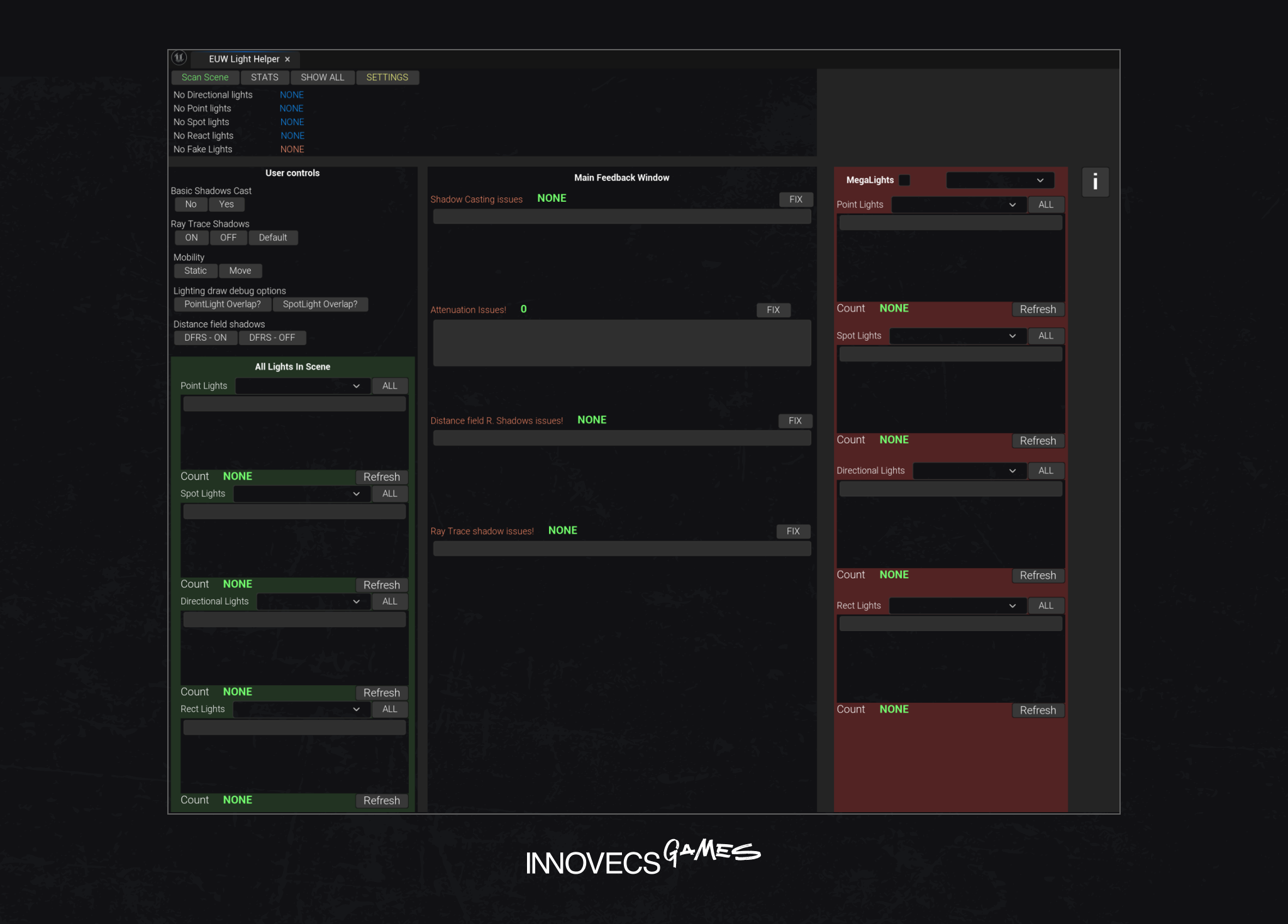
As the scope expanded, adding every new optimization check to one growing tool would have made it harder to use and harder to extend. The lighting controls had already grown considerably as more checks were added, making the limits of a single interface increasingly obvious. 

The expanded lighting controls below make that progression visible. 

performance tool as a system
Expanded lighting controls, including separate checks for shadow casting, mobility, MegaLights, overlapping lights, and attenuation.

I moved to a modular structure. Lighting, assets, collision, and other areas became independent modules that could work in isolation or together as part of a larger toolkit. They were brought into a single dashboard capable of scanning a scene, producing an analysis report, and highlighting the modules most relevant to what it found. Other modules remained available if someone wanted to investigate further. 

The workflow itself stayed consistent as the toolkit grew: detect an issue, identify the affected assets, guide the user to the source, present possible solutions, and help apply the changes at scene level. That made it possible to look at a scene holistically or focus on one specific area without changing the underlying way the tool worked. 

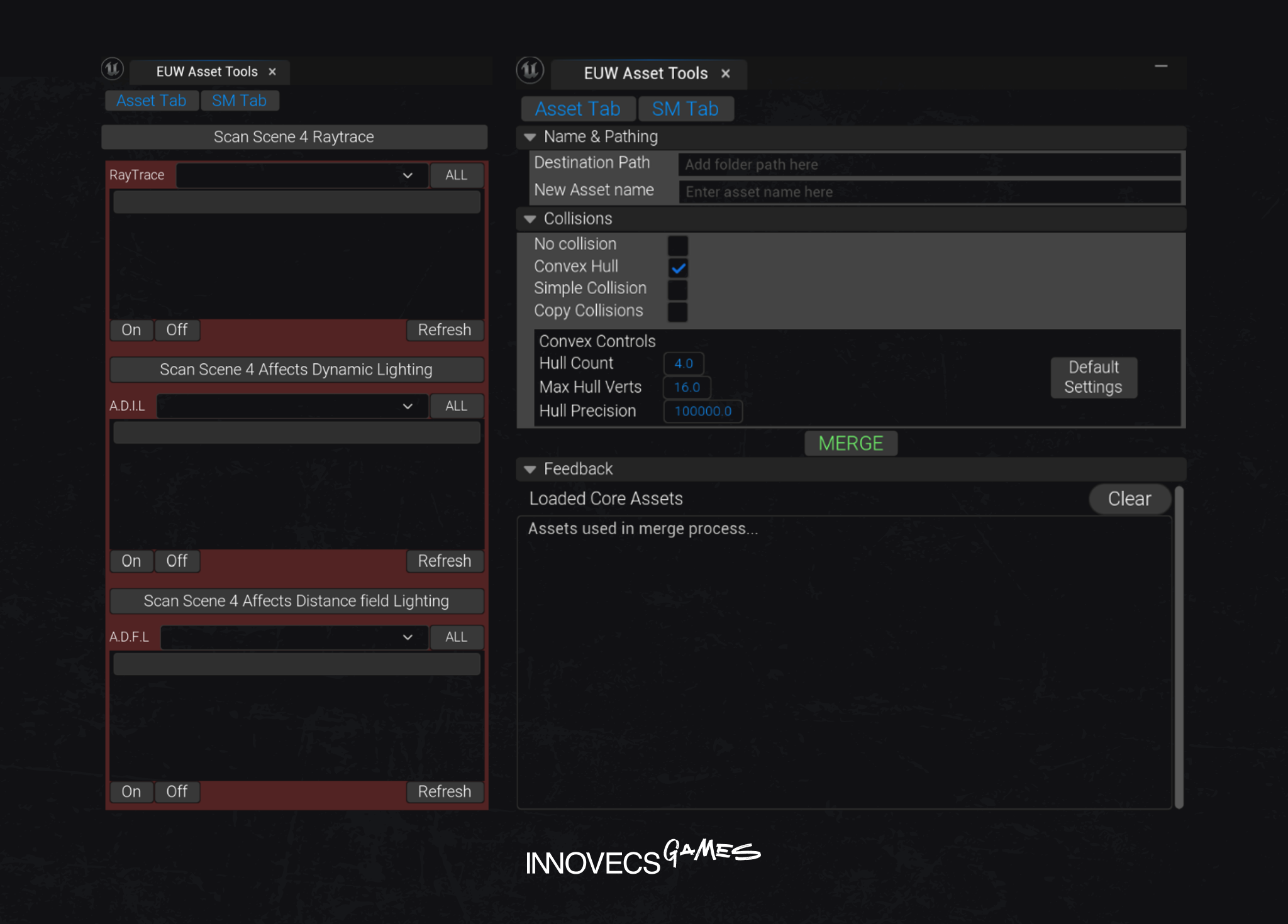
The same structure can be seen in two of the focused modules: Asset Lighting and Collision. 

Asset Lighting and Collision modules
Asset Lighting module (left) and Collision module (right).

Tools Should Work with Artists, Not Around Them

I have a simple test for production tooling: if people avoid using it, the technical quality does not matter much. A tool can be fast and functionally correct, but if it interrupts the way artists work or hides too much of the decision-making, they will find ways around it. 

I wanted to avoid that here. The toolkit needed to feel like an extension of the existing workflow, not a separate technical exercise. It could remove repetitive work and make expensive content easier to diagnose, but the final decision still belonged to the person working on the scene. 

I did not want to create button-pushers. The aim was to give artists better information, help them understand why something had been flagged, and leave room for the visual judgment their discipline still required. 

Building for a Game That Is Still Changing

Production tools rarely operate on finished content. Assets are revised, animation may arrive later, systems change, and whole parts of a level can remain in flux while the rest of the project keeps moving. 

That is why I tend to build around live data and non-destructive workflows. The tool has to work with whatever state the content is in at the time, without locking the team into that version of it. If something is incomplete, the workflow should still hold. When the missing content arrives later, it should update without forcing people to rebuild the process around it. 

This mattered even more as the toolkit expanded. New modules had to work with content that was still changing, while the existing ones needed to remain reliable throughout production rather than being tied to one fixed state of the game. 

What the Toolkit Became

By the end of the project, the original lighting tool had become a much broader performance toolkit used across the game and the different hardware targets it had to support. 

Its coverage now fell across three main areas: 

  • Rendering and visual systems: Nanite, Lumen, MegaLights, shadows, and VFX 
  • Scene and content construction: PLAs, assets, materials, collision, draw distances, and scene composition 
  • Performance and platform behavior: memory, render buffers, platform-specific settings, and FPS 

That range mattered because the same scene could behave very differently depending on the platform or the systems involved. There was no single setting that could be treated as universally correct. The toolkit needed to expose where the cost was coming from and give the user enough information to make the right trade-off for that particular case. 

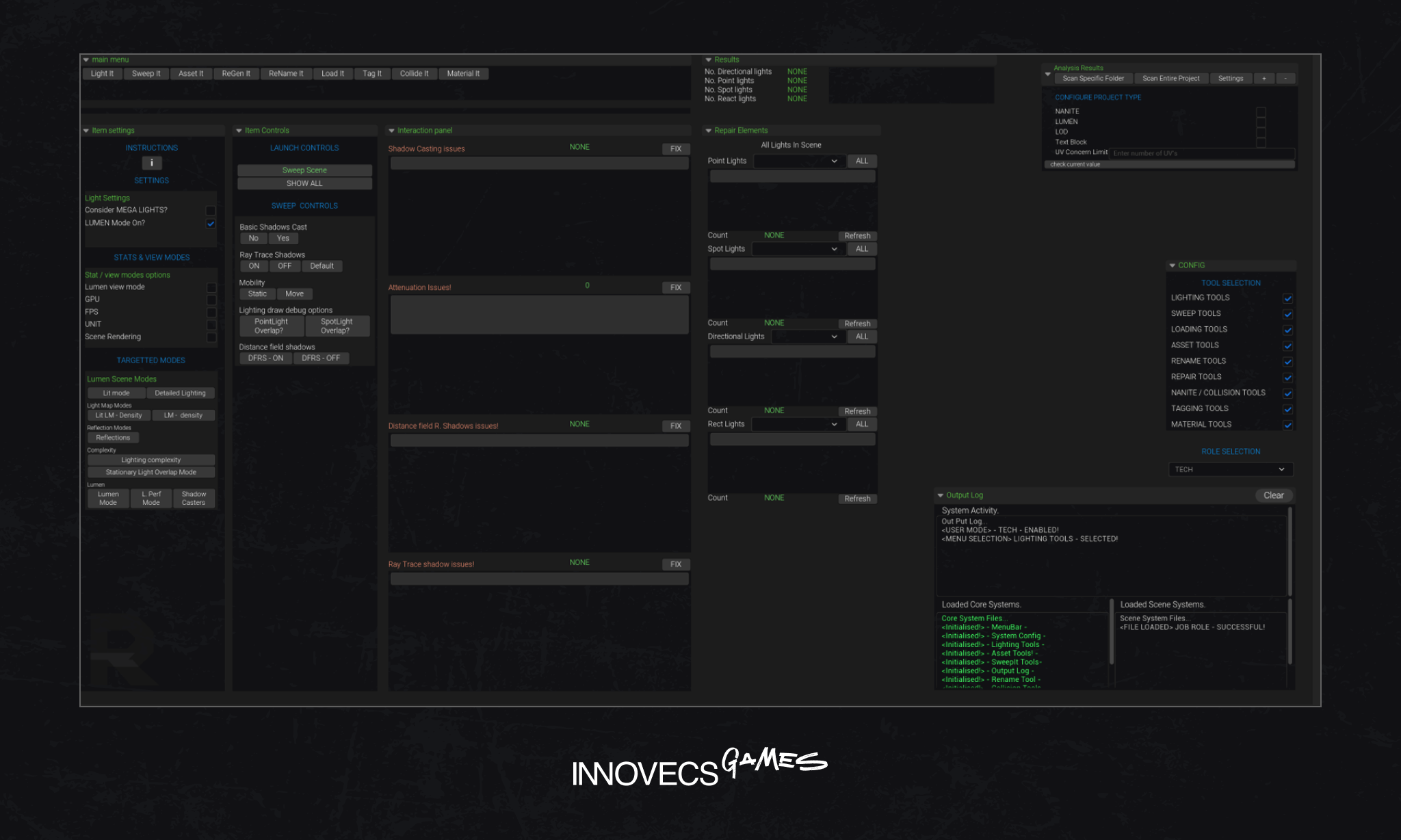
By this stage, all of those checks had been brought together into one automated toolset. 

automated toolset at the end of the project
Final automated toolset at the end of the project.

A Holistic View of Technical Problem-Solving

Working across different engines and production environments has taught me not to accept every technical limitation at face value. Sometimes the boundary is real. Sometimes it belongs to a particular implementation, pipeline, or way of working that can be changed. 

That perspective matters because production problems rarely respect discipline boundaries. Lighting, assets, rendering, animation, engineering, and gameplay eventually meet in the same running game, even if they were created by different teams using different tools. Understanding those connections makes it easier to recognize when the visible issue is only one part of a larger technical relationship. 

For me, that is where good technical work becomes most useful, and it is the same perspective I bring to my work at Innovecs Games. The goal is to understand enough of the system as a whole to know which constraints have to be accepted, which can be redesigned, and which part of the system is actually worth changing. 

READY TO START YOUR PROJECT?
If you need assistance in building a product from scratch or supporting the existing one, drop us a line to discuss details, and we will reply within 24 hours.