How to Port Games: A Step-by-Step Guide for 2026
Seven steps from a shipped game to a second platform, with the checks worth running before you spend anything and the weeks where the schedule tends to come apart.
On paper, every port is the same seven jobs. Somebody audits the build and picks the platforms, and after that come the dev kits, the code changes, the long squeeze to fit weaker hardware, new controls, certification, and patches for as long as the thing stays on sale. If that list were all there was to how to port games, we’d have printed it on a postcard and saved you the scroll.
It isn’t, because the sequence hides a calendar. Two of those jobs run on a platform holder’s schedule and not yours. Another, optimization, can’t be estimated until the game boots on the target hardware. Studios that leave the port for the last quarter of production tend to learn all of this in the same week.
The reward for getting it right is easy to see. Alinea Analytics estimates that Forza Horizon 5 passed 5 million copies on PS5 by January 2026, less than nine months after it arrived there, and earned more than $300 million from a game that was over three years old. Microsoft didn’t build that version itself, either. It went to Panic Button, a studio whose whole business is other people’s games on other people’s hardware.
Before the steps there’s a short definition and a readiness check, which is ten minutes well spent if it talks you out of the wrong port. Keep a calendar open once you reach step 1, since the order the steps are listed in isn’t the order they start in.
What Is Game Porting and Why Studios Do It
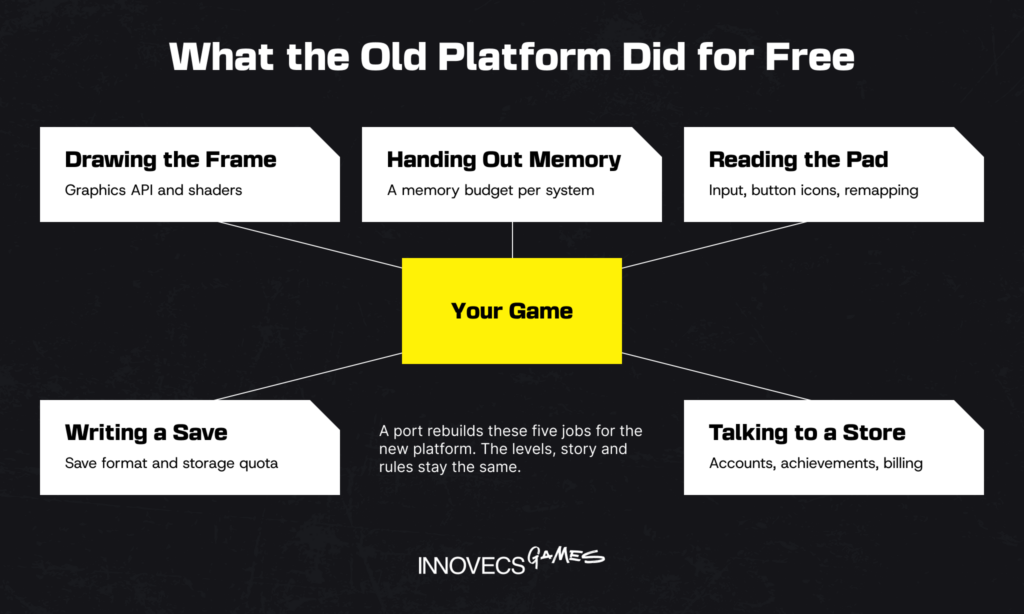
What is a video game port? It’s a game you’ve already shipped, made to run on a platform it wasn’t written for. Nothing changes for players, who get the levels, story and rules they’d get anywhere else. What changes is the list on the engineers’ wall, which now holds every job the old platform quietly did for them: drawing the frame, handing out memory, reading the pad, writing a save, talking to a store. Video game porting counts as a success when the only difference a player can point to is the logo on the box. It’s the rare engineering job where the best review you can get is “I didn’t know it was a port.”
A remaster and a remake both change what the player sees, which a port tries hard not to do. A remaster repaints the same game, and a remake builds a new one from the old design. Our article on remake vs remaster covers where that line sits. For planning purposes the difference is who you hire: those two need an art team, and a port needs engineers.
Read around on how to port games and you’d think it was purely an engineering problem. No studio has ever ported a game for the engineering, though. There’s a business reason behind each one, and which reason it is changes the plan.
- A wider audience. Nintendo sold 19.86 million Switch 2 consoles between June 2025 and the end of March 2026. That audience didn’t exist before the console launched.
- A longer revenue tail. Shift Up brought Stellar Blade to PC a little over thirteen months after its PS5 release and sold a million copies on Steam in three days. The game’s lifetime total stood at just over three million at that point, so roughly a third of it came from one long weekend.
- New kinds of platform. Handheld PCs, cloud gaming services and instant games inside apps like YouTube all take existing games, and each one has its own rules for getting in.
A port chasing a new audience can afford to arrive late and polished. One chasing a launch window can’t.
Is Your Game Ready to Be Ported?
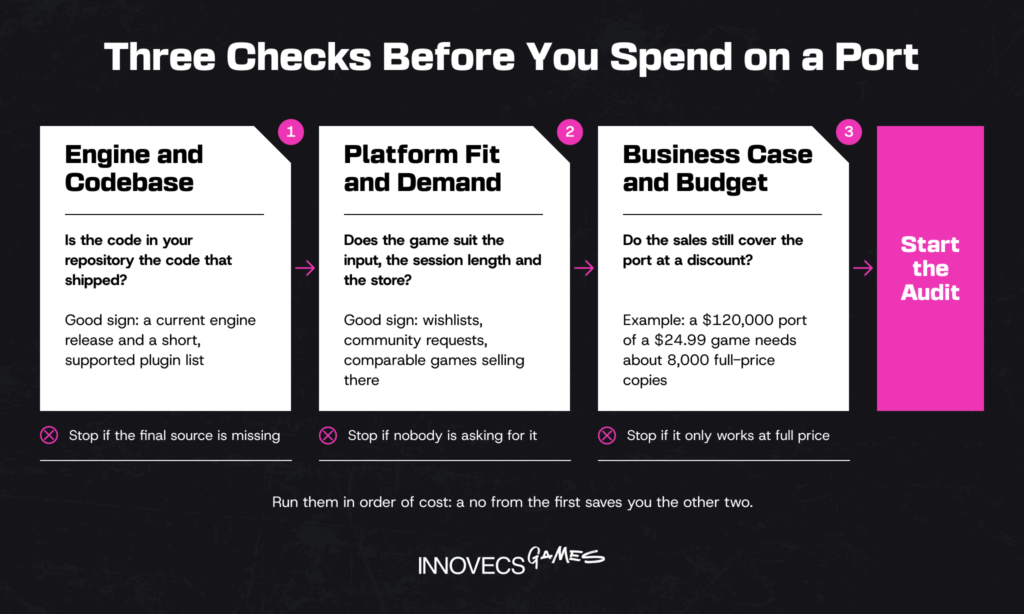
You can rule a port in or out before any money moves, and you don’t need a vendor in the room to do it. There are three checks, and we’ve put them in order of cost, so that a no from the first saves you the trouble of the other two.
Check Your Engine and Codebase
Start with what you actually have on disk. Write down the exact engine version, every third-party plugin, and whether each plugin’s vendor supports your target platform. Then confirm that the source code in your repository is the code that shipped. That sounds too obvious to check, and it has sunk real projects. Konami’s Silent Hill HD Collection was built from early code, as senior producer Tomm Hulett later explained: “We got all the source code that Konami had on file, which it turns out wasn’t the final release version of the games.” The team spent part of the project fixing bugs the original developers had already fixed once. Final builds have a way of living on one machine under one desk, right up until the desk moves.
A game on a current Unity or Unreal Engine release with a short, supported plugin list is a good candidate. An engine that’s several versions behind turns the project into two projects, and the upgrade is often the larger one.
Check Platform Fit and Audience Demand
A platform is more than hardware. It’s an input method, a session length and a store, and your game has to fit all of them before the engineering question even comes up. Then look for demand you can count: wishlists, community requests, how the closest comparable games sold there. Poncle rushed Vampire Survivors onto phones in December 2022 because, as its director told Game Developer, clones built from its assets and code had “forced our hand to release the mobile game ASAP.” When other people are already selling your game on a platform, the demand question is settled.
Session length is the fit test teams skip most. A forty-hour RPG works on a handheld because people play handhelds on the sofa. It works less well on a phone at a bus stop.
Check Your Business Case and Budget
Put a number next to the port before anyone opens the editor. In the projects we’ve scoped, a first platform costs between $20,000 and $250,000, and the six cost drivers further down decide where your game lands. Divide that by what you keep per copy, which is roughly 60% of the list price after the store’s share, tax and refunds. A $120,000 port of a $24.99 game needs about 8,000 full-price sales on the new platform to break even. Our view: if the sum only works at full price, it doesn’t work, because a port that arrives a year after the original sells most of its copies on discount. If that looks like a stretch, a porting publisher who pays for the work and takes a share of the revenue may suit you better than a vendor. Our guide to game porting cost works a full budget through line by line.
How to Port a Game: The Step-by-Step Process
If the checks came back clean, the work starts here, and the first step is the engine check done properly: what took you an afternoon becomes a paid audit with estimates attached. One warning about the numbering before you go on. We numbered the steps so you could find them again, and they don’t queue up that politely in real life. The paperwork in step 2 starts on day one and grinds along in the background for weeks, and testing for step 6 is under way long before there’s a finished build, because a compliance problem costs least while the code around it is still being written. What every step does have is an end you can check, and we’ve marked it.
| Step | What it produces | Who owns it |
|---|---|---|
| 1. Audit and choose platforms | Risk list, platform order, scope with numbers | Tech lead, producer |
| 2. Dev kits and platform access | Approved developer accounts, hardware, SDKs | Producer |
| 3. Adapt code and engine features | First boot on target hardware, platform services wired in | Engine and gameplay programmers |
| 4. Optimize assets and performance | Locked frame rate inside the memory budget | Programmers, technical artists |
| 5. Rework controls and UI | Native input and readable UI on the target screen | UI/UX designer, gameplay programmer |
| 6. Test, certify, submit | Certification pass, store approval | QA lead, producer |
| 7. Launch and support | Day-one patch, update plan, handover | Whole team |
The right-hand column changes hands five times in seven rows. Ports tend to lose their weeks at those handovers, when nobody is sure whose turn it is.
Here is how those steps sit on a calendar. The example is a mid-level port that we’ll follow through every step: a 3D action game built in Unity, on sale on Steam, heading to Nintendo Switch 2 with a team of four over 20 weeks.
| Step | Weeks 1 to 2 | Weeks 3 to 6 | Weeks 7 to 12 | Weeks 13 to 16 | Weeks 17 to 20 | After launch |
|---|---|---|---|---|---|---|
| 1. Audit | Audit, platform order, quality bar | |||||
| 2. Access | Apply for approval | Dev kit arrives, SDK set up | ||||
| 3. Adapt | First boot, saves, platform services | Remaining services | ||||
| 4. Optimize | Baseline on PC | First readings on the kit | Main memory and frame rate work | Final tuning | Fixes only | |
| 5. Controls and UI | Input layer | Menus, glyphs, handheld text | Polish | |||
| 6. Test | Test plan | Smoke test on each build | Functional and compliance passes | Pre-certification | Two submission rounds | Patch regression |
| 7. Launch | Ratings started | Store assets, localization | Day-one patch scoped | Release | Support window |
Source: Innovecs Games delivery data, projects scoped 2023 to 2026. An illustrative schedule, not a client project.
Look at weeks 7 to 12. Five of the seven steps are open at once, and the team is four people. That stretch is where ports slip, and it’s a bad six weeks to approve anyone’s holiday.
Step 1: Audit the Game and Choose Target Platforms
Budget one to two weeks of a senior engineer’s time for the code audit, the step with the best return in the whole project. The engineer goes through the source code looking for PC habits: hard-coded save paths, menus that only answer to a mouse, calls that assume the player is online.
Use the results to order the platforms, with the closest one in hardware terms first, because its fixes carry over to every target after it. Then write the quality bar as numbers a tester can check, such as a locked 30 frames per second in handheld mode and no hitch longer than a tenth of a second. A target nobody can measure can’t fail a milestone, and that’s exactly what’s wrong with it.
- Record the engine version, every plugin and every middleware package, and check each one for a build on the target.
- Search the code for platform assumptions and put an estimate next to each.
- Profile memory and frame time on your weakest supported machine.
- Read the contracts. Somebody licensed the middleware, the music and the fonts for the platforms you had in mind at the time, and a font bought for desktop doesn’t always stretch to a console. The same goes for any third-party IP in the game.
- Rank the target platforms and write the quality bar down.
Time: 1 to 2 weeks · Done when: there’s a risk list with estimates and a quality bar the tech lead has signed
In the example: the audit finds two plugins with no Switch 2 build and a save system that writes straight to a Windows folder. Both go on the risk list, at one week and two.
Step 2: Get Dev Kits and Platform Access
Console development is gated, and the gate has its own calendar. You register with each platform holder, describe the game, and wait for approval before you can order a dev kit or download an SDK. The three doors look like this:
- Nintendo. Signing up for the Nintendo Developer Portal takes a few minutes and is open to individuals. Approval for a specific title and its hardware comes later.
- Sony. Registration goes through PlayStation Partners, and everything past the sign-up page is under NDA.
- Microsoft. Independent studios apply through ID@Xbox. The published conditions are short: you’re at least 18, you sign an NDA, and you’re in a country Microsoft does business with.
Steam, the App Store and Google Play have open sign-up and no concept approval, which is why PC and mobile ports can start on the day they’re funded.
Start this on the day the port is approved, in parallel with the audit. The paperwork is dull, and it’s the one part of a port that no amount of overtime speeds up. A partner who already holds kits and developer agreements skips this queue entirely, and for many studios that alone is the reason to hire one.
- Register the company with every platform holder on your list.
- Submit the game for concept approval where the platform asks for it.
- Order dev kits, counting one for QA as well as one per engineer who needs it.
- Install the SDK and the matching platform support for your engine version.
- Brief the team on the NDA. Console documentation can’t sit in a public repository, and it can’t be pasted into a chat with a contractor who hasn’t signed either.
Time: starts in week 1; allow a month or more before hardware is on a desk · Done when: a dev kit boots in your office and the engineers can log in to the developer portal
In the example: approval and the kit take until week 5, so the first month’s code is written on PC with the platform calls stubbed out.
Step 3: Adapt the Code and Engine Features
This is where the game first runs on the new platform, and it runs badly. Rendering has to move to the platform’s graphics API first. Then comes the platform layer every console expects: user accounts, saves, achievements, controller ownership, suspend and resume.
Two parts of this step get underestimated. Saves are the first. The PC format usually has to change, the platform sets a storage quota, and if players should carry progress between platforms you now need cross-save, which means a backend and account linking. It’s hard enough that studios with hits ration it: Supergiant’s Hades II FAQ says saves move between the two Switch versions and between its PC stores, and that other combinations aren’t available “due to technical limitations.” Online services are the second. Invites, friends lists and multiplayer sessions have to go through the platform’s own systems, and every third-party SDK in the game needs checking for a version on the target. If you publish on mobile, that’s your whole analytics, attribution and backend stack (Firebase, AppsFlyer, Adjust, PlayFab or whatever you run), and parts of it simply don’t exist on consoles.
- Get a first boot on the dev kit. A logo on a black screen counts.
- Move rendering to the platform’s graphics API and rebuild the shaders.
- Replace or remove middleware that has no build for the target.
- Wire in accounts, saves, achievements, and suspend and resume.
- Convert the save format and test that it survives a full storage quota.
- Set up the build pipeline so that every commit is built for all targets overnight. Jenkins, TeamCity or the engine’s own cloud build will all do the job.
Time: 3 to 5 weeks to a first playable build · Done when: the game boots on the kit, signs a user in, saves, and survives being suspended and resumed
In the example: first boot arrives in week 6 at 14 frames per second. Nobody panics, because that’s about what a first boot looks like, and step 4 exists to deal with it.
Step 4: Optimize Assets and Performance
More of the port budget goes on optimization than on anything else, and it’s the part nobody can estimate with a straight face. Programmers and technical artists work down a list: smaller textures, fewer shader variants, cheaper lighting, less on screen at once, faster loading. Every change is measured against a memory budget and a frame rate target on real hardware, because a reading taken in the editor is a guess.
One counterintuitive rule applies. A well-optimized game is harder to bring down in hardware than a sloppy one. The Switch version of Doom Eternal arrived on December 8, 2020, almost nine months after the others. Panic Button’s Travis Archer told Nintendo Life why: id’s engine was so efficient that “there wasn’t a lot of inefficiency to fix.” If the audit says your game is lean, you’ll get to the target by cutting content, and code tricks won’t do it. That’s the conversation nobody schedules and every port ends up having.
- Capture a baseline on the kit: frame time and memory in the five heaviest scenes. Record reference screenshots and video of the original from fixed camera positions at the same time.
- Split the memory budget between systems, so textures, audio and code each have a ceiling.
- Fix whatever the profiler says is worst, measure again, and go round until the list runs out. It’s tedious, and it’s still quicker than guessing.
- When code changes stop paying, agree content cuts with the art director, scene by scene, against those reference captures. If the game carries a licensed IP, the licensor signs off visible changes too, and licensors don’t plan around your submission date.
- Lock the build once the target holds in the worst scene for a full hour.
Time: a third to a half of the project · Done when: the frame rate target holds for an hour in the heaviest scene, inside the memory budget
In the example: textures drop one resolution step, two lighting features go, and a crowd scene loses a third of its characters. It takes until week 15 for handheld mode to hold 30 frames per second.
Step 5: Rework Controls and UI
Input is where players decide whether a port respects them. Take the cursor away, as a console does, and every menu has to be reachable from a gamepad. The button icons have to match the pad that’s actually in the player’s hands, and the text has to survive being read from a sofa three metres off. PC players complain about the opposite things. They expect keyboard and mouse with full input remapping, and since they’ll run the game on anything from a handheld to an ultrawide monitor, the UI has to scale across every screen resolution and aspect ratio. Phones are the hardest case. Touch controls have to be designed from nothing, since a virtual stick on glass gives the thumb no feedback at all.
None of that has to mean redrawing every screen. Factorio is a game with more menus than most, and when Wube took it to Switch the studio kept the interface and wrote an algorithm that works out which widget the stick should land on next. A radial quick panel covers the tools players reach for most. That port was one developer’s full-time job for about twenty months.
Microsoft published a useful free checklist in 2025 with its Handheld Compatibility Program. The “Handheld Optimized” badge goes to games with default controller input, correct iconography, a workable way to enter text, a suitable full-screen resolution and text you can read. That’s five lines, and we’d run a build against them even if it’s never going near an Xbox, since between them they cover most of what port reviews complain about.
- List every screen in the game, and next to each one write how the player gets around it today.
- Build navigation for the new input, starting with the screens players open most.
- Add button icons and remapping, then check text size on the real screen, in handheld mode if there is one.
- Hand the build to someone who has never played the game. Watch, and don’t help, however much you want to.
Time: 3 to 6 weeks, alongside step 4 · Done when: a new player gets through the first hour on the target device without asking how
In the example: the inventory was built for a mouse and turns into a radial menu. The smallest text goes up two sizes after the first person tries to read it in handheld mode.
Step 6: Test, Certify, and Submit
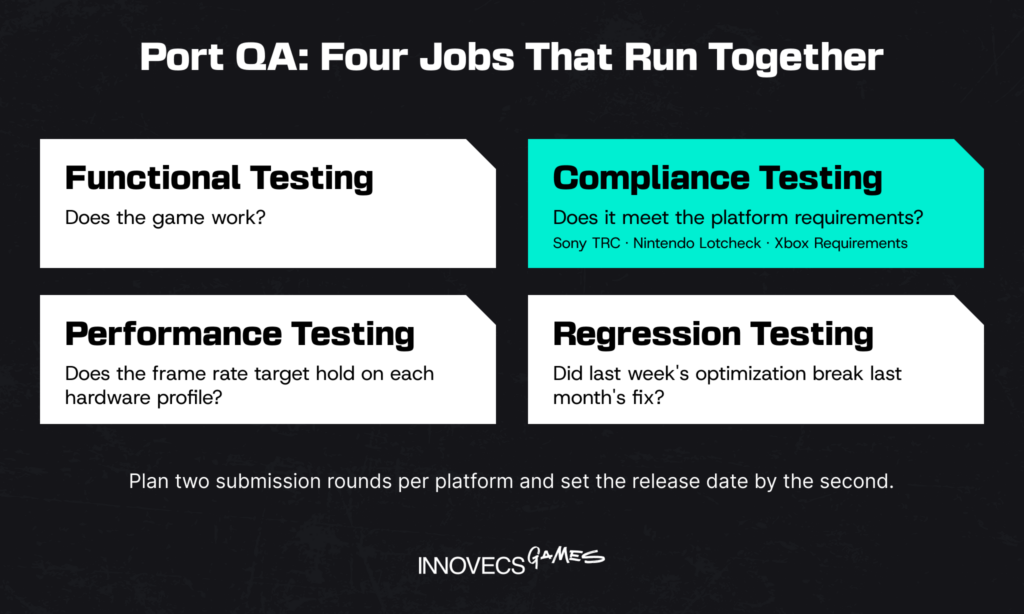
Port QA has four jobs that run together. Functional testing checks that the game works, and compliance testing checks it against the platform requirements: Sony’s TRC, Nintendo’s Lotcheck, Microsoft’s Xbox Requirements. Performance testing holds the frame rate target on each hardware profile, and regression testing confirms that last week’s optimization didn’t break last month’s fix. Our game testing guide covers each of these passes in detail.
Microsoft is the only platform holder that publishes its list. As of September 2026 there are 24 Xbox Requirements, with titles such as Title Stability, User State and Title-Save Location, and Loss of Connectivity. They’re worth reading even if Xbox isn’t your target, because they show the kind of behavior every console checks.
When a submission fails, the platform holder sends back the specific requirements the build broke. Nothing ships until all of them pass a second review, so plan for two rounds per platform and set the release date by the second. Large publishers aren’t exempt. In September 2023 Ubisoft told players that xDefiant had been submitted in July and rejected in August, and its release slipped while the fixes went in.
- Write the test plan from the platform requirements in week 1, before there’s a build to test.
- Run a smoke test on every build that comes out of the pipeline.
- Run a full compliance pass monthly at first, then weekly as submission gets close.
- Do a complete pre-certification pass on the release candidate itself.
- Submit, fix what comes back, and submit again.
Time: continuous, with the last 4 to 6 weeks for pre-certification and submission · Done when: the platform holder’s approval arrives in writing
In the example: two failures come back from the first submission, and both trace to a controller disconnecting while a menu is open. The second submission passes.
Step 7: Launch and Support the Port
Release prep runs alongside certification and has lead times of its own. For a digital release the age rating is the easy part: you fill in the IARC form, a questionnaire that’s free for developers, and ratings for several regions come back at once. Put the game in a box and each ratings board wants its own review. Then there’s the store page, which nobody remembers until it’s due, with its art in the platform’s sizes, a price for every region and text in every language you’re selling in.
The first week on sale then finds problems no test plan covered. Sony’s PC version of The Last of Us Part I came out on March 28, 2023 and went straight to mostly negative Steam reviews. It took eleven weeks of patches before the game earned its Steam Deck Verified badge on June 14.
Live-service games are the exception to all of this, because their port never stops shipping. Somebody has to decide early whether new content reaches every platform on the same day or whether the new platform runs a patch behind, and it isn’t a small decision. Same-day parity sounds like the obvious answer until you count backwards: each update now has to be finished early enough to clear console review, which drags the whole live calendar forward by that lead time. Cross-progression brings account linking with it, along with purchases that have to follow the player from one store to another. In multiplayer there’s a sharper problem still: when two platforms are on different versions the player base is split, and it stays split until the slower patch arrives.
- Start the age rating and the store page early. The build will still be in optimization, and that’s the right time.
- Get a day-one patch through certification before launch day.
- Switch on crash reporting and decide who reads it each morning. A crash log nobody opens is just a very detailed diary.
- Book engineers for the first month after launch. Have them write the handover documents in that month too, while they still remember why things were done.
- Agree, by name, who maintains the port once the launch team has moved on.
Time: prep from mid-project; support for at least three months · Done when: the crash rate is stable and the branch, the pipeline and the documents have a named owner
In the example: the day-one patch fixes four crashes found after submission. Support runs for twelve weeks, and then the branch moves to the studio’s own engineers.
Common Porting Mistakes and How to Avoid Them
Ask a few producers how to port games and the same six warnings come back, each tied to one of the steps above and most with a launch date attached. All of them are cheap to avoid in the first month and expensive to fix in the last one.
- Treating a port as a copy-paste job. The engine’s export button gives you a build that boots. The button is real. The port is the other four months: input, UI, saves, store integration and performance work.
- Underestimating certification lead time. Approval, dev kits and submission rounds all run on someone else’s calendar. The applications go in the week the port is approved, not the week the code is ready.
- Testing too late on real hardware. Memory and frame rate problems hide very well in an editor preview and on a fast PC. Put the game on the weakest target device in the first month, and don’t wait for it to look presentable first.
- Ignoring controller or touch UX. Mapped buttons aren’t a control scheme. Input needs design time and a line of its own in the estimate.
- Hitting memory limits late. Every platform gets a memory budget before optimization starts, and every build gets measured against it. That way the overrun turns up as a line on a graph, months before it would have turned up as a crash.
- Having no post-launch update plan. Before release, somebody should be able to say who patches the port, who pays for that, and how content updates are going to reach the new platform.
Five of the six come back to the calendar. What should have started in week one tends to get noticed in the last month, because that’s when it starts blocking something.
Porting Games by Platform: PC, Console, Mobile, and Web
You’ll go through the same seven steps whichever platform you pick. What moves is where the pain is: an open platform makes you pay in QA, a closed one in certification, and a small one in memory.
| Platform | Main challenges | What to focus on |
|---|---|---|
| PC and Mac | Thousands of hardware combinations, shader stutter, handheld PCs | Settings menus, input options, a wide test matrix |
| PlayStation and Xbox | Certification rules, platform features, two Xbox hardware profiles | Compliance checks in every sprint, pre-certification QA |
| Nintendo Switch and Switch 2 | Memory, battery, docked and handheld modes | Memory budget, content cuts agreed early |
| iOS and Android | Touch input, heat, device spread, yearly store rules | Control redesign, mid-range Android performance |
| Mobile to PC and console | Interface built for touch, art resolution, business model | How the game earns on the new store, decided before scoping |
| Web and instant platforms | Download size, browser memory, load time | Asset diet, short-session design |
Read down the table and you’re mostly watching freedom being swapped for predictability. On PC you can ship whatever you like and the testing is your problem, whereas a console does some of the checking for you and then sits on your release until the build passes.
Porting to PC and Mac
A console build runs on one machine. Porting games to PC means running on all of them, so most of the work is giving players choices: resolution and quality settings, ultrawide support, key bindings, and a shader cache built before the first level. Nixxes’ PC version of Ghost of Tsushima shows the standard to aim for: 21:9, 32:9 and 48:9 triple-monitor support, upscalers from three vendors, and presets running from 720p at 30 frames per second to 4K at 60. QA then has to cover a spread of graphics cards and drivers that no console team ever sees. Somewhere a player is running your game on a 2017 laptop with forty browser tabs open, and that player writes reviews. Then there are the handheld PCs. A Steam Deck or a ROG Xbox Ally is the PC build again, this time on a seven-inch screen with a battery to protect, and Microsoft now labels games by whether they average 30 or 60 frames per second on those devices. Cloud gaming is the cheap one for once. GeForce NOW streams the PC version you already have and Xbox Cloud Gaming streams the console one, so there’s rarely a port to build, only a contract to sign and somebody to check whether the text can be read on a phone.

Apple will let you test a Mac version before you commit to one. Its Game Porting Toolkit will run an unmodified Windows build on Apple silicon, which lets you measure performance while the decision is still open, and it converts DirectX shaders to Metal along the way. Don’t mistake it for the port, though. It’s there for evaluation, and what you ship is a native Metal build.
Porting to Consoles: PlayStation, Xbox, and Switch
Console video game porting is the most rule-bound kind. The hardware is fixed, so optimization has a clear finish line. We’d call that a gift, strict rules included: it’s the one platform where the machine you tested on is the machine every player owns. What the platform holder checks is everything around the game. Sign the user out, pull the controller, fill the drive, suspend the session, and the build has to behave each time. Then each console has a rule or two the others don’t. Xbox store policy, for one, says a game must offer the same game modes on Series X and Series S, which means the weaker box sets the floor. Switch 2 is really two targets, docked and handheld, and on anything Nintendo it’s the memory budget that ends up making most of your decisions for you. PlayStation and Xbox versions tend to lose their weeks to the compliance checklist. Size doesn’t change that. In October 2025 the Switch 2 edition of Elden Ring was pushed into 2026, with its developers saying they needed time for “performance adjustments.”
Porting to Mobile: iOS and Android
Mobile game porting carries the most risk of any direction, and most of that risk sits in the design. The game has to suit a phone as well as run on one. It can be done with large games: Subnautica, a 2018 PC survival game, reached iOS and Android in July 2025 with the complete original and all its modes.
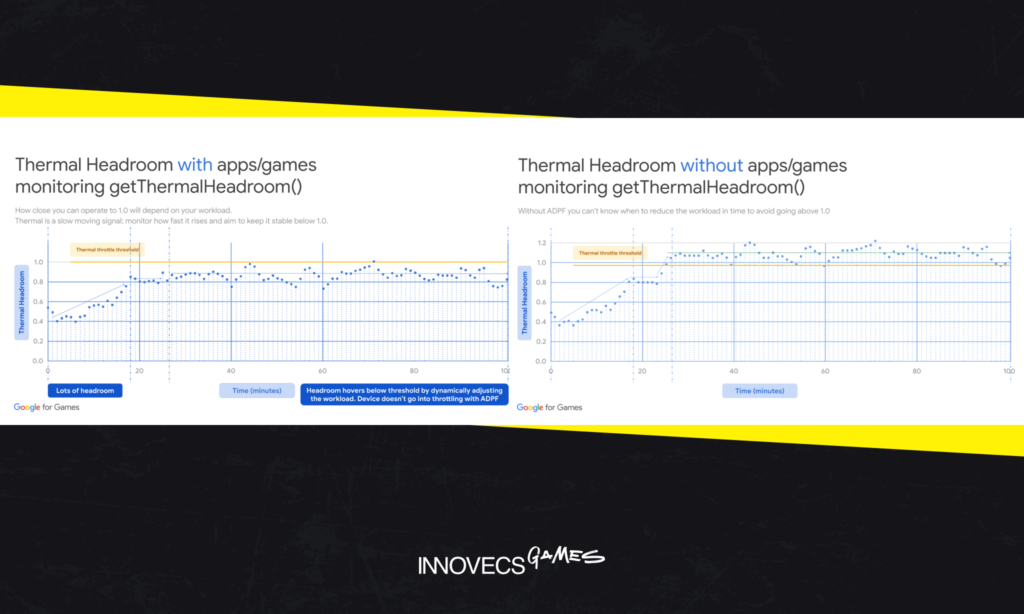
Most of the engineering goes into mid-range Android, since that’s what most of the audience holds. Three things decide the result there. Asset compression comes first, since it fixes the download size and the memory footprint in one go. Then frame rate stability, which counts for more than the peak figure, because a steady 30 feels better in the hand than a 60 that sags after ten minutes. And then there’s heat, the limit you don’t see on a spec sheet: once a phone throttles halfway through a session, the frame rate goes and the battery goes with it. Nobody reviews your texture compression. They review a warm phone. Android’s Dynamic Performance Framework gives a game a thermal reading it can act on, lowering quality before the system does it by force, and both Unity and Unreal Engine have integrations for it.
QA grows to match. Your own analytics will tell you which devices to test on. Sort them by chipset and GPU family when you do, since two phones sold under one name can turn out to be different machines inside. A dozen physical devices plus a cloud device farm covers most of what players will report. Every language is a test pass of its own as well: clipped strings, missing glyphs, and store text that has to match the build.
Store rules move every year and they land hardest on ports. Since November 1, 2025, Google Play has required apps targeting Android 15 or later to support 16 KB memory pages. In practice every native library in the project must be recompiled, including the old middleware binary nobody has touched in four years. On the Apple side, our piece on iOS game development via Unity covers the build and review path.
Porting From Mobile to PC and Console
The traffic runs the other way too, and it’s growing. Cygames brought Umamusume: Pretty Derby, a mobile game, to Steam in June 2025, and within two weeks it had passed 50,000 concurrent players. Going up in hardware removes the performance problem and leaves three others. The interface was drawn for a thumb on a tall screen and has to be rebuilt for a wide one with a controller or a mouse. Art made for six inches looks soft on a monitor. And the business model has to move: purchases go through the new store’s billing, rewarded ads have no equivalent on a console, and sessions built to last three minutes need a reason to last thirty. Settle the last one first. The first two can be estimated, but the business model is a design decision and nobody can scope around it.
Porting to Web and Instant Platforms
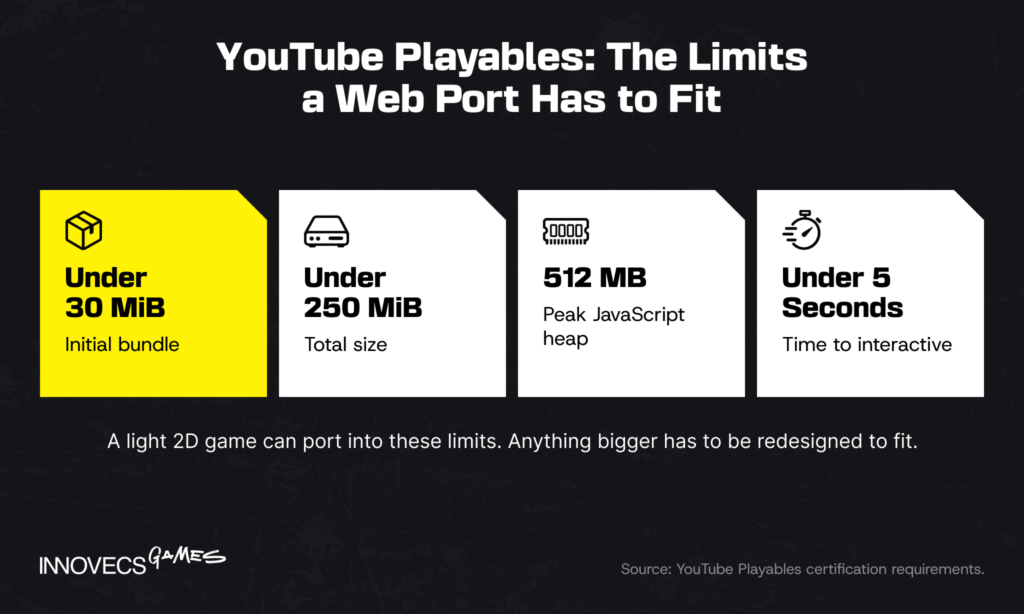
WebGL and HTML5 builds reach players with no install at all, and instant games inside messaging and video apps put them in front of very large audiences. The price is a hard ceiling. YouTube Playables requires an initial bundle under 30 MiB, a total under 250 MiB and a peak JavaScript heap of 512 MB, and it wants the game interactive in under five seconds. That’s less time than most games spend showing their own logos. A light 2D game can port into those limits. Anything bigger has to be redesigned to fit, and it’s worth saying so before the estimate.
Choosing the Right Engine and Tools for a Port
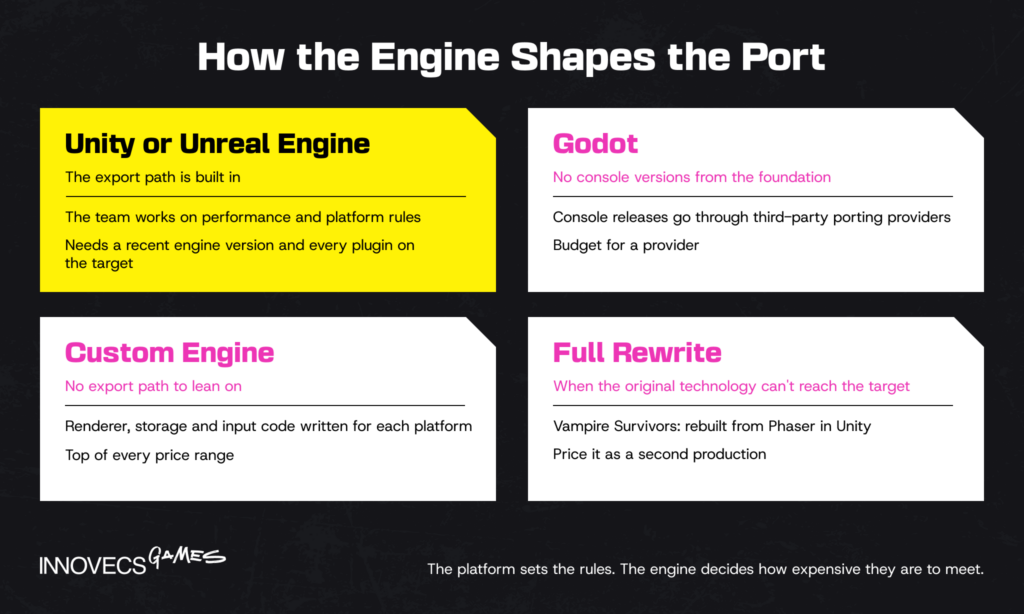
The platform sets the rules. The engine decides how expensive they are to meet, and it does so long before anyone asks for a port. Hollow Knight: Silksong launched on nine platforms on the same day in September 2025, from a studio with a core of three developers. It runs on Unity, and none of those nine versions was a port. Three people, nine platforms, one day. Most studios have had worse launch weeks with one. That’s the case for cross-platform game development over porting later, and if you haven’t chosen an engine yet, our Unity vs Unreal comparison looks at platform reach for both.
The tools around the engine matter almost as much. Middleware for audio, physics and video is licensed per platform as well as built per platform, so check the contract along with the download page. Version control needs a branching plan that keeps the port in step with the main game. Build automation, set up in step 3, is what tells you about breakage the next morning and not a week later.
Unity and Unreal Engine Ports
Both engines already contain the export path. Unity lists more than 25 supported platforms, and Unreal Engine has shipped games on every current console. So on either one, the port team spends its time on performance and platform rules, working in C# or C++ the studio knows.
Two conditions apply. The engine version has to be recent, since new console SDKs are integrated into current engine releases first. And every plugin needs a version for that platform. Godot is the exception among popular engines: its foundation doesn’t maintain console versions, so those releases go through third-party porting providers and you should budget for one.
Custom Engines and Full Rewrites
With a custom engine there’s no export path to lean on. The studio’s own engineers, or a partner’s, write the renderer, storage and input code for each new platform, and that’s expensive C++ work few people can do. Those few know it. Custom-engine ports sit at the top of every price range for that reason.
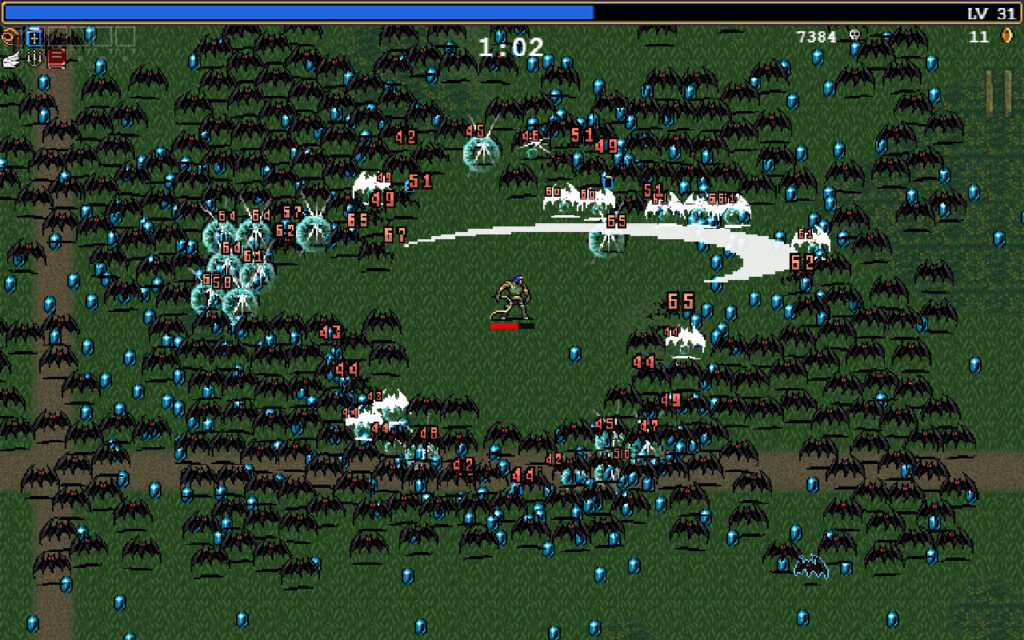
Sometimes the right answer is a rewrite. Vampire Survivors, the game from the readiness check, was built on Phaser, a JavaScript framework meant for web pages. That was fine on PC and a problem everywhere else. Poncle rebuilt the game in Unity, and tech director Sam McGarry said the goal was for players not to notice the change. A rewrite beats a port when the original technology can’t reach the target at all. Price it as a second production with a known design.
Who You Need on a Porting Team
Whatever the engine, a mid-sized port runs on the same three to five people, and each role owns one thing nobody else can.
- Engine and gameplay programmers own the build: the graphics API, platform services, memory and frame time.
- Technical artists own the assets’ side of the budget. Textures, LODs, shaders and streaming all sit with them, and on a port to weaker hardware their cuts decide how much of the game’s look survives. Our game technical art team does this work.
- A UI/UX designer owns input and readability on the new screen.
- QA testers own the compliance checklist and the regression suite.
- A producer or project manager owns the submission calendar, the platform holder relationship and the list of open risks.
On a small port the producer is often part-time, and that’s fine. What doesn’t work is no producer at all, because the submission calendar then belongs to whoever happens to notice it.
In-House vs Outsourced Porting: Which Fits Your Studio?
Those three to five people can be yours or somebody else’s, and even the largest publishers answer that differently. Sony bought the porting specialist Nixxes in 2021, and Jim Ryan said plainly that it was there to help bring PlayStation games to PC. Microsoft, with a long list of studios of its own, still handed Forza Horizon 5’s PS5 version to an outside team. Both were right for their situation, and five questions tell you which one is yours.
| Question | In-house if | Partner if |
|---|---|---|
| Have you shipped on this platform? | Yes, within two years | No, or not recently |
| Do you hold dev kits and agreements? | Yes | No, or approval is pending |
| Are your engineers free? | Yes, between projects | No, they’re on the next game |
| How many ports are planned? | A steady pipeline | One or two |
| Is the game live? | A platform team exists | Updates already stretch the team |
Three or more answers in one column usually settles it. An even split tends to mean you need both: your own lead and somebody else’s hands.
When an In-House Port Makes Sense
Keep the work inside when porting games is a permanent part of your business: a back catalogue to move, or every new title launching on five platforms. Then the platform knowledge compounds from one project to the next, and so does the tooling. The cost is a team you pay between ports as well as during them. For a single port the sums rarely work, since by the time a new platform hire is productive the project is half over. In our experience studios tend to build a porting team right after the port that needed one.
When to Bring in a Porting Partner
Bring in a porting studio when the platform is new to you, the date is fixed, or your team is busy. With game development outsourcing you get a fixed scope and a dedicated team that arrives with hardware and a certification history. What you give up is knowledge. The understanding of your Switch build sits in the partner’s heads, so write handover documents and a support window into the contract.
Game co-development is the alternative when you’d rather keep that knowledge. The partner’s engineers join your repository and your sprints, and your own people pick up the platform by working next to them. You pay for it twice, in a higher monthly bill and in your tech lead’s calendar. Game porting outsourcing in either form goes more smoothly with teams that share most of your working day, which is one reason studios in the US and Western Europe hire in Eastern Europe, Ukraine included. That’s where our own teams sit, so you’ve now heard that argument from an interested party.
Not Sure Where to Start With Your Port? Let’s Talk
Tell us which engine version you’re on, where the game needs to go and by when. We’ll reply with the readiness check we’d worry about most and a first step that doesn’t commit you to anything.
Working With a Porting Partner
Handing a port over doesn’t hand over the decisions. The platform holder still deals with you as the publisher, your art director still approves every visible cut, and your leads still field questions about code only they understand. The practical questions start after the contract is signed.
Running the Seven Steps With a Partner
Most bad stories about porting vendors come down to one gap: nobody agreed which side does what at each step. The split below is the one we’d write into a statement of work, and it answers the question a head of production asks first: how much of the team’s time the port will take.
| Step | The partner does | Your team still does | Signs off on your side |
|---|---|---|---|
| 1. Audit | Reads the code, profiles, writes the risk list | Grants access, explains old decisions | Tech director |
| 2. Access | Works on its own kits and agreements | Stays publisher of record with the platform holder | Producer |
| 3. Adapt | Platform layer, saves, build pipeline | Reviews changes to shared systems | Tech lead |
| 4. Optimize | Profiles and proposes cuts | Approves every visible change | Art director |
| 5. Controls and UI | Builds input and interface | Plays it and judges the feel | Design lead |
| 6. Test | QA passes, submission builds, fixes | Presses the submit button | QA lead, producer |
| 7. Launch | Day-one patch and support window | Store page, pricing, community | Executive producer |
The middle column never empties. In the projects we’ve scoped, it adds up to about a day a week from your tech lead, plus a few hours each from the art lead and the producer. That’s worth knowing before the port is approved, because those are the people with the least time to give, and a question that waits three days on their desk stalls the whole partner team.
Two things keep that manageable. Use the “Done when” lines from the steps above as acceptance criteria in the contract, so a milestone is accepted on a measurement and nobody has to argue it in a meeting. And review a build on the dev kit every week. A slide can say the frame rate is on track, but the kit will show you whether it is.
Your CTO will want code access settled before any of this. The partner should work in your repository under your branching rules, with access limited to what the port needs, and with the NDA and IP assignment signed before the first clone. Console access is a separate matter. Platform agreements generally don’t let you pass your SDK to another company, so the partner needs its own license for every platform it touches. Our porting cost guide lists the other checks worth running before you sign.
When a Port Is Already in Trouble
Not every call for outside help comes at the start. A common one arrives six weeks before submission, and it has a recognizable shape: the frame rate target has been missed at two milestones running, a first submission came back with a long list, or the engineers doing the port were pulled back to the main game.
Extra people help at that point if the work can be split. Certification failures split well, since each one is a separate fix with a clear test. Optimization splits only by system, so one engineer takes streaming while another takes shaders. What never splits is a decision nobody has made, such as which content to cut.
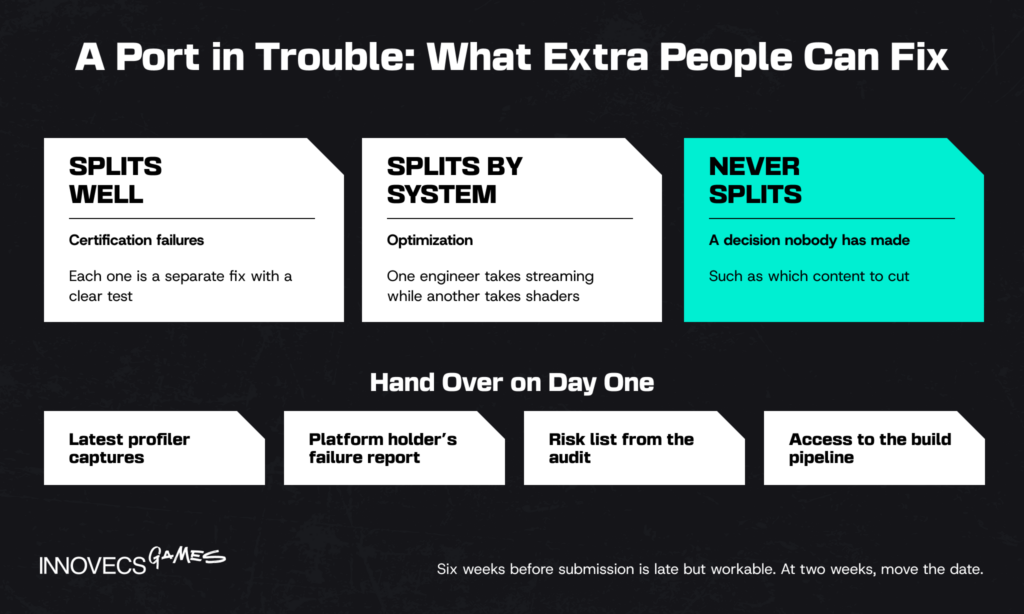
Hand a rescue team four things on the first day: the latest profiler captures, the platform holder’s failure report, the risk list from the audit, and access to the build pipeline. Expect them to spend the first week reading before they change anything. Six weeks out is late but workable. At two weeks the honest advice is to move the date.
Porting a Back Catalogue
Publishers rarely move one game. The usual brief is several titles onto one or two new platforms, and the order matters more than the head count.
- Start with the title on the newest engine version. The platform layer built for it (saves, accounts, achievements, the build pipeline) carries over to every later game on the same engine.
- Group the rest by engine version. Each new version forks that shared layer, so three games on one version cost less to move than three games on three.
- Stagger the submissions. Certification rounds for two titles in the same week compete for the same QA team and the same producer. Microsoft spaced out its first four games on rival consoles in 2024: Pentiment, Hi-Fi Rush, Grounded and Sea of Thieves arrived one at a time between February 22 and April 30.
- Add teams after the first title ships. A second and third team can then work in parallel from a pattern that has already passed review.
Volume is also the argument for giving the port, its QA and its certification to one partner. Split them across three vendors and a failed submission produces three opinions about whose defect it is. With one partner there’s one owner, and the fix starts the same day. The trade is dependence on that partner, which is why the handover terms above matter more as the catalogue grows.
Porting Costs and Timelines: What to Budget For
The readiness check asked you to put a number next to the port, and this is where that number comes from. Published prices for game porting services vary so widely that an average is useless, so the figures here come from one place: our own scoping. Each range covers a single target platform and includes certification QA. Platform fees are extra, and the rates behind the numbers are Eastern European.
| Port scope | What it looks like | Typical range | Timeline |
|---|---|---|---|
| Simple | 2D or light 3D on a current engine, similar hardware | $20,000 to $60,000 | 6 to 12 weeks |
| Mid-level | 3D game needing real memory and frame rate work | $60,000 to $180,000 | 3 to 6 months |
| Complex | Custom engine, open world or online play, big step down in hardware | $180,000 to $600,000 and up | 6 to 12 months or more |
Source: Innovecs Games delivery data, projects scoped 2023 to 2026.
Two games in one row can still land far apart, and the reason is almost never the hourly rate. Rates are just the part everyone enjoys negotiating.
What Drives Porting Cost
Six cost drivers move a port inside its range, and the first two are settled before you ask anyone for a quote.
| Driver | Cheap when | Expensive when |
|---|---|---|
| Engine | Current Unity or Unreal Engine release | Old version, or a custom engine |
| Code quality | Input, saves and file access are abstracted | PC assumptions are spread through the code |
| Target platform | Similar hardware class | A big step down in memory and CPU |
| Optimization depth | The game already has a memory budget | Nobody has profiled it on weak hardware |
| Certification | Checked against the requirements all along | Read for the first time before submission |
| QA scope | One platform, one language | Several hardware profiles and many languages |
Only one of the six rows describes the platform. The other five describe your game and your habits, which is where a project scope gets cheaper. The contract type moves the price as well. Under a fixed-price contract the vendor carries the overrun risk and adds a margin for it, and under time and materials you carry it and pay by the hour. Either way, ask for the audit before the number.
Typical Timelines by Platform
The 20-week calendar earlier showed one port from the inside, and it’s a single point in a range. Engineering time changes with the target, and every platform adds a review at the end that differs more than most plans allow for.
| Target | Typical engineering time | Review before release |
|---|---|---|
| PlayStation 5, Xbox Series X|S | 3 to 6 months | Console certification, usually two rounds |
| Nintendo Switch 2 | 3 to 6 months | Lotcheck, usually two rounds |
| PC on Steam | 2 to 6 months | Build review, 3 to 5 business days; Valve asks you to allow 7 |
| iOS | 4 to 9 months | App Review; Apple says 90% of submissions clear in under 48 hours |
| Android | 4 to 9 months | Google Play review; up to seven days or longer for some accounts |
| Web and instant platforms | 1 to 3 months | None for an open web build; instant platforms run their own checks |
Source: engineering time from Innovecs Games delivery data, projects scoped 2023 to 2026; review times from the platform documentation linked in the table.
The mobile reviews are the fastest in that table and the mobile ports are the longest. Review speed tells you nothing about how hard the work is.
How AI Is Changing Game Porting
The obvious question about every figure above is whether AI brings it down. AI has already changed the routine half of game porting. On the half that decides whether the result is any good, it’s still unproven.
Code conversion. Porting is full of the work AI coding assistants do best: API wrappers, shader translation, build scripts, serialization. Platform holders have noticed. Apple’s Game Porting Toolkit 4 ships with a companion repository of open-source agent skills, so a coding agent can work through the steps of bringing a game to Apple hardware. The best public evidence that this scales comes from outside games. Airbnb reported converting nearly 3,500 test files to a new framework in six weeks with an LLM pipeline, against an original estimate of a year and a half. Look at why it worked, though. Every converted file could be checked automatically, and about a hundred had to be finished by hand. A game codebase rarely has that safety net, and without tests an “almost right” conversion survives until certification finds it.
AI upscaling and asset conversion. Upscalers have moved part of the optimization problem from artists to neural networks. If the hardware can rebuild a sharp image from fewer pixels, the port can render fewer pixels. Some of what the player sees is invented, and players are fine with that as long as nobody points out which part. Sony’s Mark Cerny announced an upgraded PSSR upscaler for PS5 Pro in February 2026, built with AMD, and Resident Evil Requiem used it at launch. On the asset side, batch tools now handle the first round of texture downscaling and LOD generation, and a technical artist reviews the output before it goes into the build.
Automated QA. Regression testing is the obvious target, since a port repeats the same checks after every optimization. At GDC 2026 Razer showed QA Companion-AI, which drafts test plans from a design document, sends agents through the game to run them, and flags rendering and collision bugs from the footage. Notice what the announcement leaves out: there’s no figure for bugs found or hours saved. The agents can play a build, and their makers aren’t yet quoting what they’re worth on a shipped game.
Where being wrong costs the most, a person still makes the call. Take performance profiling: a frame capture will show you where the time went, but it has no opinion on which effect the game can live without, and somebody has to have one. Platform certification is next, because the requirements sit behind NDAs and the edge cases live in people’s memory. Then there’s game feel. No tool yet catches the moment a tester says the jump lands late on this controller. Our article on AI in game development covers the wider picture. We’d staff a port the old way: senior people first, with the tools taking the typing.
How Innovecs Games Helps You Port Your Game
Innovecs Games has delivered 300+ games in over a decade, with 200+ developers and artists working for game studio and publisher clients in the US, UK, EU, Israel and Australia. Engineering, technical art and UI/UX are the disciplines we’re built around, and a port leans on exactly those. Our game engineering services team handles engine-level work, performance and platform integration for console, PC and mobile.
How we join depends on what you already have. If your team is mid-production and the new platform has to launch alongside the others, co-development puts our engineers in your repository. If the game is finished and the scope is clear, outsourcing hands us the port with a date attached. If you only lack a rendering engineer or a technical artist for a few months, staff augmentation fills that seat. We also take on full-cycle development for new titles, and our game porting services run on the same teams.
We’re not the cheapest option for a simple 2D port. A two-person specialist will quote less for that job, and for that job they’re probably the right call. We make more sense when the port needs all of those disciplines pulling in one direction. Our portfolio shows the studios and publishers we’ve worked with.
FAQ
How do you port a game from one platform to another?
Start with an audit of the code, and apply to the platform holder the same week, because approval takes longer than anyone budgets for. Once the game boots on the new hardware, most of what’s left is optimization, a rebuilt control scheme and UI, and compliance testing, with certification or store review to close it out. If you want one rule for how to port a game well, it’s this: the build on the dev kit is the only progress report that counts.
What is the average cost of a game port?
There isn’t a useful one. A small 2D game on a current engine can reach a second platform for about $20,000, and a large game on its own engine can pass $500,000. Most first ports we scope land in the lower half of that spread. Ask for a range tied to an audit of your build, since a single figure quoted without one is a guess.
How long does a game port usually take?
It depends on the gap between the two platforms more than on the size of the game. A light game moving between similar machines can be done in two to three months, a typical 3D title takes three to six, and a custom engine can stretch the work to a year. The platform holder’s approval and review sit on top of that, and they’re the weeks that don’t get any shorter when you add engineers.
Is it possible to port a game without the source code?
Not in the usual sense. With no source you’re left with emulation, where the original program runs inside software pretending to be the old hardware, or with reverse engineering, which is slow and legally delicate. Retro collections are built on emulation all the time. The more common trap with newer games is source that’s incomplete, so check what’s actually in the repository before you promise anyone a date.
What is the difference between a port, a remaster, and a remake?
Ask what the player is supposed to notice. With a port, nothing: it’s the same game on new hardware. A remaster shows off sharper textures, better lighting and cleaner audio on top of the original, and a remake is a new build of an old design. Budgets follow the same order, from an engineering team to a full production.
Is porting to consoles harder than porting to mobile?
They’re hard in different ways. A console port answers to a platform holder, who has to approve the build against a long requirements list before it can go on sale. Nobody approves a mobile port in that sense, which sounds easier until you’ve designed touch controls from scratch, kept a phone from overheating and tested on a few hundred Android devices. In most teams’ experience console certification is the steeper learning curve and mobile the bigger design risk.
Should I port in-house or work with a porting studio?
A porting studio is the better choice if your team has never shipped on the platform, or if you can’t see a second port coming after this one. You’re paying for people who have already been through approval, hardware and certification, so that learning curve isn’t yours to climb. Keep it in-house when ports are a steady part of your release plan, because then the team you train has a next project to move to.
What do studios need before porting to consoles?
Four things have to be in place: a developer account approved by each platform holder, dev kits, an engine license that covers console builds, and an age rating for every region you’ll sell in. Get hold of the platform’s compliance checklist as early as they’ll let you have it, too. Of the four, approval and hardware are the two that money can’t hurry.
🤖 How is AI changing the porting process?
Mostly by taking over the repetitive parts. A coding assistant will draft the API wrappers and build scripts, an upscaler lets the port get away with rendering fewer pixels, and test agents can rerun the regression checks while everyone’s asleep. How much that saves is hard to pin down, since few teams publish figures. Whatever the tools produce, a senior engineer still reviews it before it goes near a submission build.
🤖 Can AI convert a game to another platform on its own?
No. Translating a shader or wrapping a platform call is within an AI agent’s reach today, but the agent has no dev kit to run the result on, and it can’t tell you how the game feels in the hand. It also can’t read much of the documentation, which platform holders share only with registered developers. What you can realistically expect for now is a smaller team that finishes sooner.
Ready to Bring Your Game to New Platforms? Let’s Talk
If you’re still working out how to port games from your catalogue to a new platform, send us the build, the engine version and the platforms you have in mind. We’ll come back with the order we’d tackle them in and what would have to be true for the date to hold.