Weapon Concept Art for Games: Styles, Process, and What It Really Takes
Take any weapon from Elden Ring or Bloodborne. Someone drew it first. Not modeled it, not textured it. Drew it. That drawing is where the actual design decisions happened, and everything built after it was just execution.
That’s the job. Figure out what the weapon looks like before production starts. Get the shape, the materials, the proportions, the mood down on paper. Give the rest of the team something to work from instead of a description they’ll each interpret differently.
This post covers the main styles, how the process works, what tools get used, and what it costs.
What Is Weapon Concept Art?
It’s 2D reference created before any production asset gets built. A concept sheet tells the art team what a weapon looks like, what it’s made of, how big it is, and what kind of world it belongs in. Not a final asset. A blueprint.
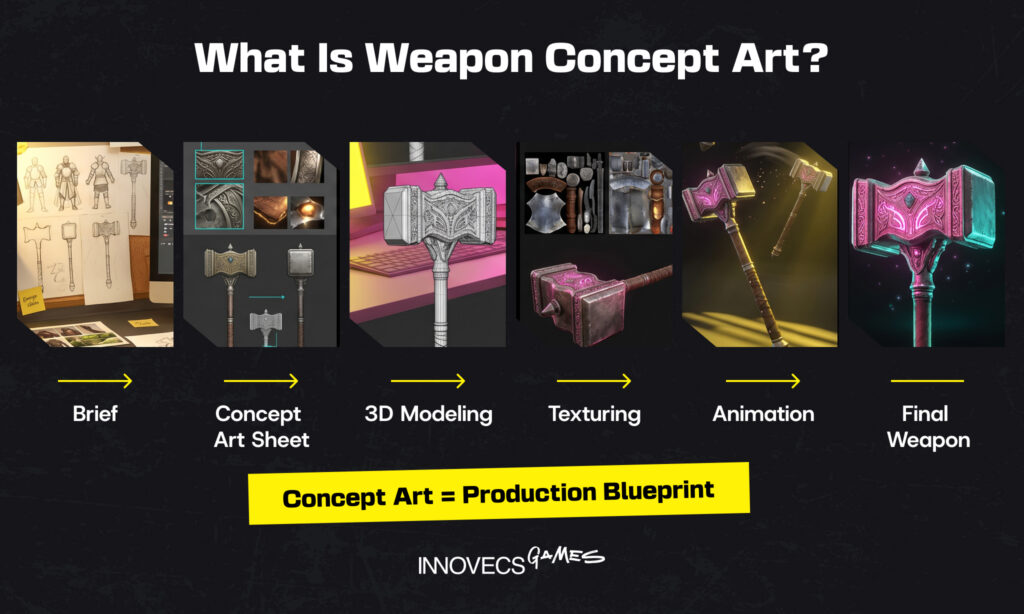
It’s a different discipline from character concept art or environment work, and a different stage from the broader game art production process. Narrower scope, different priorities. A single weapon can need multiple views, material callouts, and a handful of variant explorations before anyone’s ready to model it. That’s normal.
Why Weapon Concept Art Matters in Game Development
Most of the value is about catching problems early. A concept sketch costs almost nothing to change. A half-built 3D asset costs a lot.
Art and animation account for 25–40% of a typical AAA production budget, and those costs have been rising roughly 14% year-over-year as fidelity demands increase. At that scale, the difference between a design problem caught at the sketch stage and one caught after a 3D asset is half-built isn’t marginal. It’s the difference between an hour of work and potentially days of rebuilding.
Without solid reference, things drift. One artist interprets the brief one way, another goes somewhere different entirely. Two weapons end up in the same game looking like they’re from different projects. The art director flags it late, after the assets are built, and now someone’s rebuilding instead of moving forward.
Good concept work stops that from happening. Proportions, materials, tone: all locked in at the sketch stage, when the cost of changing anything is basically zero. It also gives directors and leads something concrete to react to early, which means fewer surprises later. A war-worn sword and a pristine royal blade are both “swords” in a doc. A concept sheet makes the difference visible.
Types of Weapon Concept Art
The genre, tone, and gameplay function of a weapon shape every decision a concept artist makes, from silhouette to material to how much detail the final sheet needs. Here’s how the main categories break down.
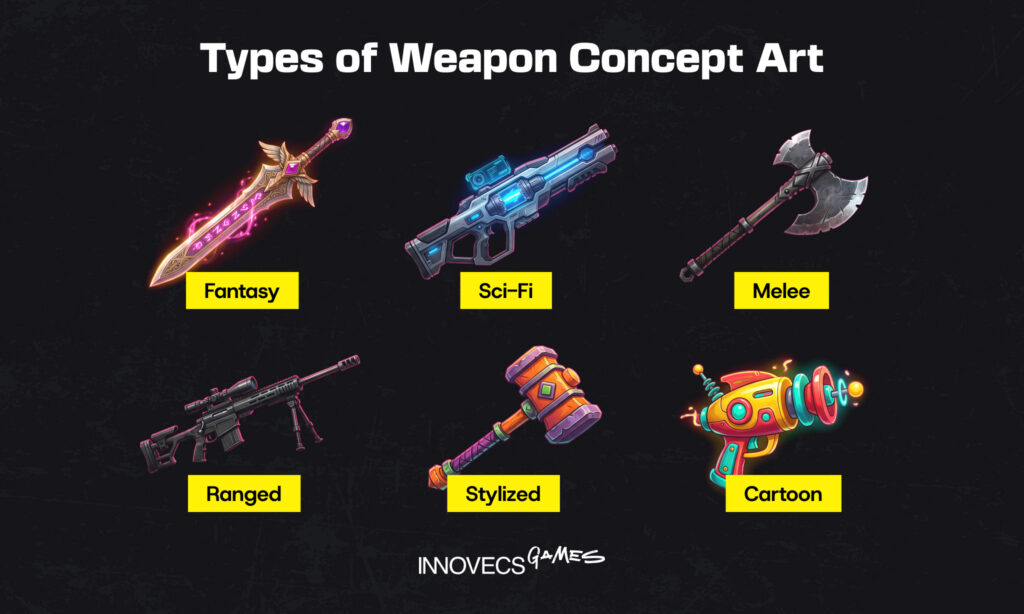
Fantasy Weapon Concept Art
This is where concept artists get the most creative latitude. Swords with impossible proportions. Axes wrapped in magical runes. Staves that blur the line between tool and creature. The design logic is internal: does it feel right for the world, even if it couldn’t exist in ours?
Games like Elden Ring and Monster Hunter push this hard, with weapons that have their own lore baked into the shape. The real challenge isn’t imagination — it’s making something fantastical still read clearly as a weapon at thumbnail size.
Sci-Fi and Futuristic Weapon Concept Art
Sci-fi weapon art has a tighter leash. The design needs to feel plausible, just within a speculative technological framework. Halo’s weapons are the benchmark: functional-looking, manufacturing-implied, visually consistent with the universe they live in. Futuristic designs can push further into abstraction, but the good ones never lose the silhouette or the implied use.
Melee Weapon Concept Art
Close-range weapons are the most technically unforgiving category. A blade that reads beautifully in a detailed illustration can completely disappear in a fast-paced game environment. Concept artists working on melee weapons spend the bulk of their time on shape exploration before touching any detail. If the silhouette doesn’t work at every size the weapon appears in-game, the design doesn’t work.
Ranged and Projectile Weapon Concept Art
Guns, bows, crossbows, and launchers all have moving parts, implied loading mechanisms, and ergonomic considerations that ground the design even in stylized games. Concept sheets for ranged weapons often include exploded views and detail callouts. You need to communicate not just what the weapon looks like, but how the pieces relate to each other.
Stylized and Cartoon Weapon Concept Art
Stylized weapon design puts shape and personality first. Think Fortnite or Ratchet & Clank: weapons that are immediately readable, slightly exaggerated, designed to feel fun before they feel dangerous. Color and silhouette carry almost everything here. The concept process focuses more on shape language iteration than on material or texture depth.
The Weapon Concept Art Process: Step by Step
The process looks different depending on the studio and project, but the core stages are consistent.
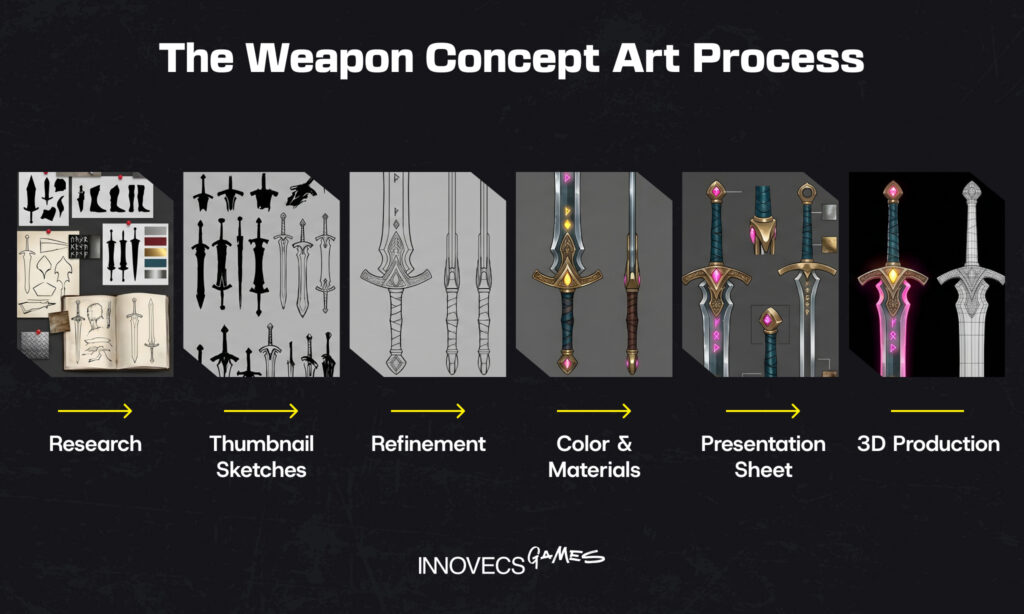
Research and Reference Gathering
Before anything gets drawn, there’s a lot of looking. Concept artists pull historical references, material studies, genre examples, and art direction briefs to build a foundation for the design. This stage sets the scope: what the weapon needs to communicate and what visual language the game is already using. Skip it and you’ll probably design something that doesn’t fit the world. Technically accomplished, but wrong.
Thumbnail Sketches and Silhouette Exploration
This is where design actually starts. Artists produce a high volume of small, rough thumbnails, exploring different silhouettes before committing to any direction. Quantity first, quality second. A strong silhouette that reads clearly at a small size is the foundation everything else builds on.
Most of these sketches get thrown away. That’s the point.
Refinement and Linework
Once a direction is selected, the artist develops it into a cleaner drawing. Proportions get locked in, details emerge, and the design becomes something the team can review and give real feedback on. This is where the bulk of the craft decisions happen. If you’ve ever followed a weapon concept art tutorial, this is the stage they spend the most time on, because refinement is where judgment calls live.
Color, Materials, and Lighting Studies
Line art answers one question: what’s the shape? Color and materials answer everything else. Is the blade oxidized steel or enchanted obsidian? Does the grip look like it’s been through twenty battles or never left the armory? These aren’t aesthetic choices — they’re worldbuilding decisions that affect how the weapon reads next to every other asset the player sees.
Final Presentation Sheet and Turnarounds
What comes out the other end is a presentation sheet: front, side, back views, detail callouts, material notes, sometimes a few variants. For anything going into a full production pipeline, turnaround views are non-negotiable — a 3D artist needs every angle, not just the hero shot. This sheet travels with the weapon through the rest of production. It’s the thing everyone points to when there’s a question about what the weapon is supposed to look like.
Tools and Software Used for Weapon Concept Art
The toolset hasn’t changed much in recent years, not because there’s nothing new, but because the existing tools are genuinely good and production pipelines are built tightly around them. Switching has a real cost.
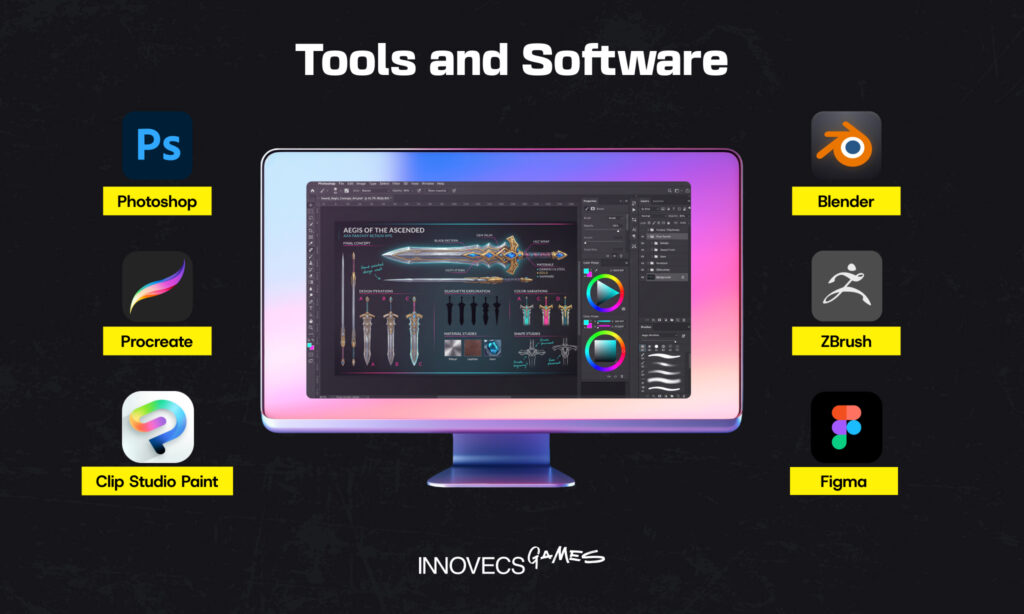
Adobe Photoshop is still where most production-ready concept sheets get finished. Art directors expect PSD deliverables, and that expectation alone keeps Photoshop the default even for artists who sketch elsewhere. The brush engine and compositing options are hard to beat for anything that needs to travel through a full studio pipeline.
Procreate is the go-to for early sketching, especially on iPad. Fast, tactile, great for thumbnails. It breaks down when you need annotation layers, callout text, and the structured layout a final presentation sheet requires — which is why most artists switch to Photoshop before delivery.
Clip Studio Paint has a loyal following, particularly in stylized and linework-heavy work. Its vector line tools give it an edge for clean, scalable weapon illustrations. Strong in the anime-adjacent corner of game art.
Figma shows up mainly for packaging and sharing — wrapping concept sheets with notes, assembling style guides, presenting work to stakeholders who don’t open PSDs. It’s not a drawing tool, but it’s useful in the handoff.
Blender and ZBrush get pulled in occasionally when an artist needs to block out perspective or check how a complex shape reads in three dimensions. That’s a reference step, not a deliverable. The actual concept work stays 2D. For studios that need technical art alongside concept work, game technical art outsourcing covers that side of the pipeline separately.
What Makes a Strong Weapon Design?
The answer isn’t always “more detail.” Some of the most iconic weapon designs in games are remarkably simple. They just do a few things exactly right.
Silhouette first. A weapon that doesn’t read at thumbnail size doesn’t work. Art directors test this constantly: shrink the design down, cover the color, look at the shape alone. If you can’t tell what it is, the design hasn’t solved the core problem yet. Melee weapons in particular live or die here. A sword or axe in fast combat needs to be instantly recognizable at any size it appears on screen.
Functional logic, even when it’s fantasy. A weapon doesn’t need to be physically possible, but it needs to feel like it has internal logic. Elden Ring’s weapons are a good example: fantastical, yes, but each one implies a history, a making process, a reason for its shape. Designs that feel random don’t connect with players the same way.
Fit with the game’s art style. A photorealistic assault rifle dropped into a cartoon world doesn’t just look wrong — it breaks trust with the player. Weapon concept art has to solve the design problem within the visual language the game has already established. This is one reason concept artists spend time studying existing assets before sketching anything new.
Narrative through the design. A war-worn sword and a pristine royal blade are both swords. The concept art is what makes that distinction legible before a single line of lore is written. Surface wear, material choices, proportion. All of it tells the story. The best weapon designs communicate character and world without needing a caption.
How AI Is Changing Weapon Concept Art
AI has made the earliest stages of the concept process faster. Tools like Midjourney, Stable Diffusion, and Adobe Firefly can generate a high volume of silhouette variations and mood references in a fraction of the time it would take to sketch them manually. For studios under tight pre-production timelines, that’s a real advantage, and the numbers back it up. According to the IGDA’s 2024 industry report, studios using AI tools in early production reported a 60% reduction in time spent on repetitive pre-production tasks, with average task time dropping from 170 minutes to 68 minutes. Nearly 40% of studios reported productivity gains of over 20%.
Adoption is moving fast but unevenly. Around 73% of game studios were already using some form of AI tooling by 2024, with 88% planning to expand usage. The gap between roles is notable: 85% of executives report using AI tools, compared to 58% of artists, reflecting genuine caution about consistency and creative control rather than simple resistance to change.
Past the thumbnail stage, things break down fast. The core problem is consistency: get Midjourney to generate twenty silhouette variations in an afternoon, fine. Ask it to produce the same weapon from a different angle, in the same style, matching the other assets in your game — and you’re back to manual work. AI images don’t hold together across iterations the way a human-designed sheet does.
The other issue is structural. AI doesn’t know how a weapon is built. It doesn’t know which parts move, where the grip sits relative to the balance point, or why a crossbow limb has that curve. For fantastical designs, that gap matters less. For anything that needs to feel physically grounded, a concept artist still has to make those calls — and AI currently can’t.
AI is a useful ideation accelerator — not a replacement for the craft. Studios getting real value from it are using it to expand the range of options at the start of a project, then bringing in skilled artists to develop those options into something production-ready. For more on how AI is reshaping game development broadly, AI in Game Development Is Changing Everything covers it in more depth.
How Much Does Weapon Concept Art Cost?
Pricing swings a lot. A mid-level freelancer might charge $25–$100/hr or $150–$800 per finished sheet. A senior artist with AAA credits on their portfolio is a different conversation entirely — Salary.com‘s 2026 data puts experienced US-based concept artists at $65–$350/hr depending on how deep their specialization runs. A realistic weapon with full orthographic turnarounds and material callouts sits at the top of that range. A stylized weapon with one or two views is closer to the floor.
Studio rates run higher — but you’re paying for more than the drawing. Project management, structured feedback cycles, consistent art direction across a full roster, and production-ready files as the deliverable rather than a raw PSD. For studios building out a full game asset library, that overhead pays for itself.
What drives cost up:
- Complexity (a magic weapon with particle effect callouts versus a basic melee prop)
- Number of angles and views required
- Art style (photorealistic demands more rendering time than stylized)
- Turnaround time
- Number of revision rounds
| Freelance Artist | Concept Art Studio | |
|---|---|---|
| Hourly rate | $25–$350/hr depending on experience | Higher, but includes PM and oversight |
| Per-sheet cost | $150–$800 per finished sheet | Project-based, typically bundled |
| Art direction | You provide it | Included in the process |
| Consistency across assets | Depends on the artist | Managed across the full roster |
| Revision rounds | Negotiated per project | Structured (typically 2–3 rounds) |
| Deliverable formats | Raw PSD, varies | PSD, annotated sheets, turnarounds, palette callouts |
| Best for | Single weapons, tight budgets, fast turnarounds | Full game projects, teams without in-house art lead |
Outsourcing to a concept art studio is usually the more cost-effective path for full game projects, especially when in-house art direction bandwidth is limited. For a broader look at how concept art pricing works across asset types, Cost of Concept Art Creation for Games breaks it down in more detail.
How to Work with Innovecs Games
The process starts with a brief. A strong one covers the genre and tone of the game, the weapon’s gameplay function, style references, and examples from comparable titles. The more context upfront, the fewer revision cycles later.
Weapon concept art brief checklist:
- Genre and overall art style of the game (with visual references)
- Weapon type and its function in gameplay (primary, secondary, melee, ranged, boss drop)
- Tone and narrative context (who uses this weapon, what’s its history)
- Reference games or artists whose style fits what you’re looking for
- Technical constraints (poly budget range, in-game perspective, UI display size)
- Number of views required (front, side, back, detail callouts)
- Deliverable format (PSD, PDF, turnaround sheets, color palette)
- Revision rounds included and feedback timeline
Innovecs Games typically runs two to three rounds of review: direction exploration, refinement, and final production notes. Deliverables are formatted for handoff: PSD files, annotated presentation sheets, turnaround views, and color palette callouts the 3D team can work from directly.
For studios without an in-house art team, or those scaling for a specific production phase, this kind of co-development keeps quality consistent without the overhead. More on the full range of services at Game Art Services.
Common Weapon Concept Art Mistakes to Avoid
Even experienced teams run into the same problems. Here’s what to watch for before anything goes into production.
Silhouette that only works at full size. The concept looks great zoomed in, but shrink it to icon size and you can’t tell what it is. Test every design at the smallest size it’ll appear in-game before signing off.
Too much detail too early. Jumping into texture and material before the shape is locked is one of the most common ways to waste time. Refinement should follow silhouette approval, not happen in parallel with it.
No turnaround views. A front-facing illustration isn’t enough for a 3D artist to build from. Without side and back views, you’ll get an asset that looks right from one angle and wrong from every other.
Misaligned style reference. Sending three reference images from three different games with three different art styles leaves too much room for interpretation. The concept artist needs to know which direction to commit to, not synthesize something in between.
Skipping material callouts. “Dark metal with some glow” means something different to every artist on the team. Material callouts and color palette notes are not optional for weapons that go into a shared asset library.
Late art direction. Feedback that arrives after the refinement stage restarts the process from scratch. Build review checkpoints into the brief before work begins, not after the first draft comes back.
Final Thoughts on Weapon Concept Art
Bad concept art doesn’t just look wrong — it costs money. Rework, late-stage art direction changes, assets that have to be rebuilt because no one agreed on what the weapon was supposed to look like in the first place.
The economics are simple: the earlier a design decision gets made, the cheaper it is to change. Weapon concept art is where those decisions happen. Everything downstream is just execution.
If you’re planning a project and want to get that stage right, talk to the team at Innovecs Games.