Home|Blogs|How Much Does a 3D Model Cost? A Price Guide for 2026
How Much Does a 3D Model Cost? A Price Guide for 2026
December 22, 2025 |
5 min read
How much does a 3D model cost? That unspoken question was probably in the air as early as 1963 when Ivan Sutherland’s Sketchpad gave us computer-generated three dimensional objects. The first physical 3D artifact emerged in the 1980s, and the printer that produced it cost $300,000, which is about $1,180,000 today.
While the hardware has democratized considerably, pricing a model hasn’t simplified in the slightest. Most estimates turn out to be wrong because they seldom account for the complexity of 3D designs and the labor that goes into production. Clients, for their part, can’t see how the figures stack up and have no true reference to judge them.
So we asked our modelers at Innovecs for the raw data. The cost breakdown that follows is taken from actual projects.
What Is a 3D Model?
A 3D model is a digital replica of a real or imagined object. It can also exist as a continuous surface or an entire environment. 3D models are constructed using specialized programs.
As opposed to 2D images, a three dimensional image adds depth and volume, letting you view and move it from any direction. The right interpolation of textures, materials, and lighting makes 3D images appear almost real.
Standard Use Cases
3D models are a big deal in the entertainment, science, and engineering industries, although broader utility is underway. First, you can adapt them for games, films, or animated productions to create immersive experiences.
Second, for prototyping consumer goods, architectural demos, or vehicular concepts before the physical versions are made.
Third, for rendering molecular pieces, anatomical structures, or simulations leveraged in research activities.
Core Elements of 3D Model
Three dimensions models have a few essential parts:
Vertices. Points in 3D space defined by X, Y, and Z coordinates. Vertices build out the model’s foundation and determine its structure.
Edges. Lines that connect vertices and shape the outline. A good edge flow is important for smooth bending and clean animation.
Faces/Polygons. Flat surfaces, usually triangles or quads, that create the mesh. Even complex curves are just clever combos of these flat bits.
Textures & Materials. These add surface detail like color, shine, or bumpiness. They make the object look authentic without loading up the model with extra geometry.
As much as these components are invariably associated, different modeling methods are ideal for specific jobs.
3D Modeling Basics
Modeling starts in a digital medium, such as software, where modelers manipulate points (vertices) to create the desired shapes. Four main ways to build 3D models are:
Polygonal Modeling
A mesh composed of polygons is utilized to depict the surfaces of objects. This can include triangles with three sides or quadrilaterals featuring four corners. Polygonal modeling stands as the leading technique, highly recommended for both games and animations.
NURBS Modeling
An abbreviation for Non-Uniform Rational B-Splines, NURBS models are defined not by a mesh of polygons but by mathematical equations that accurately describe curves and surfaces. These equations allow for infinite resolutions along with heightened flexibility and precision. This method is particularly favored in the realms of product and automotive design.
Subdivision Surfaces
This procedure begins with a fundamental low-polygon mesh, referred to as a cage. It is then refined into smaller faces. Subdivision surface is a popular modeling choice among artists dabbling in complex tasks, organic creations. SS are remarkable for visual effects and product visualization.
Sculpting
The sculpting technique is quite similar to the traditional one. In fact, in computer graphics, this style melds organic, freeform sculpting with extended control that is already characteristic of conventional surface modeling. Artists can first outline a base form using typical modeling techniques, then utilize digital sculpting tools to add intricate details. Sculpt modelling is the best recourse if you want incredibly lifelike characters or creatures in your project.
After selecting the appropriate tactic, the actual process would comprise:
Conceptualization for sketching or schematizing the intended object.
Modeling, where you construct the base mesh or the wireframe skeleton.
Texturing, which means layering colors, patterns, and material properties (e.g., burnished steel, porous stone).
Rigging and animation, though optional, help introduce skeletal armatures if motion is required.
Rendering, which is the final phase when you generate the image or sequence with lighting and post-processing effects.
To craft exceptional 3D models, you will need special applications.
Software and Tools Used for Modeling
Modelers use popular programs such as:
Maya, for very sophisticated feature-film-class animation, character rigging, or large-scale CGI themes. Maya is overkill for simple jobs.
ZBrush works for sculpting of ultra-high-resolution organic forms (characters, creatures, jewelry reliefs).
Blender if you prefer a free, open-source option that can still handle modeling, animation, VFX, and CAD-style specs with the appropriate add-ons.
SolidWorks, for products that need to be manufactured. Or for design assemblies with motion, or engineering validation.
Rhino, choose it for precise NURBS surface modeling in industrial, jewelry, marine, or product design. It is also remarkable for engineering validation but needs plug-ins (e.g., Grasshopper, VisualARQ) rather than full built-in CAE.
3ds Max, better applied for arch-viz stills/interiors and real-time game asset creation because of its fast modeling stack and tight Unity/Unreal bridges.
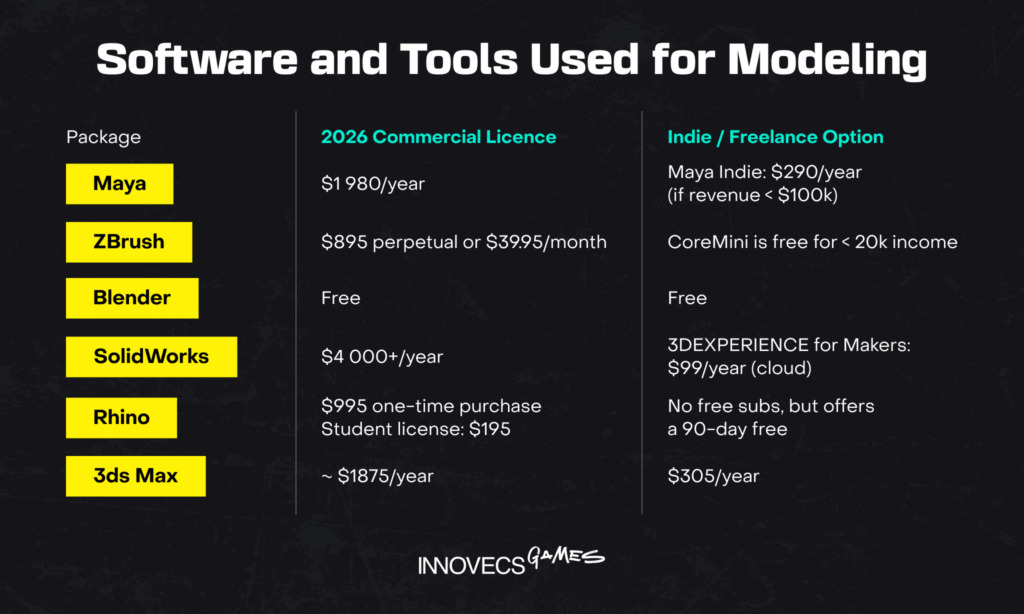
The prices for these tools differ, as illustrated in the image below.
On average, 3d model software costs a few tens to hundreds of dollars. The modeler will likely fold licensing fees into their rate.
Several interdependent variables coalesce to determine pricing structures. These are the pivotal ones.
Detail Level
The number of polygons, texturing requirements, material properties, and level of detail dramatically impact production time.
Photorealistic models require sizable work on surface details, proper UV mapping, and sophisticated shader networks. So it’s only natural to pay heed to these drivers that could bump up 3D model pricing:
Polygon count and topology optimization
Texture resolution and PBR material creation
Rigging and animation capabilities
LOD (Level of Detail) variations
The fastest way to estimate cost is to benchmark your project against one of the five industry-standard buckets.
Level
Typical Deliverable
Geometry Density
Texturing Setup
Production Time
Budget Range (2026)
Level A – Ultra-Basic Assets
Chess pawn, basic crate, bottle
< 2,000 polygons
1 × 1K texture set
2–4 hours
$120–$400
Level B – Basic Props
Chair, sword, desk lamp
5,000–20,000 polygons
1 × 2K texture set
4–12 hours
$300–$1,200
Level C – Stylized Characters
Fortnite-style skin, indie protagonist
30,000–60,000 polygons
3 × 2K texture sets
3–7 days
$800–$3,500
Level D – Realistic Hero Assets
AAA firearm, vehicle, detailed furniture
100,000–300,000 polygons
4 × 4K + ORM maps
2–4 weeks
$2,000–$8,000
Level E – Cinematic / Architectural Assets
Hero building, film-grade vehicle
500,000–2,000,000 polygons
8K+ textures, UDIMs
4–8 weeks
$5,000–$30,000
Please note that it is normal for any rush delivery to incur a 25–50 percent surcharge. Stringent NDAs or exclusive IP transfers may also attract 10–30 percent of the final cost. It’s advisable to assess competitor pricing to see how these vary widely across offerings.
Model Complexity & Purpose
Purpose determines technical requirements, and technical requirements determine how much specialized work goes into your model.
Take a chair—seems straightforward. But a chair for a real-time mobile game needs extreme optimization. You’re probably limited to 2,000 triangles total, single texture atlas, no fancy materials.
The artist spends time making it look good with severe constraints. That same chair for an architectural visualization? Sure, use 50,000 triangles if it renders nice curves.
Product visualization has its own demands. Materials must represent real-world options exactly—this specific walnut finish, that exact brass tone.
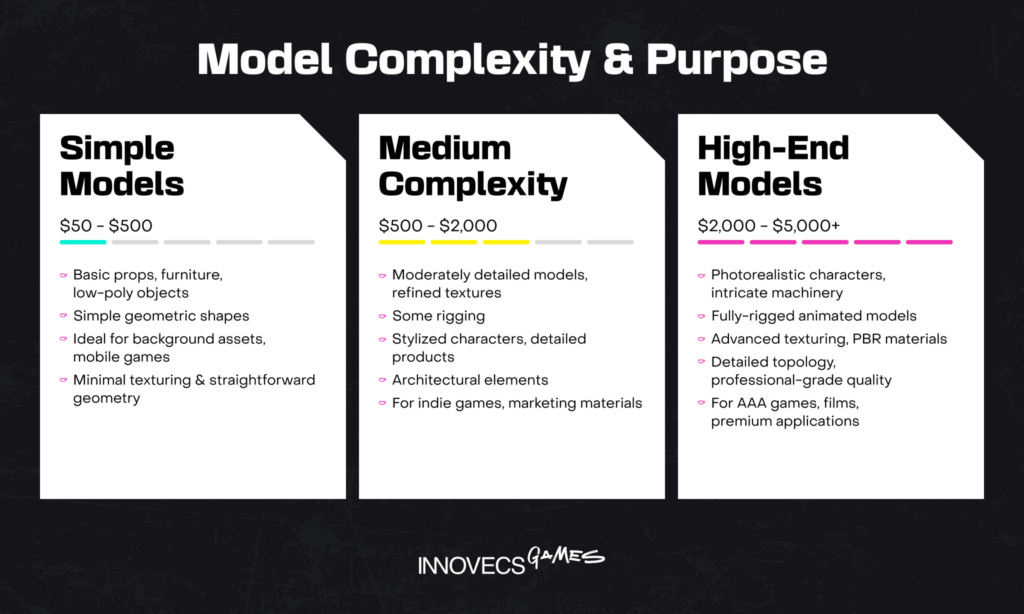
Depending on the intricacy, you can have the following cost tags. Basic projects cap at $500, medium complexity can go as high as $2000, and very intricate shapes may reach $5000.
In some cases, getting the material right takes longer than modeling the object because the client needs eight different wood species, each with accurate grain patterns and finish properties. You can check out this article for a neat breakdown on how much it costs to make a game.
Project Timeline and Urgency
These are also key factors since expedited turnarounds require designers to prioritize your project. They have to commit to extended hours or rearrange their schedule. This premium service adds a 25–50 percent surcharge to baseline rates, with extreme rush jobs commanding even higher premiums.
Designer’s Experience and Expertise
Experience shows up in speed and quality, both of which affect your bottom line. Junior artist quotes 50 hours for a character. Senior artist quotes 25 hours. Client thinks: junior’s cheaper, let’s go that route. Two months later, the junior’s at 80 hours, and the model needs another revision because the topology won’t deform properly.
In the end, it all hinges on the skill set.
Junior 3D artists: $25-50/hour. These folks have maybe 1-3 years of experience, can take on simple models or small projects with clear references.
Mid-level artists: $50-100/hour. They’ve got 3-7 years of experience, work independently, and handle a complex model without constant oversight.
Senior artists and specialists: $100-200+/hour. A senior modeler is a seasoned professional with 8+ years of experience, often a specialist in characters, hard surface, or other disciplines. Their rates seem high until you calculate the total project cost, including their pace and low revision needs.
You have to take into account that various locations of designers contribute to the ballpark number.
Pricing by Model Type & Industry Application
Different 3D asset categories have distinct price brackets, contingent on technical prerequisites, industry, and market demand.
Cost Breakdown by Model Type
Here’s what you’ll confront:
Low-Poly vs. High-Poly Models
Polygon count affects the file size, render speed, animation performance, and detail expression of your model.
Low-poly models use minimal geometry, under 10,000 triangles for a complete object. These are seen in real-time applications—games, VR, AR, live visualizations. Your phone or computer can display them smoothly because the graphics processor isn’t choking on millions of polygons.
High-poly models throw those constraints out. A high-poly character might contain 5 million triangles. You can’t use these in real-time; they’re for pre-rendered work where computers have hours to calculate each frame.
The low-poly barrel relies on textures and lighting to fake the roundness your eye expects. So it takes experience—knowing where you can cheap out on geometry and where you absolutely need more subdivisions.
High-poly models seem easier because you have so much geometry, but they’re actually more demanding in different ways. You need to maintain a clean topology, even with millions of polygons, or your file becomes unmanageable. You’re equally sculpting detail organically in the software, which requires artistic sensibility outside technical modeling.
And the kicker is that most production workflows use both. Artists create high-poly models first, capturing all the detail they want. Then they retopologize down to a low-poly game model and bake the high-poly detail into texture maps. So you’re paying for high-poly creation plus low-poly optimization, plus texture baking. Three distinct skill sets.

Realistic vs. Stylized Models
Realistic models chase accuracy. You’re trying to replicate how models look in the human world, as closely as possible. So the modeler conducts a ton of research, collecting reference photos and understanding material properties. They have to know how light interacts with different surfaces as well.
The cost driver in realism is iteration toward accuracy. Client sees first pass: “The metal doesn’t look right.” Artist adjusts. “Now it’s too shiny.” More adjustments. “The scratches look fake.” Even more adjustments. You’re chasing a moving target called “looks real,” which is subjective but also has objective markers everyone recognizes when you miss them. This back-and-forth takes time. Realistic models often need 30-50 percent more revision time than stylized ones.
Stylized models follow artistic interpretation, not reality. This doesn’t mean they’re easier—you’re trading technical accuracy for artistic coherence. The model needs to match an art style consistently.
All the forms need to share similar approaches to shape simplification. Colors need to work within a defined palette. Line weights and edge treatments need consistency across all assets. It’s a different skill set, leaning more toward design than technical reproduction.
Cost-wise, stylized can be cheaper or more expensive depending on the style and your team’s experience with it. We’ve had stylized projects cost more than realistic ones because achieving a specific art direction in 3D is sometimes harder than just making it look real.
Custom Models vs. Stock Models
Customized solutions ensure models are built to your specifications. For example, you say, “I need a Victorian desk with three drawers, brass hardware, mahogany wood, showing signs of 50 years of use.” Artist builds exactly that. The great side is that the design fits your art style perfectly. It meets your technical requirements precisely.
The model also includes only the details you need, nothing extra. You typically own full rights or exclusive licensing.
Custom is expensive because you’re funding the entire creation process, start to finish, with no cost sharing. In a majority of custom projects, you can expect slower periods. Clear communication, along with project management, is vital.
Stock models spread development costs across many buyers. An artist builds a generic the same Victorian desk, uploads it to a 3D marketplace for $180. Then sells it to 200 people. They’ve made $36,000 from one model, and buyers get it cheap.
The downside is that you can have the same desk for three other companies in your space. Or it has eight drawers when you needed three. Or it’s the wrong wood species. Or it’s built for pre-rendering and crashes your game engine. Premade works great for generic background props. However, that is bad for anything that defines your project’s identity.
High quality models and characters designed for AAA games or films can surpass $10,000.
Product Models
Visualizations of consumer goods, electronics, furniture, and merchandise. The pricing fluctuates based on the complexity of the mechanics and the precision of the materials used.
Architectural Models
Architectural designs, structures, interiors, or urban tableaux with dimensionally accurate geometry and materials. Particular projects with luxurious furnishings often come with a higher price tag.
Vehicle Models
Mechanical design projects: automobiles, aircraft, or spacecraft with functional mechanical assemblies. Racing simulations and training software need proportionate, fidelity assets.
Filmmaking Models
In the realms of film production and AAA game development, compensation typically ranges from 50-200 percent above standard rates due to superior quality standards, protracted revisions, and short timelines. These sectors demand portfolio-caliber work adhering to exacting technical criteria.
Global Hourly Rates vs. Project-Based 3D Model Estimates
Most providers quote their 3D art services in one of two ways: either hourly or project-based. Occasionally, you might also come across a monthly fixed rate, which is relevant when a project requires continuous support. The image below shows the approximate prices.
Pricing Approaches & Usage Guidelines (2026)
Pricing Structure
Best Used When
Typical U.S. Rates (2026)
Hourly Billing
Project scope is unclear, frequent revisions or experimentation expected
$40–$150 per hour, depending on region and seniority
Fixed Project Fee
Scope and deliverables are clearly defined and unlikely to change
$300–$600 for small tasks; $2,000–$10,000+ for larger or complex projects
Monthly Retainer
Ongoing production pipeline (games, e-commerce, architectural visualization)
$300–$500 per month per dedicated artist
Time assessments alone do not show further nuances. So let’s look at additional pointers.
Pricing Per Hour
Hourly compensation offers a degree of flexibility, yet it carries the potential for cost overruns. The geographic location of the service provider influences these expenses. In terms of regional cost variations, here’s the average hourly rate you can anticipate:
United States: $70–$150/hour
United Kingdom: $40–$130/hour
Eastern Europe: $25–$100/hour
India & Asia: $15–$50/hour
Quality doesn’t necessarily correlate with location. Location mostly affects the cost of living and local market wages. What you’re really paying for is skill, experience, and reliability, which you can find anywhere.
Pricing Per Project
Project based pricing fixes your cost but requires nailing down the scope correctly. As an example, in framing a Robolox game price structure, artists estimate hours needed, multiply by their rate, and add a buffer for complexity and revisions.
You get a fixed price. One thing to be mindful of is scope creep. This becomes the real danger, and it happens because clients are fond of requesting multiple small changes. Artists either eat the time (getting underpaid) or charge extra (souring the relationship).
Crystal clear requirements documents with mockups and references can help you avoid unexpected expenses. So ensure you specify exactly what is included and what costs extra.
Hourly pay makes sense for exploratory work if requirements aren’t clear yet. You’re iterating, experimenting, and figuring out what you want. Project based rates are helpful when you have explicit specifications, good references, multiple models, and well-defined deliverables.
Fixed costs provide predictability; many studios offer hybrid approaches, pricing with hourly rates, and you can adjust project scope without renegotiating costs. That’s usually fairest for both parties.
How Much Does a 3D Model Cost: Freelancers Vs Agencies Vs Outsourcing Firms
Freelancers, agencies, and outsourcing companies have different pricing structures for 3D assets.
Freelancers
A freelancer is a professional who works independently, uses their own equipment and software, and signs a personal contract with you. They bill either by the hour or per asset. Nonetheless, the project scope expands impossibly. You can find freelance modelers on sites like Fiverr and Upwork.
Studios
Agencies or studios are legally registered micro-firms with an office, a small permanent staff, and a company bank account. You will be assigned a project manager who distributes tasks among the artists. It is the agency as a collective that agrees on the working terms with you, not the individual artists. These businesses create a somewhat enhanced flexibility of scope relative to freelancers.
Outsourcing Firms
Conversely, outsourcing houses are medium-to-large corporations boasting an entire team of art, QA, DevOps, HR, Sales, IT, and Legal. They are all dedicated to your project. The process begins with a discovery meeting to plan the build cycle and select the technology stack. Scaling project scope is easiest with an outsourcing company.
Freelancers provide the most affordable services, while outsourcing outfits are the priciest. See the image below for a comparative analysis of their prices, pros, and cons.
• Higher management and coordination overhead • Less agility for small or frequent changes • Typical minimum engagement around $15k
−10% to +10% vs. boutique studio
We recommend you run a pilot task before committing resources to ongoing projects. It helps save money while maximizing value of work done.
Predictions & Trends on Where 3D Model Prices Are Headed
Here are five forecasts for 3D model prices in 2026 and beyond.
AI-Driven Automation Will Drive a 20–30 percent Price Drop for Standard Models by 2027
AI tools for auto-generating and customizing 3D assets (Spline3D, Meshy, Kaedim, and Neta’s recently released Sam 3D) usher competitive prices by slashing production times. AI-powered 3D modeling segments will hit $3.6 billion by year-end, while entry-level models like basic characters or props could see prices plummet from $50–200 to $30–150 per asset. However, premium, human-polished models may stay the same or rise slightly due to scarcity.
AR/VR Boom Increases Demand but Lowers Per-Model Costs Through Asset Libraries
The Virtual Reality market’s expansion and Augmented Reality’s integration in gaming/e-commerce will spike demand for immersive-ready assets. But pre-made libraries, for example, the Unity Asset Store, will commoditize them. Expect bulk licensing deals to reduce costs by 15–25 percent. Custom VR-optimized models will drop from over $500 to $300/$400 as hardware prices fall and tools like ARuVR GenAI enable real-time generation.
Subscription Models Move Pricing from Per-Asset to Unlimited Access, Stabilizing at $10–50/Month
Platforms are veering toward subscriptions for unlimited downloads. For example, Unity’s $200/month Pro tier but tailored for assets. This trend, accelerated by metaverse-ready needs, will make high-volume access cheaper than one-off buys. The prediction is a 40 percent shift in revenue models by 2028. Individual sales may dip 10–20 percent, but creators will benefit from recurring income, especially in gaming, where 33 percent of demand stems from AR/VR titles.
Niche and Specialized Models (e.g., Medical/Industrial) Will See 10–15 Percent Premium Pricing Growth
While generic models commoditize, sectors like healthcare (e.g., 3D-printed brain models at under $15/resin), other industries like architecture will command higher prices for bespoke assets. The 3D mapping market will grow at a 16.5 percent CAGR to $22.19 billion by 2032. Custom simulations for prosthetics or urban planning could rise from $1,000–5,000 to $1,200–6,000. Price cuts will be driven by regulatory needs and personalization via AI analysis of patient data.
How you apply these insights comes down to the 3D modeling partner you choose. It’s suggested to pick a service that covers your three risk pillars: scale, continuity, and quality gate. Your job is matching your requirements to the right solution, understanding the tradeoffs involved, and making decisions that support your project’s goals while staying within financial constraints.
Our’s is to connect you with skilled modelers at Innovecs and guarantee the success of your project. With over 300 games delivered and 10 years of experience, we can manage all aspects from concept to completion.Contact us for a personalized estimate of how much your 3D model will cost.
If you need assistance in building a product from scratch or supporting the existing one, drop us a line to discuss details, and we will reply within 24 hours.